AI naming detection: your file names, understood
Your naming convention, recognized and applied on its own.
Trusted by 300+ media buyers, brands and agencies 4.5 on Trustpilot


In short
Published · updated
- A saved convention that matches 80% or more of the file names is selected and applied automatically.
- The match badge is color-coded by score: green at 100%, amber from 50% up, red below.
- Detection recognizes four separators, the space, underscore, hyphen and period, and types each position of the name.
- Dates are recognized then excluded, so a 03/03/26 is never read as concept 26.
- The naming step stays locked until matching reaches 100%.
A naming convention is not decoration. It decides what you will be able to filter in your exports: a variable absent from the name is a dimension you cannot analyze. The hard part is applying it to three hundred files without a mistake.
What detection recognizes
Reading goes beyond splitting a string. Apogee types each position of the name: concept ID, concept name, iteration (H1, V2, Hook1, A, B, v1), format and date.
Format is inferred from keywords in the file name, 9x16, vertical, story, 16x9, horizontal, 1x1, square, 4x5, including merged suffixes such as 1055v, read as concept 1055 in 9:16. When the name says nothing, Apogee falls back on the media’s actual dimensions.
Creating a convention with AI
A four-step wizard: analyze, review, organize, save.
Analysis runs on a sample of names and returns a match score, stat cards for concepts, iterations and formats, then a per-file breakdown table. The organize step previews the resulting structure before anything launches, with one accordion per concept.
Naming the ads
Three modes, plus inline editing available everywhere.
| Mode | How it works |
|---|---|
| Detected names | The name comes from the recognized concept and iteration. Renaming a concept also renames the ad set in a One Concept One Ad Set structure |
| Bulk paste | You paste your names from Notion, Airtable or Google Sheets, one per line. The engine recognizes IDs in several shapes, zero-padded ones included, and produces a line-by-line matching report |
| File name | The file name becomes the ad name, cleaned of its extension and format indicators, with a side-by-side before and after table |
Pasting is iteration-aware: a pasted name combines with the detected iteration without ever duplicating the suffix. A toggle decides whether the concept ID appears in the final name on Meta’s side.
Good to know
Detection recognizes a regularity, it does not invent one. Files named final_v2_FINAL.mp4 carry no usable information, and no AI changes that.
Structured naming templates, with date, free text and a chosen granularity, are announced in the product but still in development.
The same detection feeds TikTok Ads and Snapchat Ads launches.
Other features
All features- Testing structures How your creatives are grouped, decided in one card.
- Bulk configuration One configuration set once, propagated across the batch.
- Copywriting Agent Copy written from what the creative actually says.
- Advantage+ controls Eleven toggles, all off by default.
- Duplicate by City A list of cities in, that many localized ad sets out.
- Analytics and funnel What each step costs you, step by step.
- Comment analysis Your ad comments turned into strategic material.
- Autopilot An agent that reads your account, analyzes it, and acts once you agree.
- Creative Studio Produce statics, then decide which ones deserve budget.
- Agency workspace Several media buyers, several accounts, one invoice.
- Bulk upload Meta Ads From raw files to live ads, in a single pass.
- Multi-platform Three ad platforms, one workflow, one creative tracked end to end.
- Bulk upload TikTok Ads Your video files become TikTok ads, no spreadsheet.
- Bulk upload Snapchat Ads Your 9:16 videos become Snapchat ads, ad squad by ad squad.
- Bridge An ad live on one platform goes live on another, with its video; copy, CTA and tracking rewritten for the destination platform.
- Cross-platform stats One creative's performance on each platform, summed then expanded.
Frequently asked questions
Another question? Ask MathieuWhich naming convention should you use for Meta ads?
A useful convention puts in the name every variable you will want to filter later, because a variable absent from the name is a dimension you cannot analyze in your exports. Apogee reads the typical positions of a creative naming convention: concept ID, concept name, iteration (H1, V2, Hook1, A, B, v1), format and date.
Do I need to rename my files before importing?
No. Apogee starts from your existing names and infers the convention. The only prerequisite is that a regularity exists: if one concept appears under three different shapes, no detection can group them.
Which separators should you use in a creative's file name?
Apogee's detection recognizes four separators: the space, underscore, hyphen and period. It then types each position of the name, and dates are recognized then excluded, so a 03/03/26 is never read as concept 26. What matters most is that one concept is always written the same way.
How does Apogee recognize a creative's 9:16, 1:1 or 4:5 format?
Apogee infers the format from keywords in the file name, 9x16, vertical, story, 16x9, horizontal, 1x1, square or 4x5, including merged suffixes such as 1055v, read as concept 1055 in 9:16. When the name says nothing, it falls back on the media's actual dimensions.
What happens if only some of my files follow my convention?
A saved convention that matches 80% or more of the names is selected and applied automatically, and a badge shows the score: green at 100%, amber from 50% up, red below. The naming step stays locked, however, until matching reaches 100%.
What if the AI gets it wrong?
A chat box lets you correct it in plain English, then re-run detection. A safeguard also flags when an obvious iteration marker, an H1 for example, was not picked up.
How do you name hundreds of Facebook ads without typing them one by one?
Apogee offers three naming modes, plus inline editing. Detected names come from the recognized concept and iteration; bulk paste takes a list from Notion, Airtable or Google Sheets, one name per line, with a line-by-line matching report; file name mode reuses the file name, cleaned of its extension and format indicators.
Can you add the date to ad names automatically?
Yes, through the prefix and suffix panel in bulk configuration, whose {{today.date}} token is replaced at launch. Structured naming templates, with date, free text and a chosen granularity, are still in development, however. In file names, a date is recognized then excluded from the concept ID.
How do you connect your Meta naming convention to UTM parameters?
Dynamic URL parameters make the link: Apogee's builder offers the campaign.name, adset.name, ad.name, placement and site_source_name tokens, which Meta replaces with each ad's actual values. A clean naming convention thus carries through to your analytics tools, and a toggle decides whether the concept ID appears in the final name on Meta's side.
Can I reuse my convention across launches?
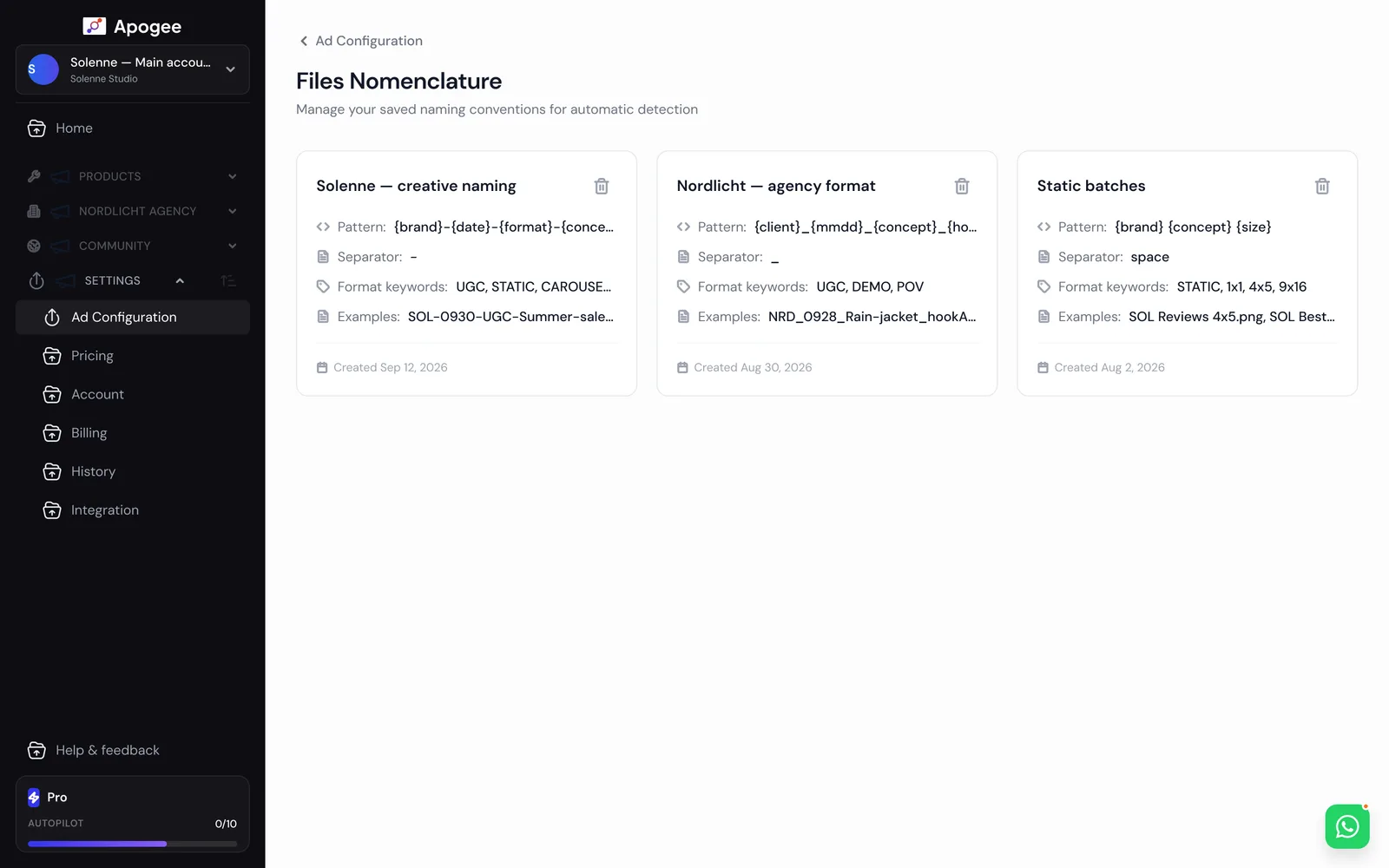
Yes. It is saved on the ad account and drives automatic detection for every later import. A dedicated page manages pattern, separator, format keywords and examples.
Launch your creatives in 47 seconds.
Try the plan of your choice for 7 days for €1. Cancel anytime from the app.