Naming conventions 14 min read
Meta Ads Naming Convention: Campaign, Ad Set and Ad Examples
Copy-paste naming templates for Meta (Facebook) campaigns, ad sets and ads, three account examples and the mistakes that quietly break your reporting.

Contents
- What is a Meta Ads naming convention?
- What is the difference between a campaign, ad set and ad name?
- Why does a naming convention matter?
- How should you structure creative file names?
- Which naming template can you copy as is?
- What is an ad set name, with examples?
- How Apogee automatically detects naming conventions
- Does the convention work with Airtable, Google Sheets and Notion?
- How do you keep naming consistent across several ad accounts?
- What do Meta Ads naming conventions look like in practice?
- Which naming mistakes break reporting?
- What does a naming convention not solve?
Most Meta ad accounts end up with the same concept spelled three ways, and from that point every report by concept is wrong. A naming convention fixes this at the source. Here is the one used across this site, ready to copy:
Campaign:  [Objective]_[Market]_[Month]            Conversion_US_March2026
Ad set:    [Audience]_[Concept]_[Placement]        Broad_UGC-Testimonial_AllPlacements
Ad:        [Concept]_[Iteration]_[Format]_[Hook]   UGC-Testimonial_V3_Story_PriceSlash
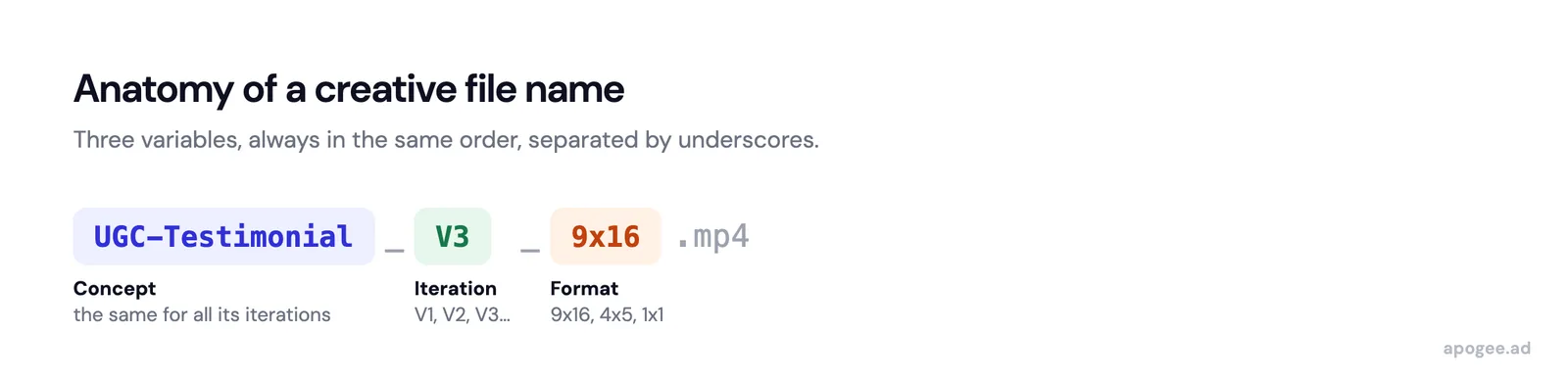
File:      [Concept]_[Iteration]_[Format]          UGC-Testimonial_V3_9x16.mp4
Underscores separate variables, hyphens join words inside one variable, ASCII characters only. The rest of this guide explains why each variable sits at its level, gives a template with allowed values, three examples by account type, and the mistakes that break a convention after a few weeks.
What is a Meta Ads naming convention?
A Meta Ads naming convention is a structured naming system that applies at three levels: campaign, ad set, and ad. Its purpose is to make every element of your ad account instantly identifiable and filterable in your reporting tools. A good naming system encodes within the name itself all the analysis dimensions you need: the creative concept, the iteration number, the format, the targeted audience, and any relevant test variable.
For example, a structured naming convention for an ad might follow this format:
[Concept]_[Iteration]_[Format]_[Hook]_[Date]Which in practice gives: UGC-Testimonial_V3_Story_PriceSlash_260115. By reading this name, any team member immediately understands it is the third iteration of the UGC Testimonial concept, in story format, with a price slash hook, launched on January 15, 2026. No need to open the ad to understand what it contains. The date is optional and always goes last: Meta already stores the creation date, and some tools read a number in the middle of a name as an identifier.
The naming convention also extends to campaigns ([Objective]_[Market]_[Month]) and ad sets ([Audience]_[Concept]_[Placement]). Together, they form a coherent hierarchical system that lets you filter and analyze performance at every level of the account. The same convention covers Facebook and Instagram ads, since both are managed in Meta Ads Manager.
What is the difference between a campaign, ad set and ad name?
Meta Ads Manager organizes every campaign in three levels, and each level holds different decisions. The rule that keeps names readable: a name describes only what its own level decides.
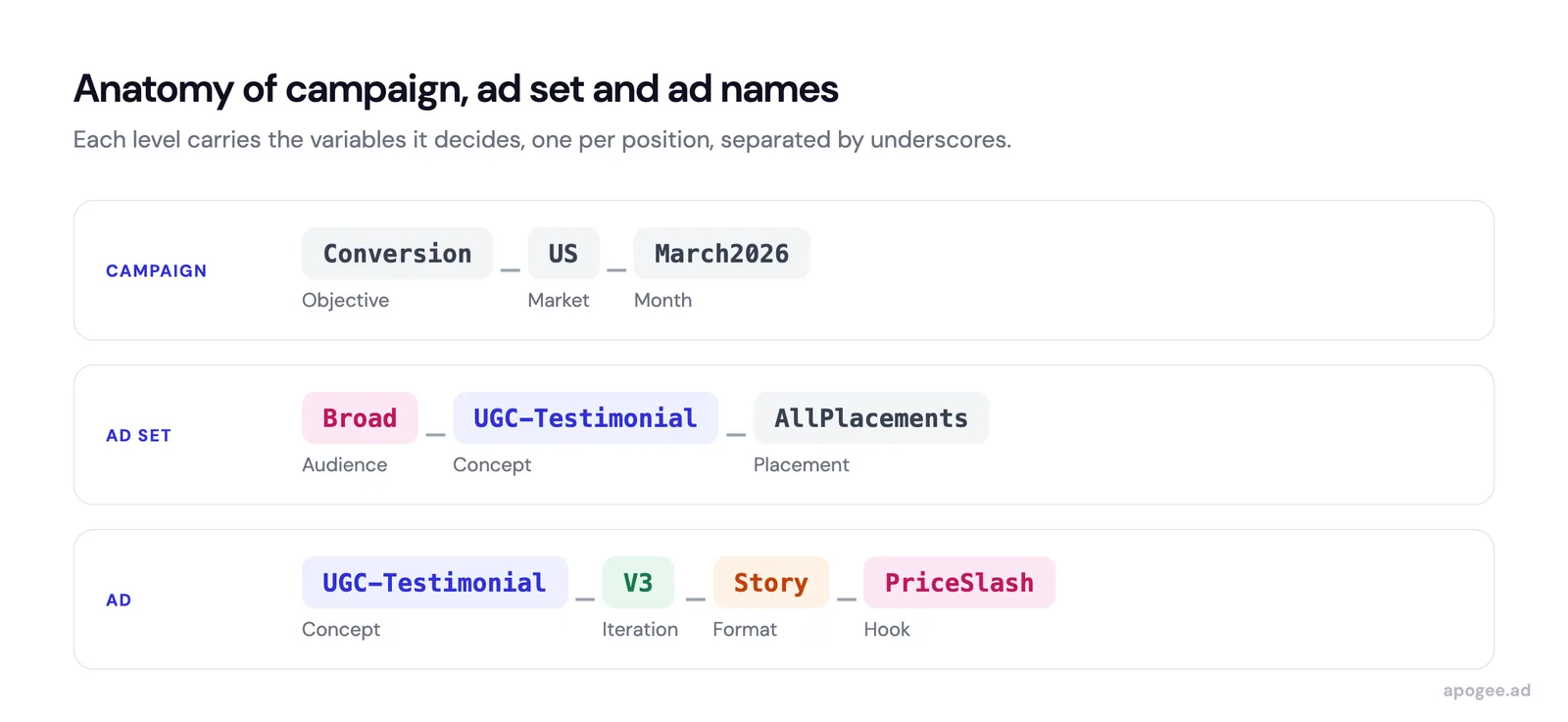
| Level | What is set at this level | What the name carries |
|---|---|---|
| Campaign | Objective, and the budget under CBO | Objective, market, period |
| Ad set | Audience, placements, schedule, optimization, budget outside CBO | Audience, concept, placement |
| Ad | Creative, text, link | Concept, iteration, format, hook |
Put a variable at the wrong level and it either repeats on dozens of rows or disappears from the view where you need it. An audience in the campaign name usually means one campaign per audience, which is a structure problem that no name can fix. More cases per level in Meta Ads campaign name examples and Meta ad set name examples.
Why does a naming convention matter?
Most performance teams improvise their naming. One media buyer names ads “ConceptA_V2_Story”, another uses “concept-a-version2-9x16”, a third writes “Testimonial v2 story”. The result: three different names for the same creative. Impossible to filter by concept, compare iterations, or identify winning formats without cleaning the data first.
The concrete consequences of inconsistent naming are numerous:
- Inaccurate reporting. If the same concept appears under 4 different names in your exports, your aggregated metrics by concept are wrong. You cannot tell which concept has the best actual ROAS.
- Cleaning time. Someone spends hours every week cleaning CSV exports, normalizing names, and rebuilding analysis dimensions. That time produces nothing the account did not already have.
- Strategic errors. When analysis is delayed by cleaning, optimization decisions come too late. You keep investing budget in underperforming concepts because you do not yet have clean data to see it.
- Difficult onboarding. Every new consultant or freelancer who joins the team must learn the naming convention. Without documentation and automation, they introduce their own variant and the problem gets worse.
The hidden cost of poor naming conventions is strategic decisions made on inaccurate data.
Cleaning time is recoverable; decisions made on dirty data are not. While exports are being normalized, budget keeps flowing to underperforming concepts whose true ROAS nobody can see yet.
How should you structure creative file names?
The right naming convention depends on your reporting needs. Here is a 4-level framework that covers most use cases:
Level 1: the creative concept. This is the most important dimension. Each concept should have a short name, without spaces, that describes it unambiguously: UGC-Testimonial, StaticPrice, VideoDemo, Carousel-Before-After. Use hyphens to separate words within a concept and underscores to separate variables.
Level 2: the iteration. Each variant of a concept receives a sequential iteration number: V1, V2, V3. Some teams add a sub-iteration for minor variants: V3a, V3b. The key is that the order is chronological and each iteration is unique.
Level 3: the format. Encode the aspect ratio in the name: 1x1 (square), 4x5 (vertical feed), 9x16 (story/Reel), 16x9 (landscape). Alternatively, use descriptive names: Feed, Story, Reel. Choose a convention and stick with it.
Level 4: test variables. Any dimension you want to analyze separately must be in the name: the hook (PriceSlash, Urgency, Social-Proof), the language (FR, EN, DE), the market (France, Belgium), the CTA (DirectPurchase, LeadGen).
Complete naming convention example:
| Level | Convention | Example |
|---|---|---|
| Campaign | [Objective]_[Market]_[Month] | Conversion_US_March2026 |
| Ad Set | [Audience]_[Concept]_[Placement] | Broad_UGC-Testimonial_AllPlacements |
| Ad | [Concept]_[Iteration]_[Format]_[Hook] | UGC-Testimonial_V3_Story_PriceSlash |
| Source file | [Concept]_[Iteration]_[Format] | UGC-Testimonial_V3_9x16.mp4 |
This framework is a starting point. Adapt it to your specific needs. The key is that every test variable is represented in the name and that the convention is documented and followed by the entire team. Separators, iteration styles and format keywords for the files themselves are detailed in file naming convention for ad creatives.
Underscores and hyphens are not interchangeable in this system: underscores separate variables, hyphens join words inside a single variable, like UGC-Testimonial. Swapping the two changes how every parsing tool splits the name.
Which naming template can you copy as is?
A convention that exists only as examples drifts within weeks. Written as a specification with its allowed values, it becomes something a new hire can apply on day one:
CAMPAIGN   [Objective]_[Market]_[Month]
           Objective: Conversion | Lead | Traffic | Awareness
           Market:    country code, uppercase (US, UK, FR, DE)
           Month:     March2026, or Evergreen for always-on campaigns

AD SET     [Audience]_[Concept]_[Placement]
           Audience:  Broad | Broad-25-45F | Lookalike-Purchasers-1 | Retargeting-14d
           Concept:   exactly as spelled in the ad name
           Placement: AllPlacements | Feed | Story | Feed-Story

AD         [Concept]_[Iteration]_[Format]_[Hook]
           Iteration: V1, V2, V3 (V3a, V3b for minor variants)
           Format:    1x1 | 4x5 | 9x16 | 16x9, or Feed | Story | Reel, never both
           Hook:      PriceSlash, Urgency, Social-Proof

RULES      underscore between variables, hyphen inside a variable,
           ASCII only, no spaces, no free text at the end
Three extensions, to add only when the account needs them: a client prefix on the campaign for agencies (ClientA_Conversion_US_March2026), a language code on the ad when one campaign serves several languages, and a budget mode (CBO, ABO) on the campaign when both run side by side. The full template, ready to copy, is in the Meta Ads naming template.
Ads Manager can enforce part of this. Its name templates are created in the ad account settings, then applied by switching on the Template toggle next to the campaign, ad set or ad name field. They cover the names typed in Ads Manager, not the files your editors export.
What is an ad set name, with examples?
The ad set name is the label Meta shows for the middle level of a campaign, in Ads Manager and in every export. It is the only key your reporting has to compare audiences and placements at equal creative, so it carries the audience, the concept and the placement:
Broad-25-45F_SkincareRoutine_AllPlacements
Lookalike-Purchasers-1_SkincareRoutine_Feed-Story
Retargeting-14d_UsVsThem_AllPlacements
Broad-30-55_ProductDemo_Form
The last line is a lead generation case: the destination (instant form or website) takes the placement slot, because it is the variable you filter by. The hook, the format and the iteration stay out of the ad set name, they belong to the ad. Meta lets you rename an ad set at any time, but the exports you already pulled keep the old name.
How Apogee automatically detects naming conventions
Apogee applies the convention during the bulk upload, before anything goes live, instead of cleaning it up in reporting. It does not impose a format: it reads the one already present in your file names.
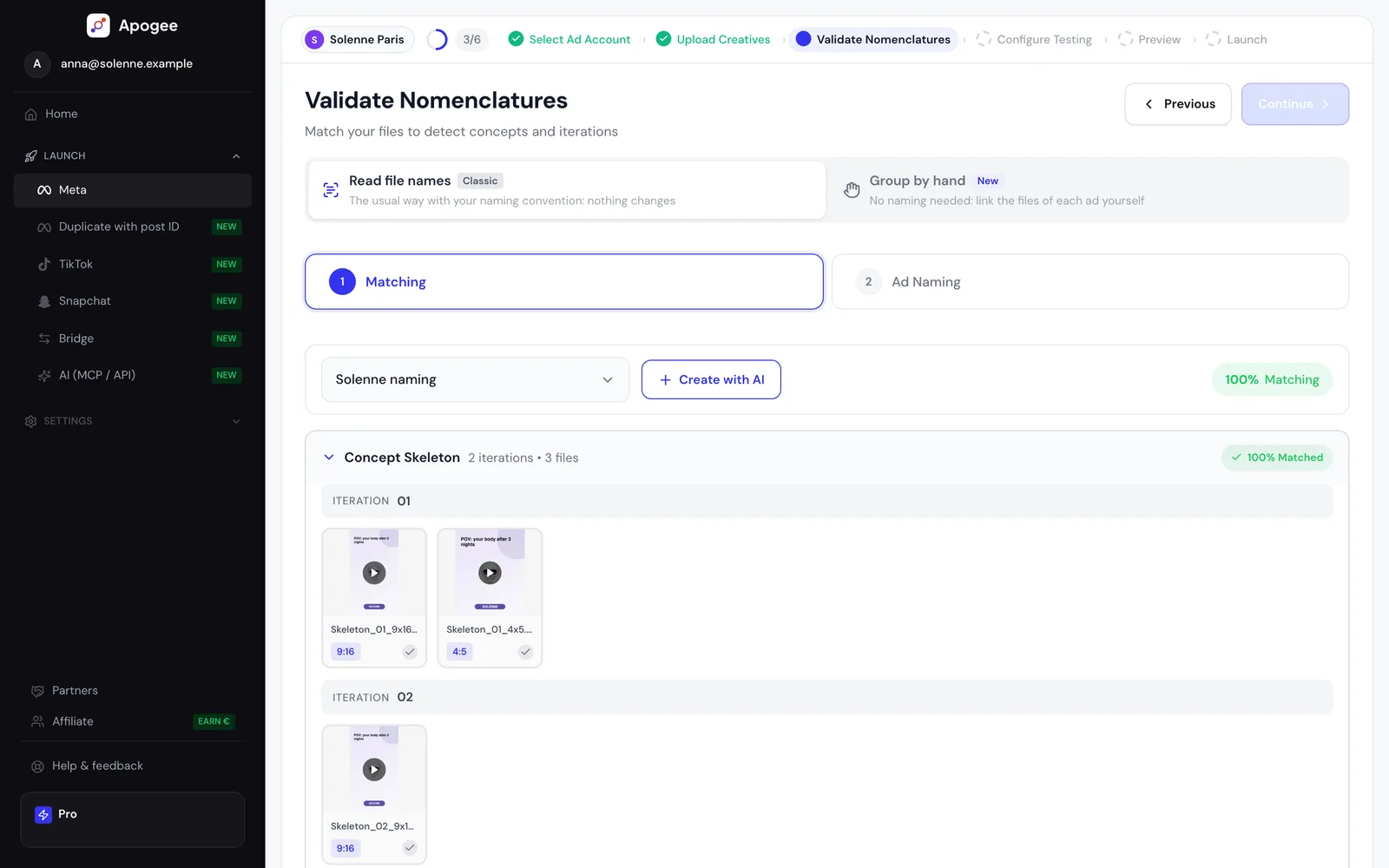
Step 1: pattern analysis. Apogee analyzes a sample of your file names and types each position: concept ID, concept name, iteration (H1, V2, Hook1, A, B, v1), format and date. If your files are named ConceptA_V1_1x1.jpg, ConceptA_V2_9x16.mp4, ConceptB_V1_1x1.jpg, it reads the first segment as the concept, the second as the iteration and the third as the format. It recognizes four separators: space, underscore, hyphen and period.
Step 2: variable extraction. The format comes from keywords in the name (9x16, vertical, story, 16x9, horizontal, 1x1, square, 4x5), and from the media’s actual dimensions when the name says nothing. Dates are recognized then excluded, so a 03/03/26 is never read as concept 26. The analysis returns a match score: green at 100%, amber from 50%, red below.
Step 3: consistent application. The naming step stays locked until matching reaches 100%. If detection misreads a name, you correct it in plain English in a chat box and run it again. Ads are then named from the detected concept and iteration, from a list pasted from Notion, Airtable or Google Sheets, or from the file name cleaned of its extension. The convention is saved on the ad account, and a saved convention that matches 80% or more of a later import is selected and applied automatically.
The same naming step runs on Meta Ads, TikTok Ads and Snapchat Ads: the bulk upload workflow has the same six steps on all three platforms, and only the name of the middle level changes (ad set, ad group, ad squad). The detail is on the AI naming detection page.
What it does not do is invent a regularity. If one concept appears under three different spellings, no detection can group them, and a file named final_v2_FINAL.mp4 carries nothing to recover.
AI detection removes the enforcement burden, not the need for a convention: pattern analysis works because your file names already carry concept, iteration, and format in a recurring structure it can find.
Does the convention work with Airtable, Google Sheets and Notion?
A good naming system does not live only in Meta Ads. It must be compatible with your management and reporting tools. Here is how to structure your naming to work natively with the most common tools:
Google Sheets / Excel. Use underscores as separators (Concept_Iteration_Format). The SPLIT(A1, "_") function instantly breaks the name into separate columns. You can then create pivot tables by concept, by format, or by iteration without any cleaning. Avoid spaces and special characters that complicate formulas.
Airtable. Create a formula field that extracts each segment of the name. With a well-structured naming convention, you can automate the creation of filtered views by concept and performance dashboards. Airtable’s advantage is the ability to link your creatives to other tables (briefs, feedback, test results) for complete creative pipeline tracking.
Notion. Use database properties to encode each variable separately: a “Concept” property, an “Iteration” property, a “Format” property. The file name follows the same convention, which allows you to automatically sync Notion with your Meta exports via Zapier or Make. Every creative in Notion is linked to its performance results.
Golden rule for multi-tool compatibility: use only ASCII characters (no accents, no special characters), underscores as primary separators, and hyphens for compound words within a variable. This format is parsable by all data tools, including Python, SQL, and reporting APIs.
The same names reach your analytics tool through UTM parameters. Meta’s dynamic parameters {{campaign.name}}, {{adset.name}} and {{ad.name}} are replaced by each ad’s actual names at delivery, so a clean convention in Ads Manager becomes a clean utm_campaign and utm_content. The template is in UTM parameters for Meta Ads.
How do you keep naming consistent across several ad accounts?
Across ten accounts, a convention breaks in three places: the spelling of values, the order of variables, and the person who types a name by hand at the end of a long day. What holds up:
- One written dictionary for every account, with the allowed values per variable, kept where the whole team works (Notion, a shared sheet).
- The client prefix on the campaign name only. Ad sets and ads are always read under their campaign, so repeating the client on every row adds characters without adding a filter.
- Enforcement at creation, not in reporting. Ads Manager name templates are set up per ad account, so each account needs its own. In Apogee, the convention is also saved per ad account and reused on every later import.
- A cutover date for accounts that already drifted. Renaming in Meta changes future exports, not the ones already pulled, so apply the convention from a fixed date and write that date down.
Reporting tools will not merge inconsistent names for you. Most group by the exact string they receive, so a concept spelled two ways stays two rows until someone maps them by hand.
What do Meta Ads naming conventions look like in practice?
Here are three examples of naming conventions by account type, all built on the same base pattern:
Example 1: DTC e-commerce (skincare brand)
Campaign: Conversion_US_March2026
Ad Set:   Broad-25-45F_SkincareRoutine_Feed-Story
Ad:       SkincareRoutine_V2_4x5_BeforeAfter
File:     SkincareRoutine_V2_4x5.mp4
Variables tracked: concept (SkincareRoutine), iteration (V2), format (4x5), hook (BeforeAfter). Enables ROAS analysis by concept and CTR analysis by format.
Example 2: multi-client agency
Campaign: ClientA_Conversion_US_March2026
Ad Set:   Broad_UGC-Unboxing_AllPlacements
Ad:       UGC-Unboxing_V1_9x16_PriceSlash
File:     UGC-Unboxing_V1_9x16.mp4
The client prefix sits on the campaign and allows instant filtering by account in consolidated exports, which an agency managing 10+ accounts needs for its weekly reports. Ad sets and ads are always read under their campaign, so they keep the base pattern.
Example 3: B2B SaaS (lead generation)
Campaign: Lead_US_Q1-2026
Ad Set:   Lookalike-Customers_ProductDemo_AllPlacements
Ad:       ProductDemo_V3_1x1_ROI-Numbers
File:     ProductDemo_V3_1x1.png
Key variables: the hook is critical in B2B because the message matters more than the visual. Tracking ROI-Numbers vs Client-Testimonial vs Feature-Zoom lets you identify which angle converts best for each audience.
What these three examples have in common:
- Consistent separator (underscore between variables, hyphen within compound words)
- Concept in first position in ad and file names
- Format encoded in the name
- No spaces, no accents, no special characters
- Compatible with Apogee’s AI parsing
Which naming mistakes break reporting?
These are the ones that turn a clean convention into a column nobody can pivot:
- The same concept spelled several ways.
SkincareRoutine,skincare_routineandSkincare-Routineare three concepts in every aggregate. - One separator doing two jobs.
Us_Vs_Them_Hook_1_9x16can be read as six variables or three, and no tool can tell which. - A variable at the wrong level, such as the audience in the campaign name or the hook in the ad set name.
- A date in the middle of the name. Tools looking for identifiers read the 26 in
03-03-26as a concept. If you need the date, put it last. - Free text at the end.
_test2_NEW_finalhas no position, so no tool can read it. - Abbreviations that change from one person to the next.
CONV,ConvandConversionare three values. - Accents and spaces, which file systems, upload APIs and spreadsheets encode differently and return changed.
What does a naming convention not solve?
A name makes results readable, not valid. Thirty ad sets sharing one budget still concentrate delivery on a few of them, and a perfect name will not tell you that the others never really spent. A convention does not fix structure either: twelve well-named campaigns aimed at the same audience still split that audience between them.
It also holds only while everyone applies it. That is why enforcing it when ads are created matters more than the template itself.
Try Apogee for 7 days for €1, with no ad limit: detection reads your naming convention from the first bulk upload, on Meta Ads, TikTok Ads or Snapchat Ads.
Related articles: