Bulk configuration: set it once, apply it everywhere
One configuration set once, propagated across the batch.
Trusted by 300+ media buyers, brands and agencies 4.5 on Trustpilot


In short
Published · updated
- Configuration comes from three sources: clone an existing ad set or ad from Meta, start from a saved template, or build from scratch.
- Each ad accepts 5 primary texts and 5 headlines, with duplicate detection, plus a description.
- Attribution windows are set separately: click-through at 1 or 7 days, engaged-view at none or 1 day, view-through at none or 1 day.
- The URL parameter builder offers five dynamic tokens: campaign.name, adset.name, ad.name, placement and site_source_name.
- Name prefixes and suffixes accept a {{today.date}} token, replaced at launch.
Fifty ads do not require fifty configurations. They require one, and a reliable way to replicate it.
Three ways to start
| Source | What it does |
|---|---|
| From Meta | Clones the full configuration of an existing ad set or ad, searchable and filterable by campaign or across the whole account |
| From a template | Applies a saved template, automatically filtered for compatibility with the objective and destination |
| From scratch | Builds the configuration by hand |
A counter tracks propagation live. Per-row completeness indicators separate what is ready from what is not, and the continue button stays locked while a required field is missing, naming which one.
At ad set level
Conversion first: conversion location for lead campaigns, website, instant form, or both with each click routed in real time, performance goal, dataset and conversion event pulled live from the pixel, purchase, add to cart, lead, registration, checkout, view content.
Attribution windows are set separately: click-through at 1 or 7 days, engaged-view at none or 1 day, view-through at none or 1 day.
Then the audience: locations autocompleted against Meta’s targeting API, age from 13 to 65 and over, gender, languages, custom audiences to include or exclude with their sizes, detailed targeting grouping interests, behaviors and demographics, and placements on Advantage+ or excluded manually per platform.
At ad level
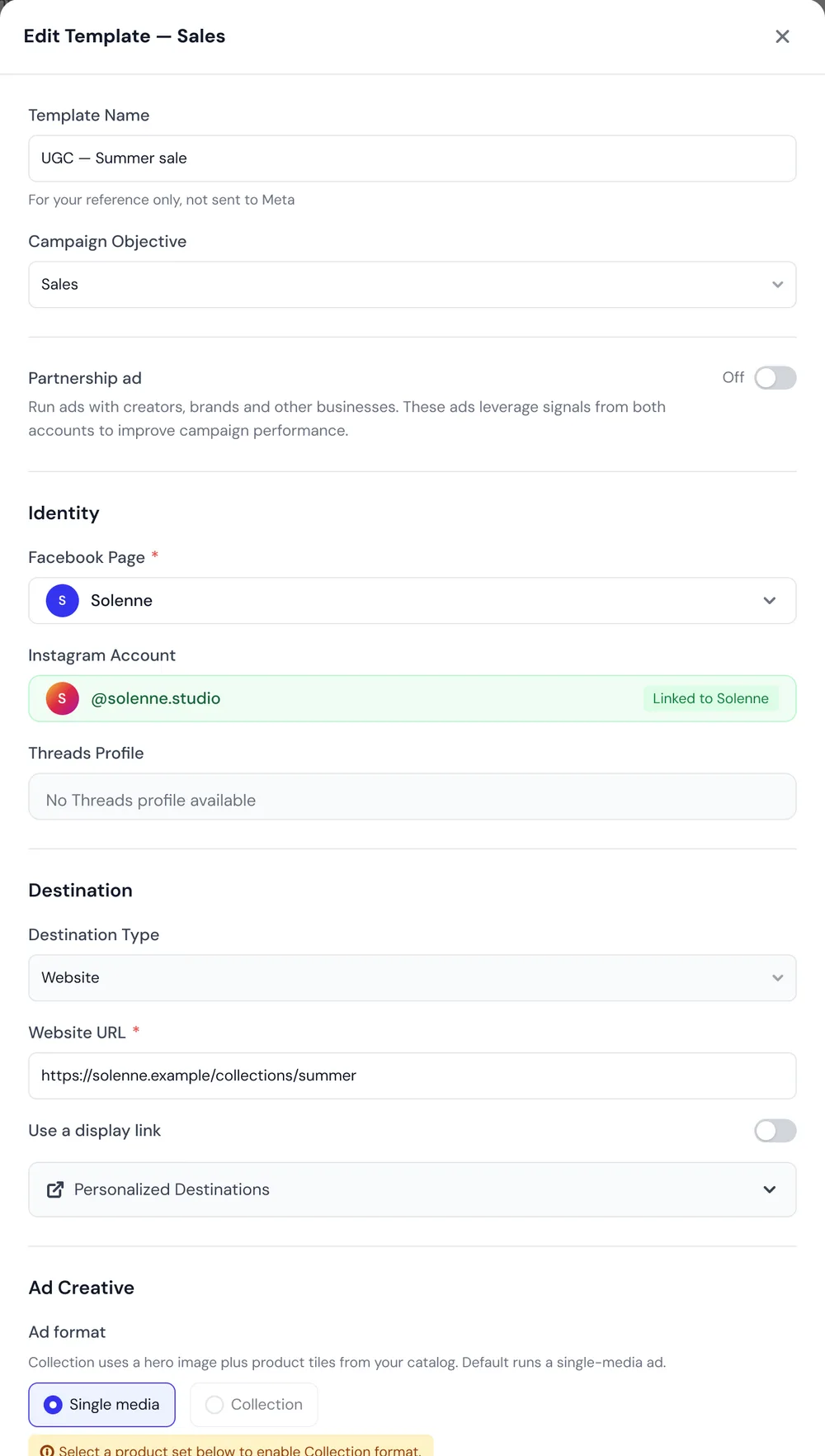
Identity: Facebook Page, Instagram account auto-linked from the Page, Threads profile detected. Partnership ads accept a creator code or a pick from approved partnerships, with the identity mode, brand first or creator first, and the header display.
Destination: validated URL, optional display link, instant form read from the Page, personalized destinations.
The creative: single media or collection, five primary texts and five headlines with duplicate detection, one description, and a call to action library per objective.
Tracking, finally: catalog and product set, and a URL parameter builder with five dynamic tokens, campaign.name, adset.name, ad.name, placement and site_source_name. That is what makes UTM hygiene sustainable at scale.
Naming in bulk
A prefix and suffix panel applies to ad set names, ad names, or both. Rules stack, each editable and removable, and a {{today.date}} token is replaced at launch.
In insert mode, that panel is deliberately restricted to ad level: the names of ad sets already running are never touched.
Good to know
Propagating a configuration does not make it correct. A wrong conversion event applied to fifty ad sets is still a wrong event, applied fifty times.
Applying one configuration across ad sets mixing website and instant form is blocked, with an explanation, because the two do not take the same fields. And templates stay filtered by compatibility: a Leads template does not apply to a Sales launch.
Other features
All features- Copywriting Agent Copy written from what the creative actually says.
- Advantage+ controls Eleven toggles, all off by default.
- Duplicate by City A list of cities in, that many localized ad sets out.
- Analytics and funnel What each step costs you, step by step.
- Comment analysis Your ad comments turned into strategic material.
- Autopilot An agent that reads your account, analyzes it, and acts once you agree.
- Creative Studio Produce statics, then decide which ones deserve budget.
- Agency workspace Several media buyers, several accounts, one invoice.
- Bulk upload Meta Ads From raw files to live ads, in a single pass.
- Multi-platform Three ad platforms, one workflow, one creative tracked end to end.
- Bulk upload TikTok Ads Your video files become TikTok ads, no spreadsheet.
- Bulk upload Snapchat Ads Your 9:16 videos become Snapchat ads, ad squad by ad squad.
- Bridge An ad live on one platform goes live on another, with its video; copy, CTA and tracking rewritten for the destination platform.
- Cross-platform stats One creative's performance on each platform, summed then expanded.
- AI naming detection Your naming convention, recognized and applied on its own.
- Testing structures How your creatives are grouped, decided in one card.
Frequently asked questions
Another question? Ask MathieuHow do you create 50 Facebook ads in under two minutes?
By configuring only once. You clone the full configuration of an ad set or ad already running, or apply a template, then propagate across the batch. A counter shows progress, such as 12 of 50 configured, and the continue button stays locked while a required field is missing.
How do you duplicate a Facebook ad set's settings across a whole batch?
Apogee clones the full configuration of an existing ad set or ad from Meta, searchable and filterable by campaign or across the whole account. That configuration then propagates to the whole batch, with a counter tracking progress live and a completeness indicator on every row.
What happens if I forget a setting?
The continue button is locked and its tooltip names exactly what is missing, destination URL, lead form, primary text or Facebook Page. Every row also carries its own completeness indicator.
Can I reuse a configuration across launches?
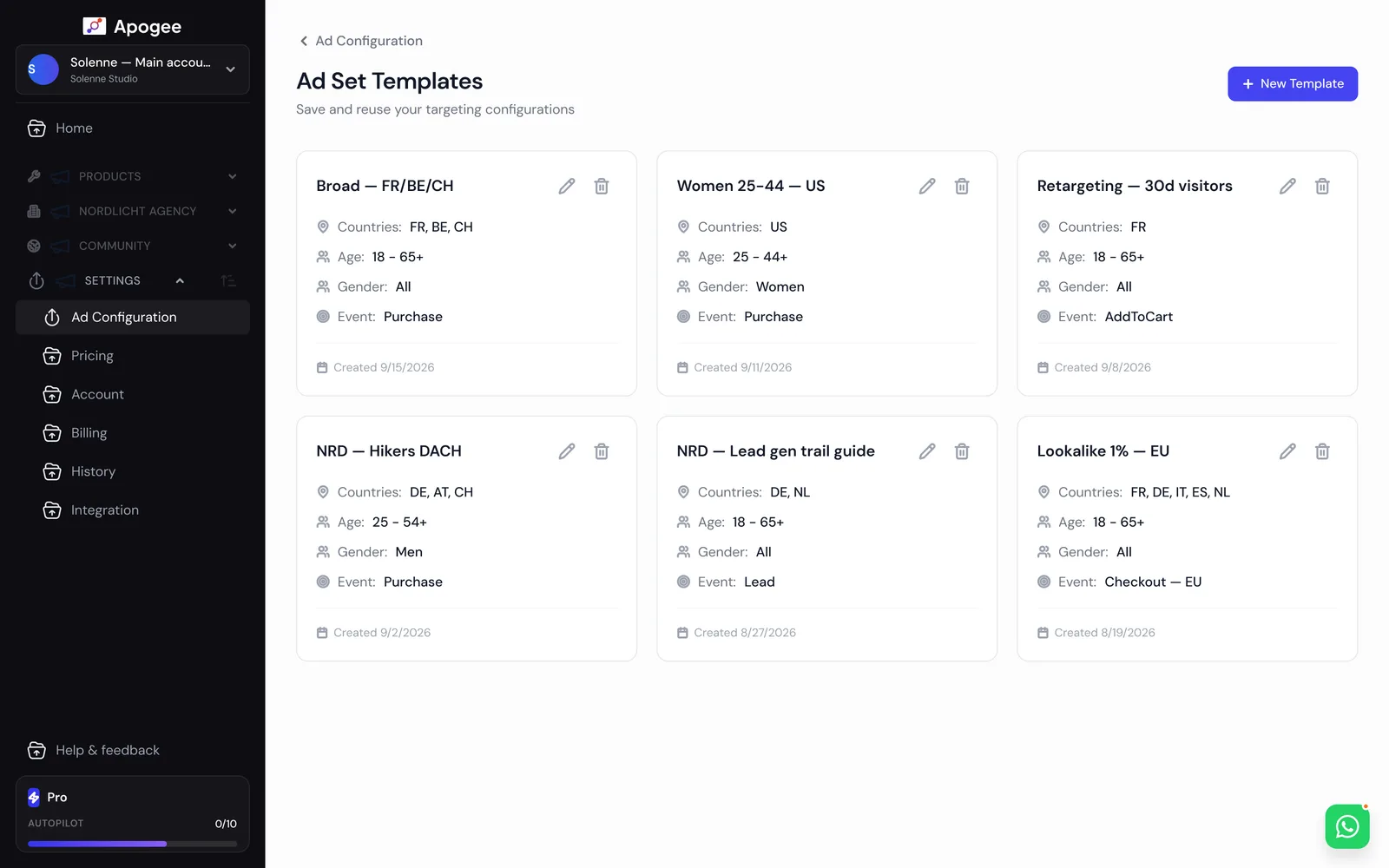
Yes, through templates. An ad set template saves the full targeting setup, an ad template saves identity, destination, copy, CTA, Advantage+ settings and tracking. They are filtered by compatibility: a Leads template cannot be applied to a Sales launch.
How do you add dynamic UTM parameters to Facebook ads?
Apogee's URL parameter builder offers five dynamic tokens: campaign.name, adset.name, ad.name, placement and site_source_name. You set it once in the tracking section of the ad configuration, alongside catalog and product set, and it applies to the whole batch, which is what makes UTM hygiene sustainable at scale.
Which attribution windows can you set on a Meta ad set?
Apogee sets three windows separately at ad set level: click-through at 1 or 7 days, engaged-view at none or 1 day, view-through at none or 1 day. The chosen setting propagates to every ad set in the batch, along with the performance goal and the conversion event pulled live from the pixel.
Can you choose between Advantage+ placements and manual placements in bulk?
Yes. At ad set level, Apogee offers Advantage+ placements or manual exclusion per platform, and that choice propagates to the whole batch with the rest of the audience: locations, age from 13 to 65 and over, gender, languages, custom audiences and detailed targeting.
Can a lead campaign send people to both a website and an instant form?
Yes, the conversion location accepts website, instant form, or both, with each click routed in real time. Applying one configuration across ad sets that mix website and instant form is blocked, however, with an explanation, because the two do not take the same fields.
How do you set up partnership ads in bulk?
Partnership ads are configured at ad level, with a creator code or a pick from approved partnerships, the identity mode, brand first or creator first, and the header display. These settings propagate across the batch like the rest of the identity: Facebook Page, linked Instagram account and Threads profile.
How do you turn off Advantage+ Creative on every ad in a batch?
In Ads Manager, every new ad comes back with Advantage+ enhancements turned on. In Apogee, the eleven enhancements are exposed one by one, all off by default, and the setting is part of the configuration propagated across the whole batch. These controls are included on the Pro and Scale plans.
Launch your creatives in 47 seconds.
Try the plan of your choice for 7 days for €1. Cancel anytime from the app.