Bulk upload 5 min read
Ads Manager Bulk Edit: What It Can and Cannot Do
Meta's bulk edit and bulk import handle structure, not creative. Here is exactly where the line sits and what to do on each side of it.

Contents
- What can Ads Manager bulk edit change?
- What is bulk import in Ads Manager?
- Where is the line between bulk edit and bulk import?
- Why does Advantage+ come back after a bulk edit?
- What does bulk import actually accept?
- What can bulk import never do?
- How do you use bulk edit well?
- How risky is a bulk edit?
- What does Ads Manager bulk edit not solve?
Meta’s bulk tools get dismissed as useless and praised as sufficient, usually by people describing different tools. There are two, and they do different things.
What can Ads Manager bulk edit change?
Select several entities in Ads Manager, edit them together. It handles:
- pausing and activating in bulk
- budget changes across ad sets
- schedule changes
- renaming
For maintenance this is genuinely good and genuinely underused. Pausing forty ad sets at end of promotion takes seconds.
What is bulk import in Ads Manager?
Bulk import takes a file where each row describes a campaign, an ad set or an ad. It creates structure at scale.
It does not take creative files. The media must already exist in the account, which means it was uploaded one file at a time by a human. That is the constraint the whole category of third party uploaders exists to remove, as the Meta Ads bulk upload guide explains, and the uploader comparison sets the main tools side by side.
Where is the line between bulk edit and bulk import?
| Task | Ads Manager |
|---|---|
| Pause 40 ad sets | yes, in seconds |
| Change budgets across a campaign | yes |
| Create 60 ad sets from a spreadsheet | yes |
| Upload 200 videos | no, one at a time |
| Name 200 ads from a concept list | no |
| Bundle formats into one ad per concept | no |
| Turn off Advantage+ across a batch | not reliably |
Everything above the line is structure. Everything below it involves creative files, and that is where the manual work is.
Why does Advantage+ come back after a bulk edit?
Some creative enhancements are on by default for new ads, and their toggles live at ad level, unlike Advantage+ campaign budget or Advantage+ audience which sit higher up. There is no account-wide switch, but Meta’s help center documents a bulk edit for Advantage+ creative enhancements on existing ads, on one condition: every selected ad must have the same ad format. The full procedure is in how to disable Advantage+ on Meta Ads.
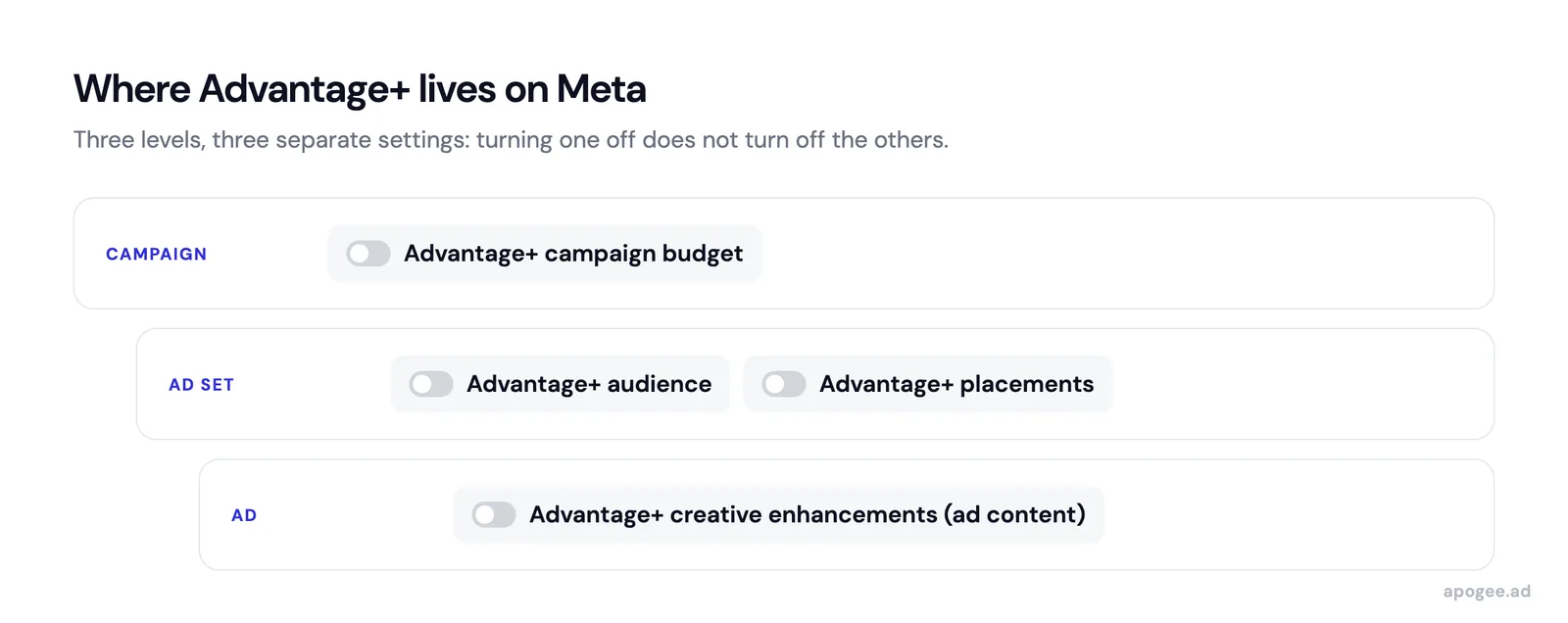
The practical consequence: handle them at creation. Once fifty ads exist with enhancements on, fixing them takes one bulk edit per ad format, and a batch that mixes images and videos takes at least two.
What does bulk import actually accept?
The import file is a spreadsheet where each row describes one entity: a campaign, an ad set or an ad. Columns map to Meta fields, and a reference column ties each row to its parent.
Used well it is genuinely powerful. Sixty ad sets with different audiences, created from a spreadsheet, in one operation. Editing budgets across an entire account, offline, with formulas.
Used badly it produces sixty ad sets with a typo in every one, because a spreadsheet has no validation and the error only surfaces after import.
What can bulk import never do?
The media must already exist in the account before a row can reference it.
That sentence is the whole limitation. A creative file on your drive is not something bulk import can consume. Somebody uploads it in the interface first, one file at a time, waits for processing, and only then can a spreadsheet row point at it.
For an account launching twenty ads a month, this is a mild annoyance. For one launching two hundred a week, it is the entire bottleneck, and it is untouched by every bulk feature Meta ships.
How do you use bulk edit well?
Ads Manager bulk features earn their place in maintenance rather than in launch:
- End of promotion: select every ad set in the campaign, pause together
- Budget reallocation: adjust across ad sets from one screen
- Seasonal restart: reactivate a set of paused ad sets in one action
- Renaming after a convention change: apply the new pattern in bulk (the pattern itself is in the naming convention guide)
None of these involve creative. All of them are faster in Ads Manager than in any third party tool, and most teams do them one entity at a time out of habit.
How risky is a bulk edit?
Bulk edit applies to your selection, and the selection is easy to get wrong.
A budget change applied to forty ad sets instead of four is one click, with a confirmation dialog that does not show you what you are about to change in any detail. There is no preview of the resulting state and no single undo.
The practical protection is to filter first, verify the count matches what you expect, and only then edit. It is a slower habit and it has saved more accounts than any feature.
What does Ads Manager bulk edit not solve?
Knowing the limits of bulk edit does not remove them. If your workflow is creative heavy, Ads Manager will stay the bottleneck no matter how well you use its bulk features.
It also does nothing about review. A batch created in one operation still goes through the same approval queue, one ad at a time, and a rejection there is not something any bulk feature can appeal.