More articles 16 min read
Claude Duet for Meta Ads: your AI media buyer on TikTok and Snap too
Make Claude Duet your media buyer on Meta, TikTok and Snapchat with Apogee: the connector, morning brief, launches, pauses and the Bridge, plus prompts to copy.

Contents
- Claude Duet’s job description as a media buyer
- Hiring Claude Duet: add the Apogee connector in two minutes
- Claude Duet on Meta Ads: launching the new batch of creatives
- Claude Duet on TikTok Ads and Snapchat Ads
- Its morning routine: the brief, then the pauses
- The Monday report, platform by platform
- Prompts to copy
- Its rules: what it never does without you
- Claude Duet, Claude or Claude Code: which one should run your ads?
- What if the connection gets stuck?
- Going further
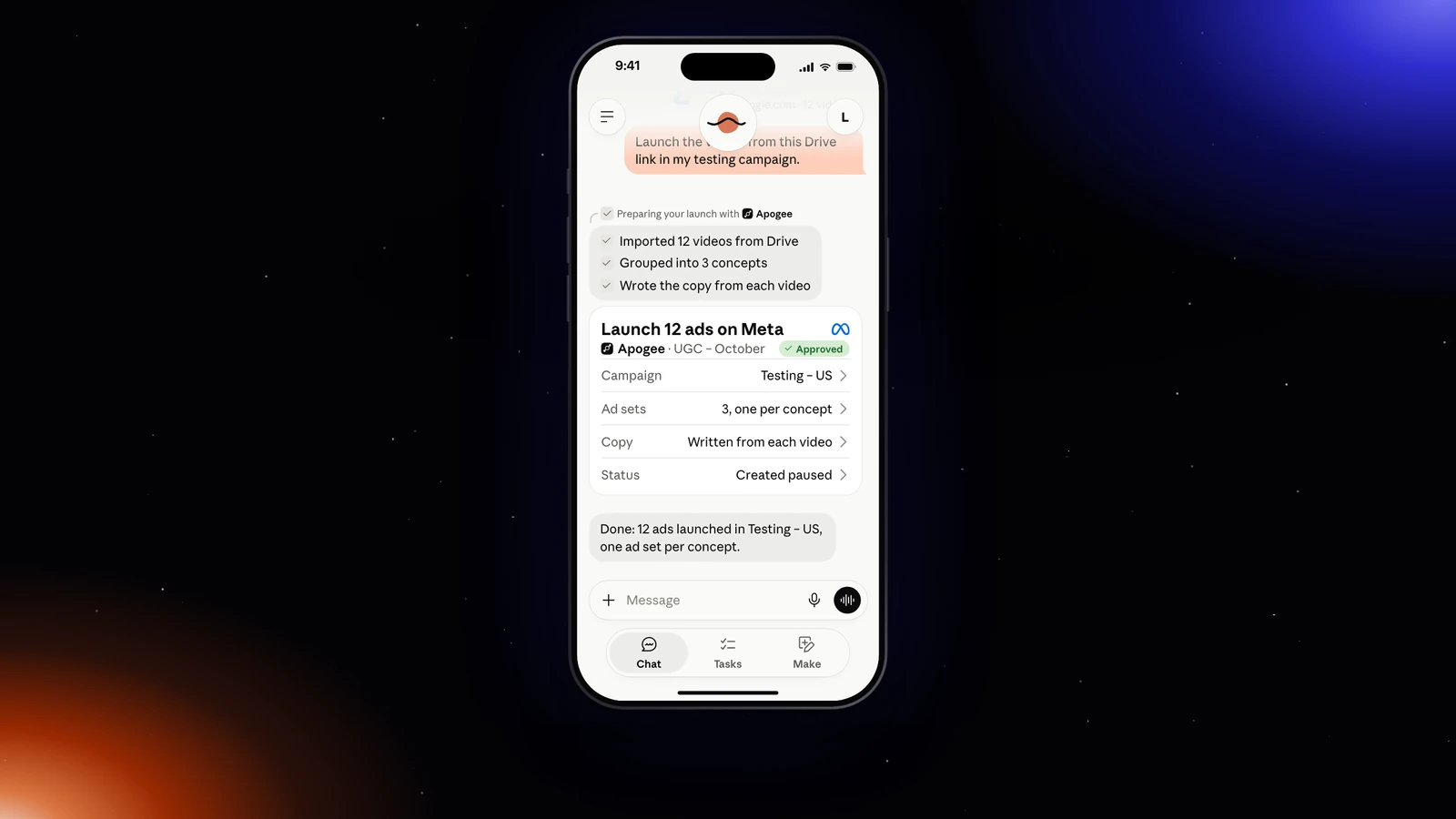
Claude Duet, Anthropic’s personal agent, can become your media buyer on Meta, TikTok and Snapchat. Plugged into the Apogee connector in Claude, it reads your accounts every morning, prepares the launch of the creatives you drop into Drive, suggests cutting the ads that burn budget and moves your Meta winners to TikTok and Snapchat. You answer its requests from your phone, and Apogee runs nothing without your yes. Duet is open in the United States, from a waitlist; elsewhere, Claude’s scheduled tasks do the same work.
Claude Duet’s job description as a media buyer
In preview since October 21, 2026, Duet works on its own computer in the cloud, talks to you from the iPhone and Android apps or the web version of claude.ai, tracks its work in the Tasks tab and asks for your approval before it sends, pays, signs or deletes. It only sees your ad accounts through a connector: Apogee’s, one of the Meta Ads MCP options, opens Meta, TikTok and Snapchat to it, with guardrails.
| Its task | Platform | When | What you approve |
|---|---|---|---|
| The morning brief | Meta, TikTok, Snapchat | Every morning | Nothing, it only reads |
| Launch the new batch of creatives | Meta, TikTok, Snapchat | As soon as a batch lands in Drive | The launch recap |
| Prepare the pause of ads that burn budget | Meta, TikTok | Every evening | The list of pauses, in Tasks |
| Send Meta winners to TikTok and Snapchat | Bridge | Every Monday | The Bridge recap |
| The weekly report | Platform by platform | Every Monday | Nothing, it only reads |
Three limits hold whatever the setting: no launch or change without your yes, no total across platforms, no account outside Apogee.
Hiring Claude Duet: add the Apogee connector in two minutes
Duet needs a Claude subscription, Apogee a plan that includes the MCP server. According to Anthropic’s help, as of November 3, 2026:
| Side | What you need |
|---|---|
| Claude Duet | A Claude Pro, Max or Ultra plan, in the United States, after the waitlist; not Team or Enterprise yet |
| Apps | iPhone, Android and the web version of claude.ai, with the same Claude account |
| Usage | Duet’s background work counts against your Claude plan’s limits |
| Apogee | Pro, Growth or Scale, MCP server included; 7-day trial for €1 |
To join Duet, Anthropic’s product page offers Join the waitlist: name, email, Claude plan and phone type, then Submit. The invitation arrives by email; open it on your phone, install the app and sign in with your Claude account.
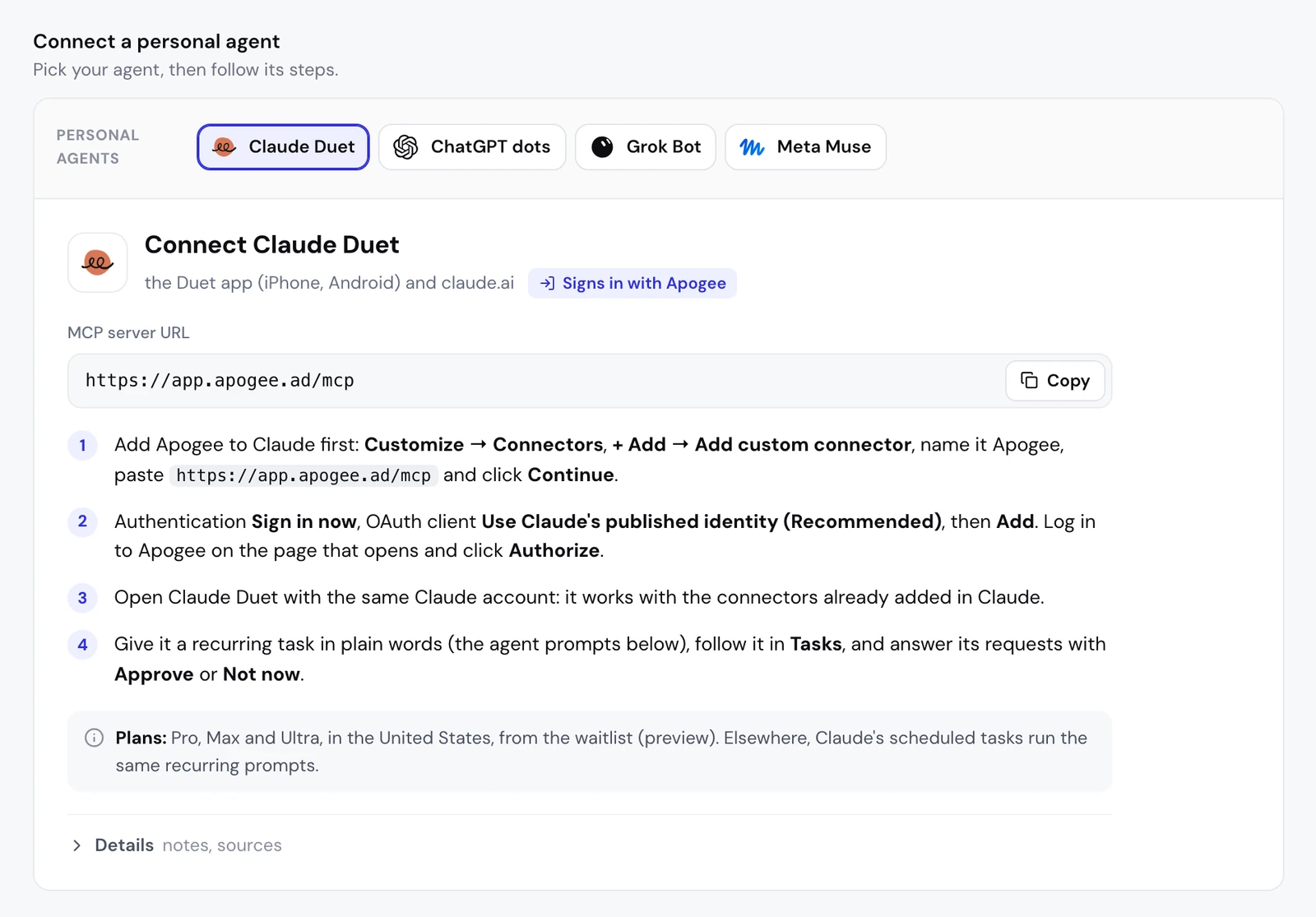
Duet has no connector settings of its own: it works with the connectors already added in Claude. So you add Apogee in Claude, on the web or in the desktop app:
- In Apogee, open Settings → Personal agents and pick Claude Duet: the server URL shows with a Copy button.
- In Claude, open Customize → Connectors, click + Add, then Add custom connector.
- Name it Apogee, paste
https://app.apogee.ad/mcpand click Continue. Claude detects the sign-in method: click Continue again. - Under Authentication, choose Sign in now; under OAuth client, keep Use Claude’s published identity (Recommended), then click Add.
- Apogee’s page opens: log in, check the access and click Authorize. You land back on claude.ai.
- Open Claude Duet with the same Claude account: it works with the connectors added in Claude.
Anthropic does not say in so many words that Duet uses a custom connector: its help page talks about connectors “already added in Claude”, without making a distinction. This Claude connector was tested for real on November 2, 2026 from claude.ai: OAuth sign-in, account reads, then one ad set and one ad launched paused on a test account. A Claude connector cannot be edited: to change its URL or sign-in, remove it and add it again.
The access you grant
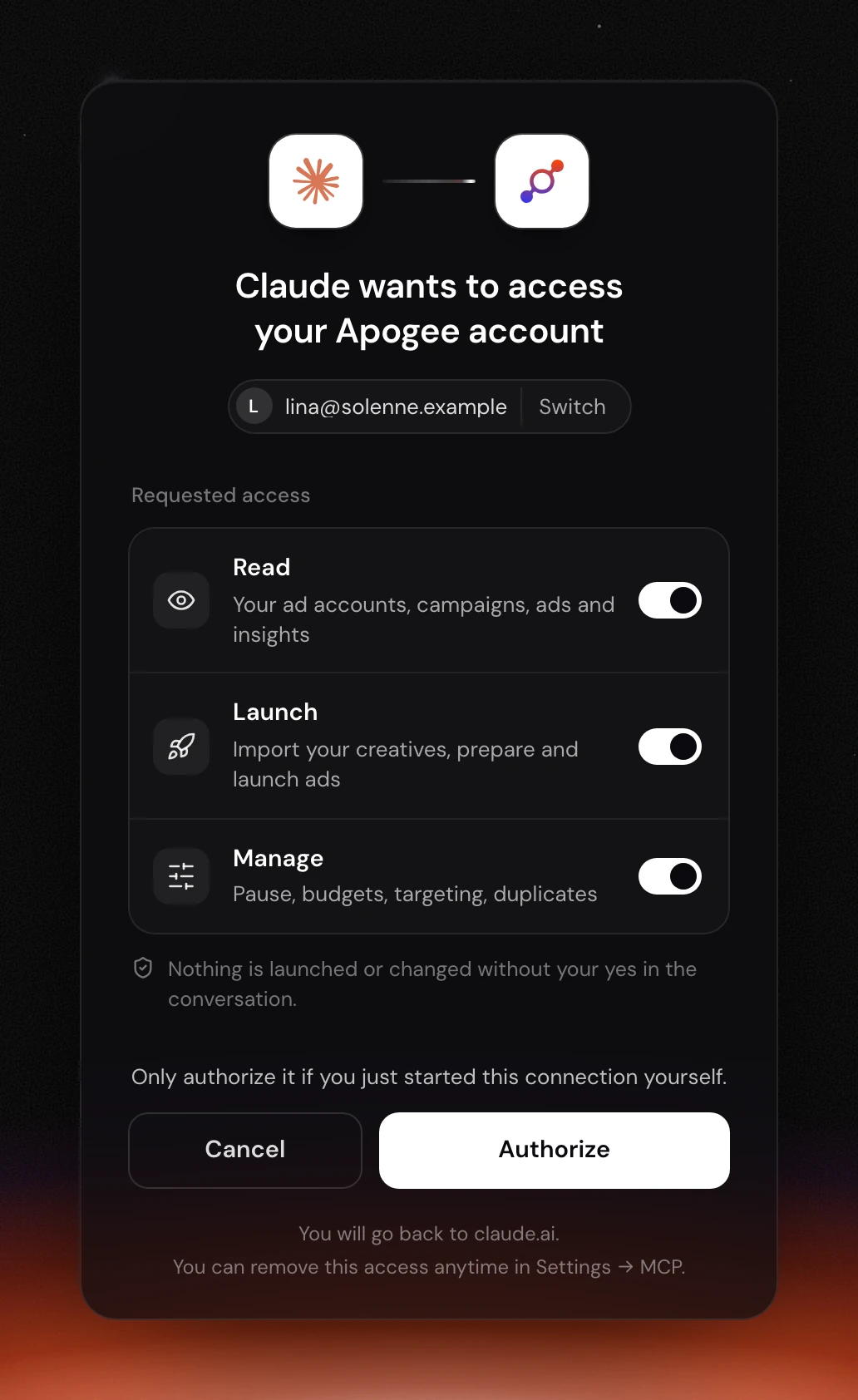
Duet goes through Claude’s connection, so Apogee’s page reads “Claude wants to access your Apogee account”, not Duet’s name. It shows the Apogee account you are signed in to, with Switch to change it, then three toggles:
| Access | What it allows | For which task |
|---|---|---|
| Read | Read accounts, campaigns, ads and statistics | Brief, report |
| Launch | Import creatives, prepare and launch ads | Launches, Bridge |
| Manage | Pauses, budgets, targeting, duplicates | Cutting an ad, adjusting a budget |
A Duet that only sends briefs is fine with Read: Apogee does not even show it the tools of an unticked access. You need at least one.
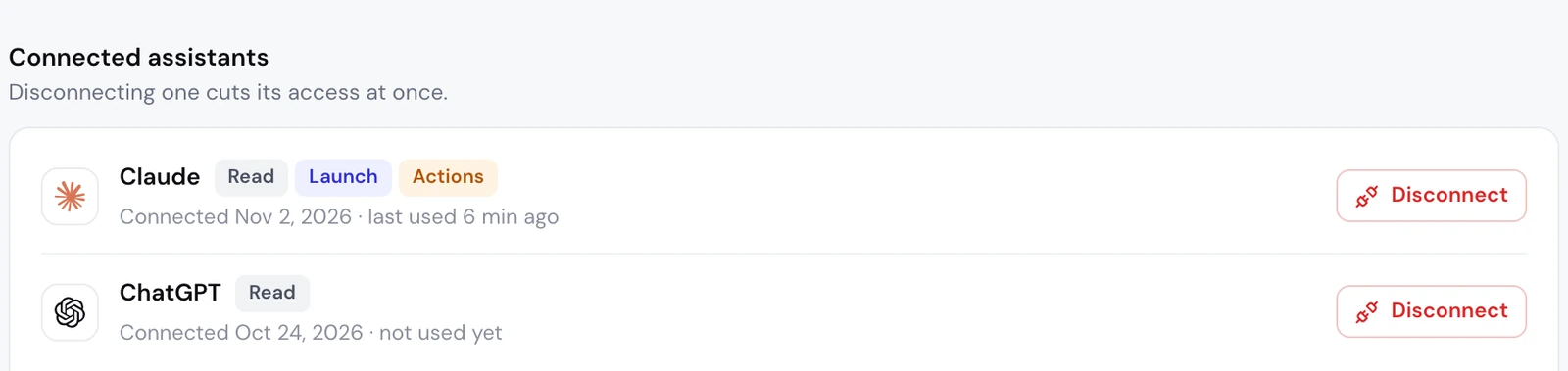
In Apogee, the connection shows under Settings → Personal agents, as Claude: the same connection serves Claude and Duet. It lists its access (Manage is called Actions there), the connection date and when it was last used. An access token lasts one hour and renews with a refresh token valid for 60 days.
Day one: check that it sees your accounts
Duet calls whoami, which returns the Apogee account and the access granted, then list_ad_accounts for each platform. If it cannot find these tools, check that Apogee is connected under Customize → Connectors and turned on in a conversation from + → Connectors.
Claude Duet on Meta Ads: launching the new batch of creatives
The Meta launch is the core of the job. Duet works on its own computer in the cloud, not on yours: give it a link to your creatives (Google Drive, Dropbox, Frame.io) rather than a local folder, and the target campaign.
What it does next, with Apogee’s tools:
- The creatives:
import_linkthenimport_statusbring them into Apogee. Nothing reaches Meta at this stage. - The settings:
get_latest_in_campaignpicks up the latest ad set and the latest ad in the campaign. - The interview:
get_launch_questionsreturns the Apogee app’s questions, with the choices read from your account and a recommended answer. Duet asks them one topic at a time, without answering for you. - Ads and texts: one creative in 9:16, 4:5 and 1:1 makes a single ad; one primary text, one headline and one description per ad, in the market’s language. The Advantage+ enhancements you do not pick stay off.
- The recap, then the launch:
prepare_launchcreates nothing. After your yes,launch, thenlaunch_statusuntil it is done.
A public Frame.io share works without a Frame.io account when downloads are allowed; a password-protected share does not. If Meta rejects an ad, launch_status says why and what to do, and Duet does not relaunch an error that needs fixing until you confirm the cause is sorted.
The launch routine: the new batch, every morning
Duet compares the folder with your past launches (list_drive_folder, list_launches) so it only prepares what is new. Share the folder with “Anyone with the link”, or keep it in the Drive connected to Apogee. Only the first run asks every question: after that, Duet reuses your answers.
Claude Duet on TikTok Ads and Snapchat Ads
Sending Meta winners over with the Bridge
When a video wins on Meta, Duet can offer it to TikTok and Snapchat. Apogee’s Bridge makes paused copies, with texts adapted to each platform, and leaves the Meta ad as it is:
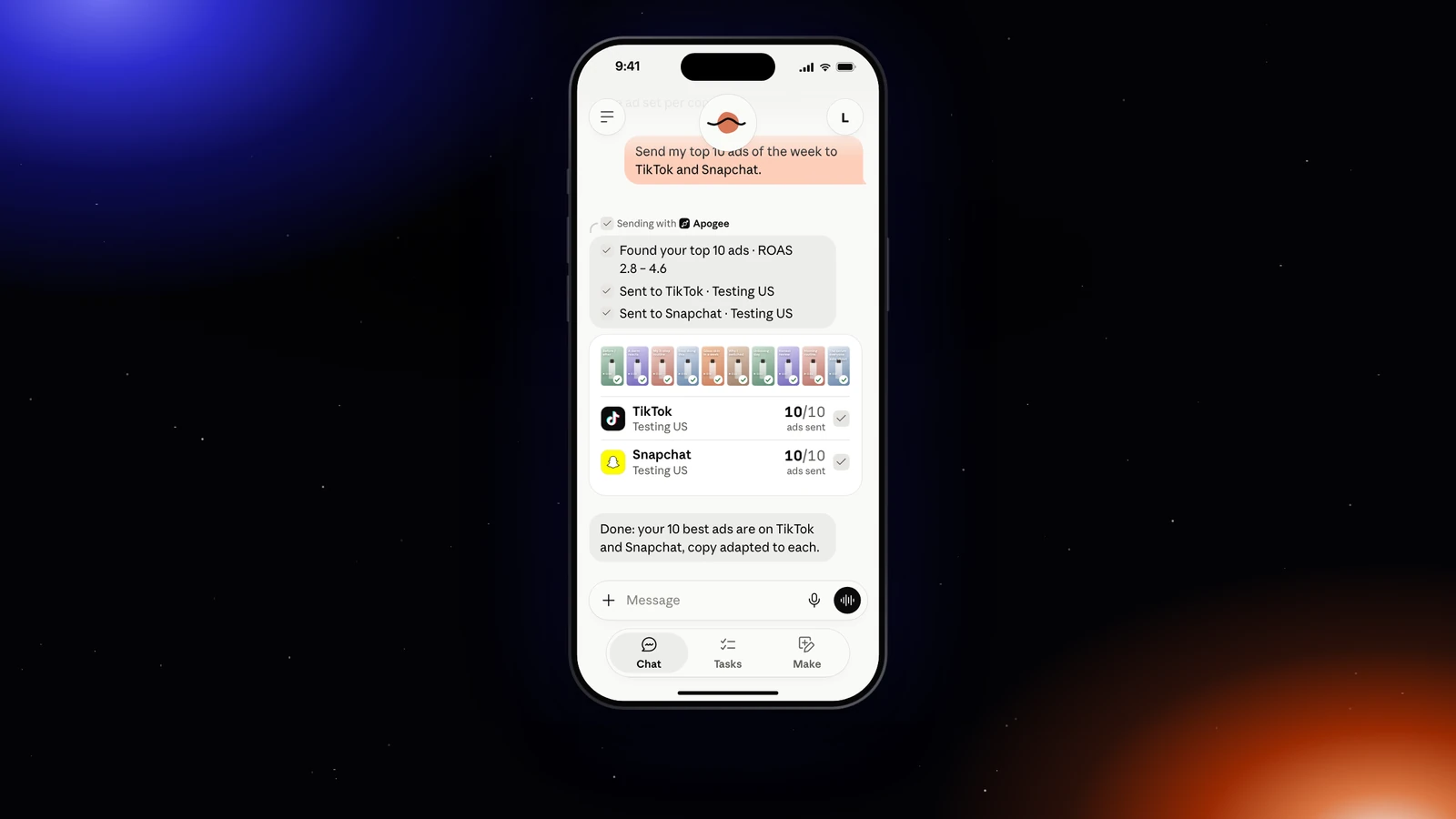
On the tools side: get_top_performers to find the winners, list_bridge_transfers to skip those already sent, prepare_bridge_transfer for the recap, then bridge_transfer once you say yes. On the first transfer, Duet asks you for what TikTok requires and Meta does not provide (the identity, the call to action). The Bridge only carries videos.
As a routine, every Monday:
Launching straight on TikTok and Snapchat
On TikTok and Snapchat, Duet follows the same flow as on Meta, with the account named in the prompt: an ad group on TikTok, where an image becomes a carousel, an ad squad on Snapchat. If you saved a template in the app (Quick Bulk Edit, Save as template), Duet reads it with list_platform_templates, and never creates or deletes one:
See TikTok Ads bulk upload and Snapchat Ads bulk upload for what each platform accepts. For a big sales moment on all three platforms at once, name the three accounts in the same prompt: Duet asks you what each platform requires (on Meta the objective, the pixel, the Page and the Instagram account; on TikTok the identity and whether to use Smart+; on Snapchat the public profile, the pixel and the countries), and each platform gets its own recap and its own yes.
Its morning routine: the brief, then the pauses
According to Anthropic’s help, Duet already runs a morning check of your email and calendar. Your ad numbers are not part of it by default: it is a task you give it. Anthropic documents no menu or setting to create a recurring task in Duet; its product page shows a plain written request that ends up as a page refreshed every morning, and its safety article mentions routines Duet runs while you are away, with the same guardrails. In practice:
- Describe the task in the conversation: what to look at, at what time, what you expect.
- Check that it shows in the Tasks tab, where Duet also keeps its requests for action.
- Answer its requests with Approve or Not now. If you do not answer, Duet finishes the rest and brings the request back later; Apogee’s plan stays valid 24 hours.
The morning brief, read-only:
Duet reads Meta with get_account_overview, get_daily_breakdown and get_top_performers, TikTok and Snapchat with get_platform_overview, get_platform_daily_breakdown and get_platform_top_performers. The first time, if Apogee does not know your CAC or ROAS targets yet, it asks you for them (get_business_profile). The numbers come from Apogee’s cross-platform stats.
The pause of the ads that burn budget, prepared every evening:
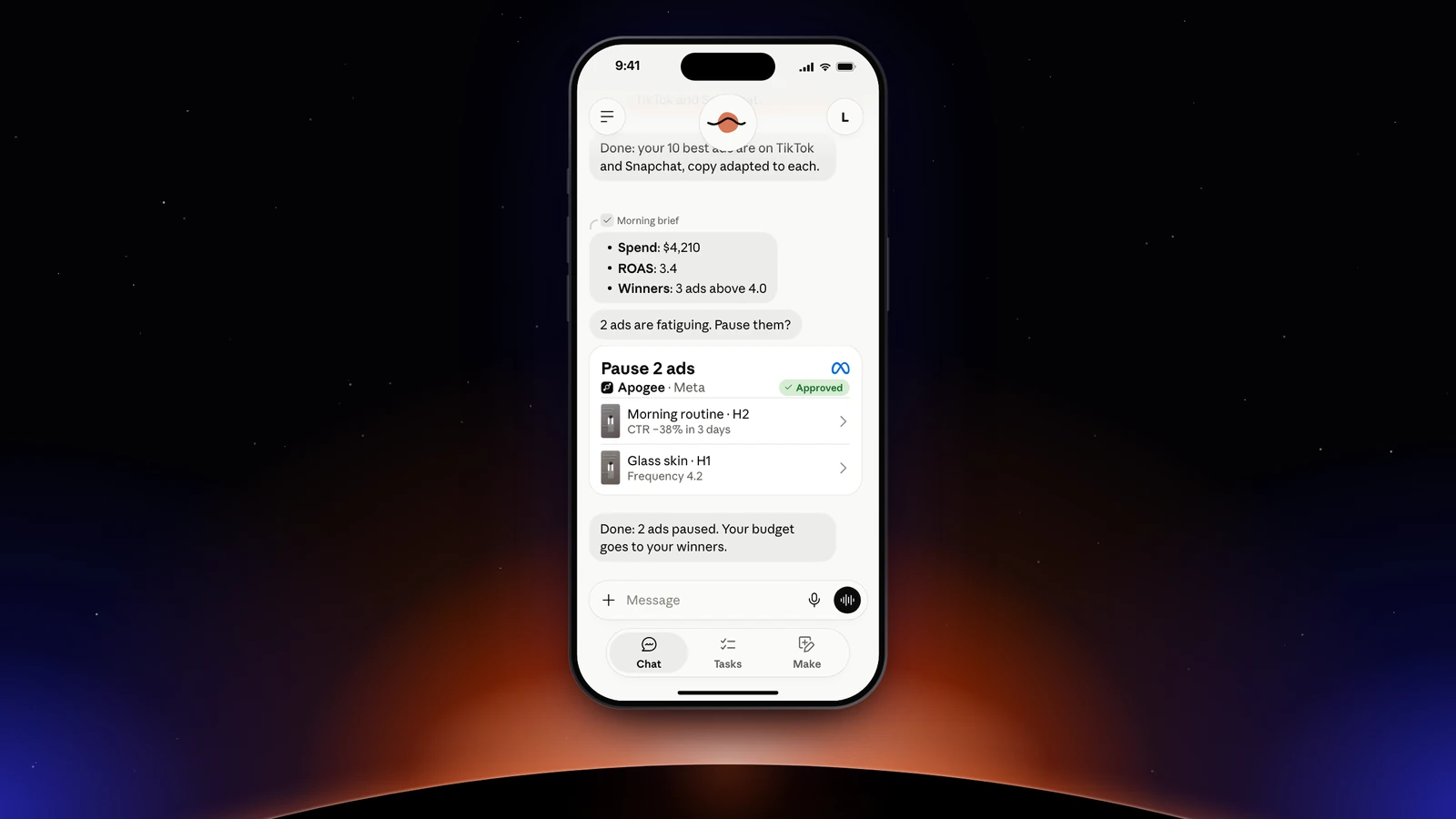
Preparing changes nothing: pause_ad or pause_adset on Meta and set_platform_status on TikTok store the action in Apogee. You say yes for every ad or only for the ones you name, and Duet then calls execute_action. If an ad is alone in its ad set, pause the ad set instead. One limit to keep in mind: Duet checks at intervals, so something urgent can land between two passes; this brief does not replace a real-time alert.
Outside the United States: Claude’s scheduled tasks
Duet is not open outside the United States. Claude’s scheduled tasks run the same prompts, with the Apogee connector, on the Pro, Max, Ultra, Team and Enterprise plans:
- In Claude’s sidebar, open Scheduled, then New task.
- Choose Create with Claude (Claude asks a few questions, then Schedule) or Set up manually.
- Manually, the Create scheduled task window asks for a name, the prompt, an approval mode and a frequency: hourly, daily, weekdays, weekly or manual. Click Save.
Tasks run remotely, even with your computer off, unless they need local files. Anthropic does not describe exactly what the approval mode does: keep the sentence that asks for your yes in every prompt, Apogee waits for it anyway.
The Monday report, platform by platform
Apogee never adds platforms together: each one stays in its account’s currency, time zone and attribution. A TikTok conversion and a Meta conversion are not measured the same way, and a total would suggest otherwise. The Bridge results come from get_bridge_stats.
Prompts to copy
On top of the routines above, six prompts that earn their keep every week:
Its rules: what it never does without you
Claude Duet shows the action, its destination and its content before it sends a message, pays, signs or deletes, with buttons such as Approve and Not now. It knows a “don’t ask again” rule for some actions; for Apogee’s launches, pauses and budgets, keep the request every time.
On Claude’s side, you can also set the connector’s tools: under Customize → Connectors, open Apogee, and each tool can be set to Blocked. When Claude asks permission to use a tool, never pick Always allow for launch, bridge_transfer or execute_action, the tools that change your ad accounts.
Apogee keeps its own guardrails, whatever Duet’s settings:
| Guardrail | Value |
|---|---|
| Before any launch or change | A full recap and your yes |
| Status of created ads | Paused by default |
| Prepared plan | Valid 24 hours, runs only once |
| Daily budget | Refused above the cap, 500 in the account’s currency by default |
| Launches and Bridge transfers | 25 per ad account over 24 hours |
Reads are free within your plan’s daily limit (5,000 on Pro, 10,000 on Growth and Scale); a change that runs costs 2 credits and an ad created 15, only when it succeeds. To cut access: Settings → Personal agents in Apogee, then Disconnect next to Claude. Removing Apogee from Customize → Connectors removes it from Duet as well. Ads already launched are not touched.
Claude Duet, Claude or Claude Code: which one should run your ads?
Anthropic’s three products use the same Apogee MCP server, for different jobs:
| Product | What it is | Adding Apogee |
|---|---|---|
| Claude Duet | The personal agent, in the background, on your phone | The connector added in Claude |
| Claude | The chat on claude.ai and the desktop app | Customize → Connectors → Add custom connector, URL https://app.apogee.ad/mcp |
| Claude Code | The coding agent in the terminal | claude mcp add --transport http apogee https://app.apogee.ad/mcp |
For a media buyer that works while you are away and pings you on your phone, Claude Duet is the right pick in the United States. Elsewhere, the Claude chat and its scheduled tasks do the same job: see the Apogee connector in Claude. To launch from a folder on your computer, go through Claude Code with Apogee.
What if the connection gets stuck?
- Apogee does not show in Duet: check that it is connected under Customize → Connectors and turned on in the conversation from + → Connectors.
- You do not have Duet: it is only open in the United States, from a waitlist. Claude’s scheduled tasks do the same job.
- You are on the Claude Free plan: it accepts only one custom connector and does not include Duet.
- Duet offers no launch tool: the Launch access was unticked. Disconnect Claude in Apogee, then connect it again with the right access.
- The wrong Apogee account shows on the consent page: click Switch before Authorize.
Going further
- Apogee vs the official Meta Ads MCP, and the same comparison for TikTok Ads and Snapchat Ads;
- The other personal agents: Grok Bot as a media buyer, ChatGPT dots with Apogee and Muse, Meta’s personal agent;
- The technical guide to Claude Duet with Apogee, with every tool named here.