More articles 10 min read
Perplexity MCP: connect Apogee to your Meta Ads accounts
Perplexity MCP: add Apogee as a connector in 4 steps, then analyze your Meta, TikTok and Snapchat ads and prepare pauses. On Perplexity Pro, Max, Enterprise.

Contents
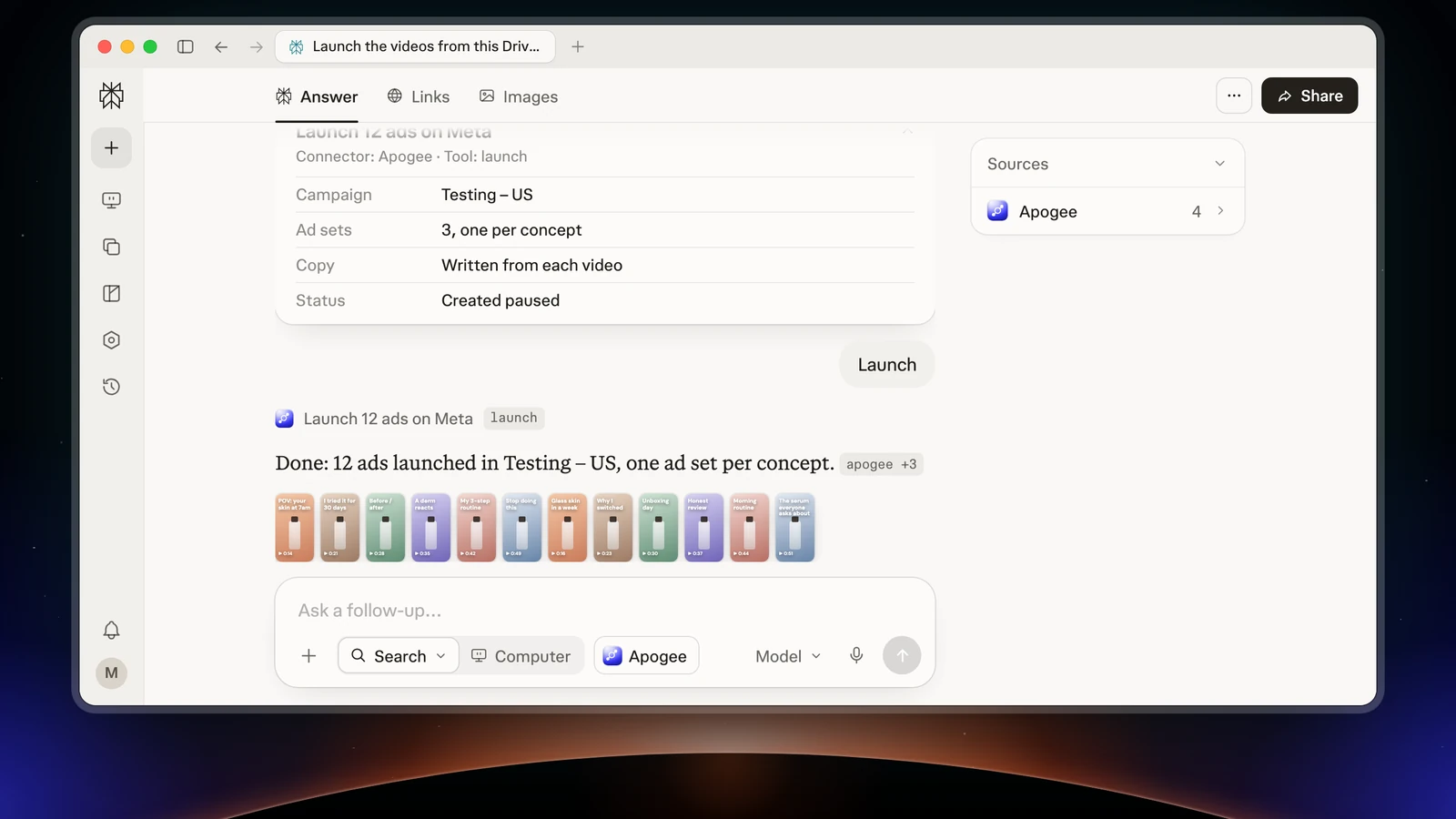
Perplexity MCP means adding an MCP server such as Apogee to Perplexity, as a custom connector. Perplexity then reads your Meta, TikTok and Snapchat accounts, analyzes your ads in plain language and prepares pauses or launches, which Apogee only runs after your yes. Two prerequisites: a Perplexity Pro, Max or Enterprise plan (on Enterprise, an admin allows custom connectors first), and Apogee from the Pro plan. The connection uses OAuth, with no key to copy.
Before you start: Perplexity and Apogee plans
| Side | What you need |
|---|---|
| Perplexity | A Pro, Max or Enterprise plan |
| Perplexity Enterprise | An admin turns on Allow members to add custom connectors under Organization settings → Connectors (off by default) |
| Apogee | Pro, Growth or Scale, MCP server included; 7-day trial for €1 |
| Connection | OAuth, through Apogee’s page, no key to copy |
| Accounts | Your Meta, TikTok and Snapchat accounts connected to Apogee |
Through Apogee, Perplexity only sees the ad accounts already connected to Apogee. Meta also documents its official MCP for Perplexity: the guide to Meta Ads MCP servers compares the options.
Add Apogee as a Perplexity MCP server in 4 steps
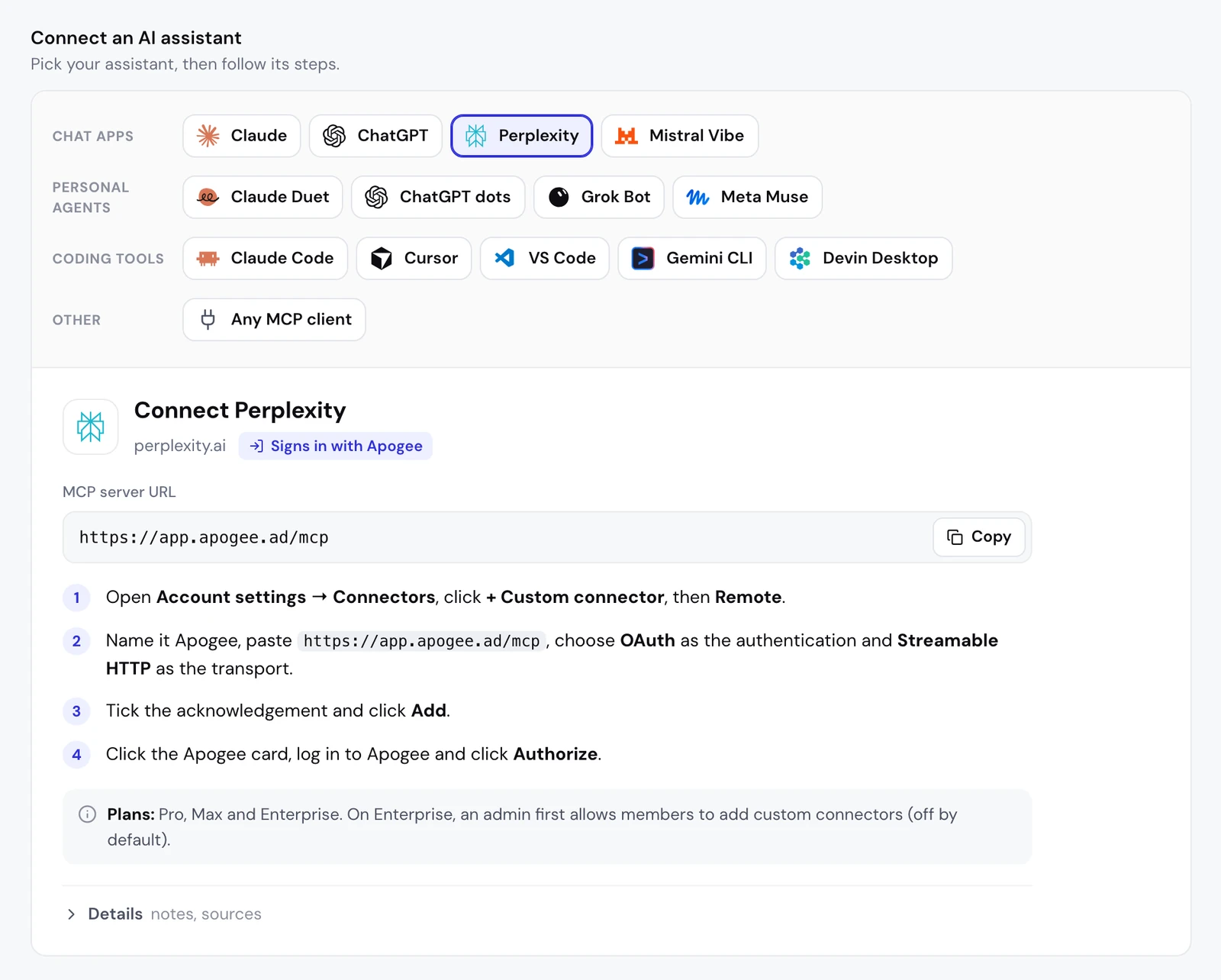
These are the steps of the guide built into Apogee, under Settings → MCP with Perplexity selected:
- Open Account settings → Connectors, click + Custom connector, then Remote.
- Name it Apogee, paste
https://app.apogee.ad/mcp, choose OAuth as the authentication and Streamable HTTP as the transport. - Tick the acknowledgement and click Add.
- Click the Apogee card, log in to Apogee and click Authorize.
If your Perplexity shows Plugins in the sidebar
Perplexity keeps updating its menus. According to its help center, the same form opens from Plugins in the sidebar, or Customize → Connectors if Plugins does not show:
- Click Add custom → Add MCP connector, then Remote.
- Fill in Name (Apogee) and MCP server URL (
https://app.apogee.ad/mcp). - Under Advanced, set Authentication to OAuth and Transport to Streamable HTTP.
- Tick the acknowledgement, click Add, then click the Apogee card to log in.
The fields stay the same: the server address, OAuth and Streamable HTTP.
Why OAuth rather than an API key
Perplexity also offers API Key and None. It does not document how it sends a key to the server: choose OAuth. There is nothing to copy or store, and you remove the access in one click in Apogee.
The access you give Perplexity
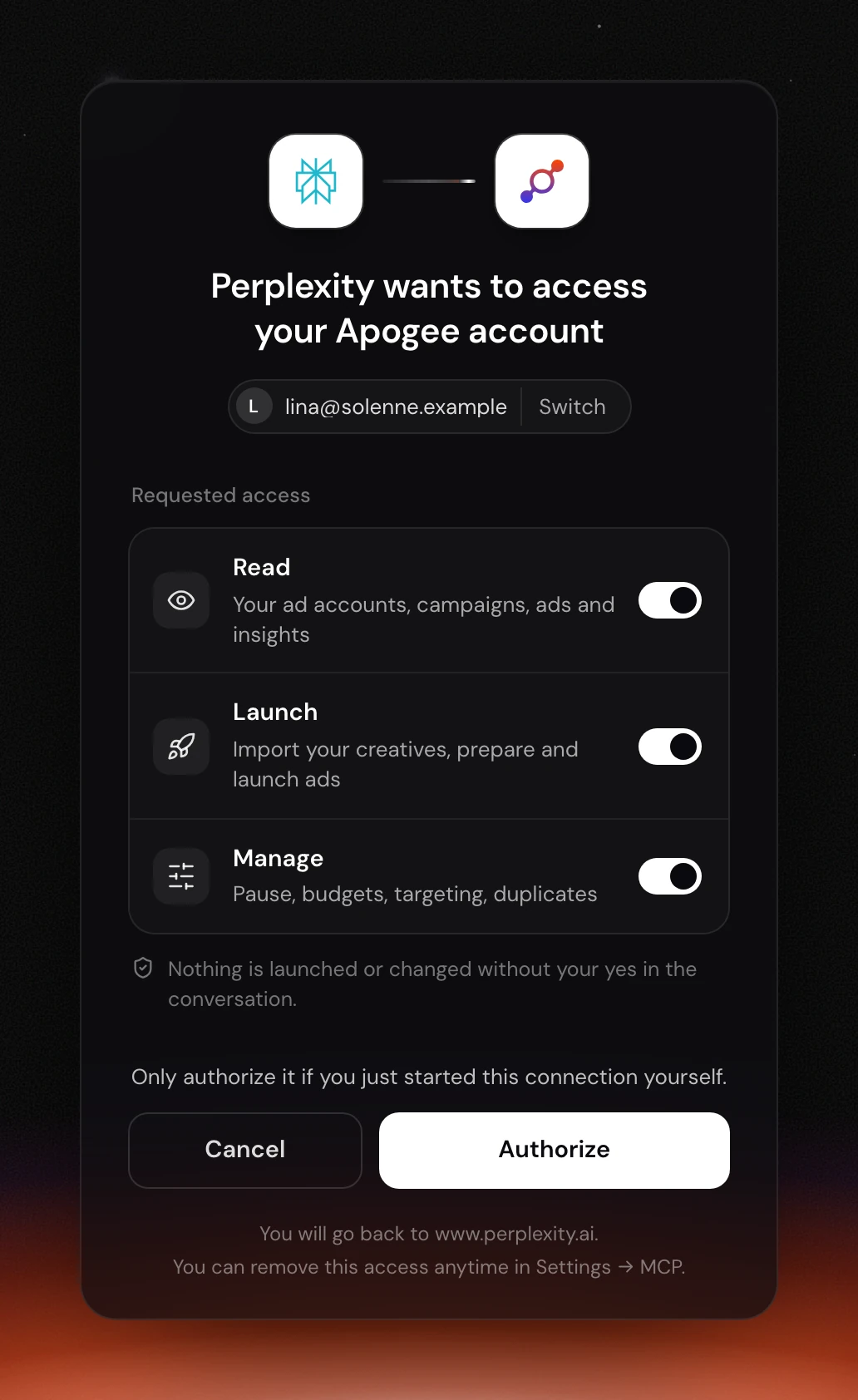
After you click the card, Apogee’s page shows “Perplexity wants to access your Apogee account”, the Apogee account logged in with Switch to change it, and three toggles:
| Access | What it allows Perplexity | Keep it if |
|---|---|---|
| Read | Read accounts, campaigns, ads and stats | Always: every analysis starts here |
| Launch | Import creatives, prepare and launch ads, Bridge transfers | You launch from Perplexity |
| Manage | Pauses, budgets, targeting, duplicates | Perplexity prepares your changes |
Keep at least one. To get started, Read alone is a good choice: Perplexity analyzes without being able to prepare anything. After Authorize, you go back to www.perplexity.ai.
Check the connection
Perplexity’s help center advises naming the connector in the request, hence the “With Apogee” at the start:
Perplexity calls list_ad_accounts, then get_account_overview for a Meta account or get_platform_overview for a TikTok or Snapchat account. If the answer comes back with your numbers, everything works.
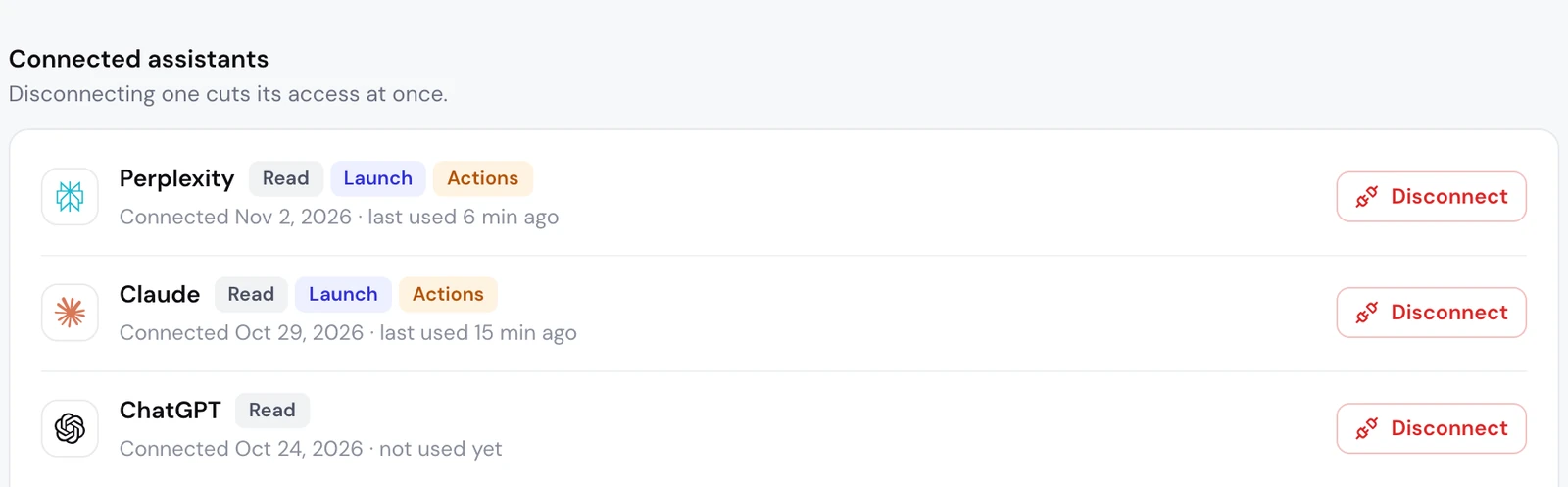
On Apogee’s side, under Settings → MCP, the Connected assistants list shows Perplexity with its access (Manage is shown as Actions there), its connection date and its last use.
Analyze your ads in Perplexity with Apogee
Perplexity is built to search. With Apogee, it searches your own accounts. Your question decides which tools it calls:
| Your question | Apogee tools called |
|---|---|
| How much did I spend, for what ROAS? | get_ (Meta), get_ (TikTok, Snapchat) |
| Which ads should I push or cut? | get_ (Meta), get_ (TikTok, Snapchat) |
| How did the week move? | get_, get_ |
| Which placement, age, device? | get_, get_, get_ |
| Are my creatives wearing out? | get_, get_ |
| What are competitors doing, what do customers say? | search_, fetch_, fetch_, search_ |
Meta Ads: the weekly review
The first time, Perplexity asks for your ROAS or CPA targets if Apogee does not know them. It can save them in your brand profile; that update only touches Apogee’s data, never your ad accounts.
Meta, TikTok and Snapchat: the report platform by platform
Each amount stays in its account’s currency, and Apogee never adds the platforms up. It follows the same logic as Apogee’s cross-platform stats.
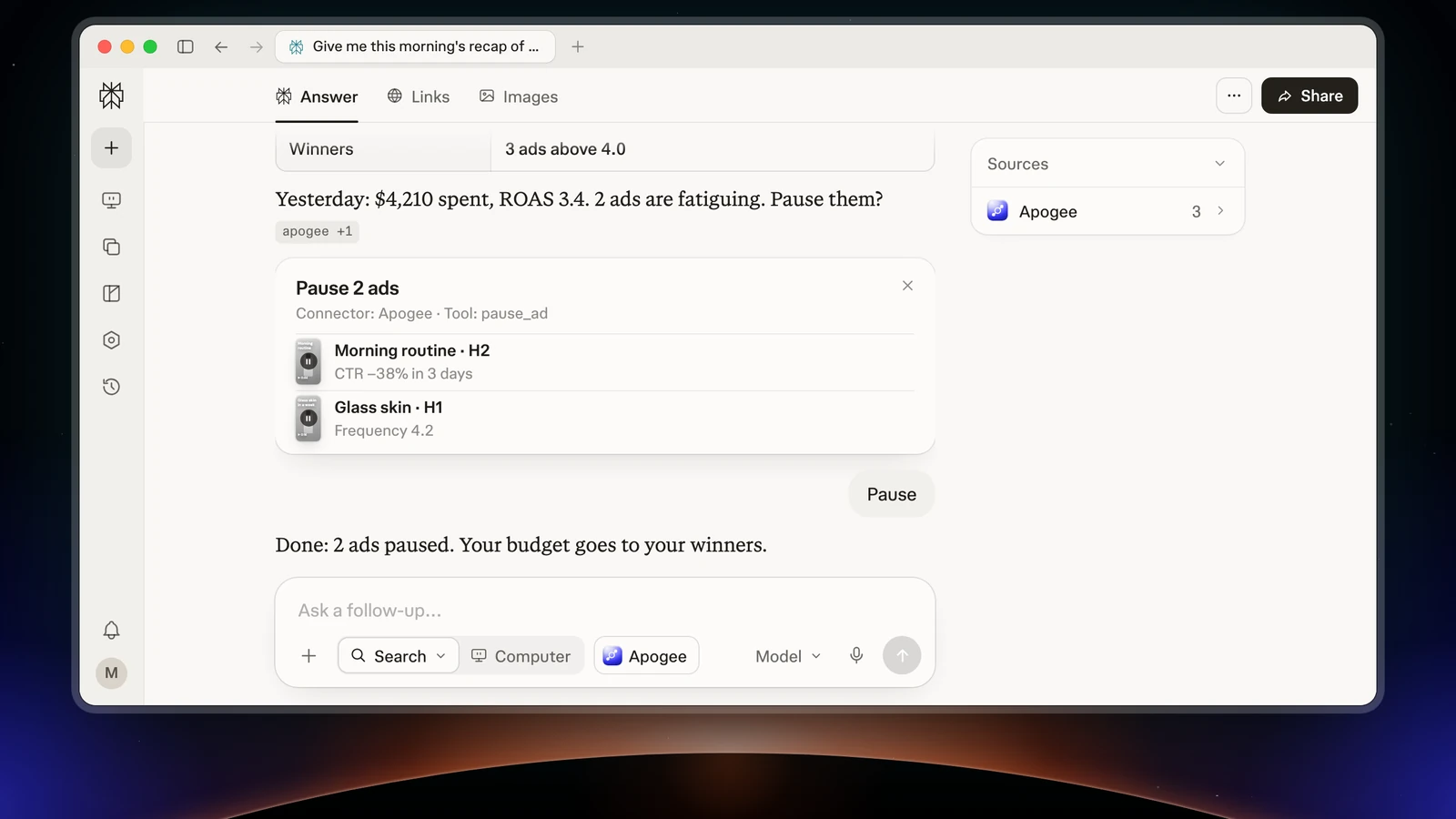
Creative fatigue and what drives the CPA up
Perplexity combines get_creative_fatigue_metrics, get_video_metrics and the three breakdowns. These detailed reads cover Meta.
Your competitors and your customers’ voice
search_meta_ad_library returns the ads’ texts, not their visuals. fetch_ad_comments reads the comments Apogee already stored; a fresh fetch from Meta (trigger_comment_sync) takes 1 to 5 minutes and costs 10 credits: only run it when you need it.
Then act: pauses, launches and the Bridge
With the Manage and Launch access, Perplexity moves from analysis to action, always through a recap you approve.
Cut and push
On Meta, Apogee prepares with pause_ad, pause_adset or scale_budget; on TikTok and Snapchat, with set_platform_status or set_platform_daily_budget. Nothing changes before execute_action, after your yes. A budget never goes up by more than 100% per change.
Launch a batch of creatives from a link
The questions come from the Apogee app (get_launch_questions) and arrive one by one in the conversation. Nothing is created while you read the recap from prepare_launch; your yes triggers launch, and launch_status follows the launch to the end.
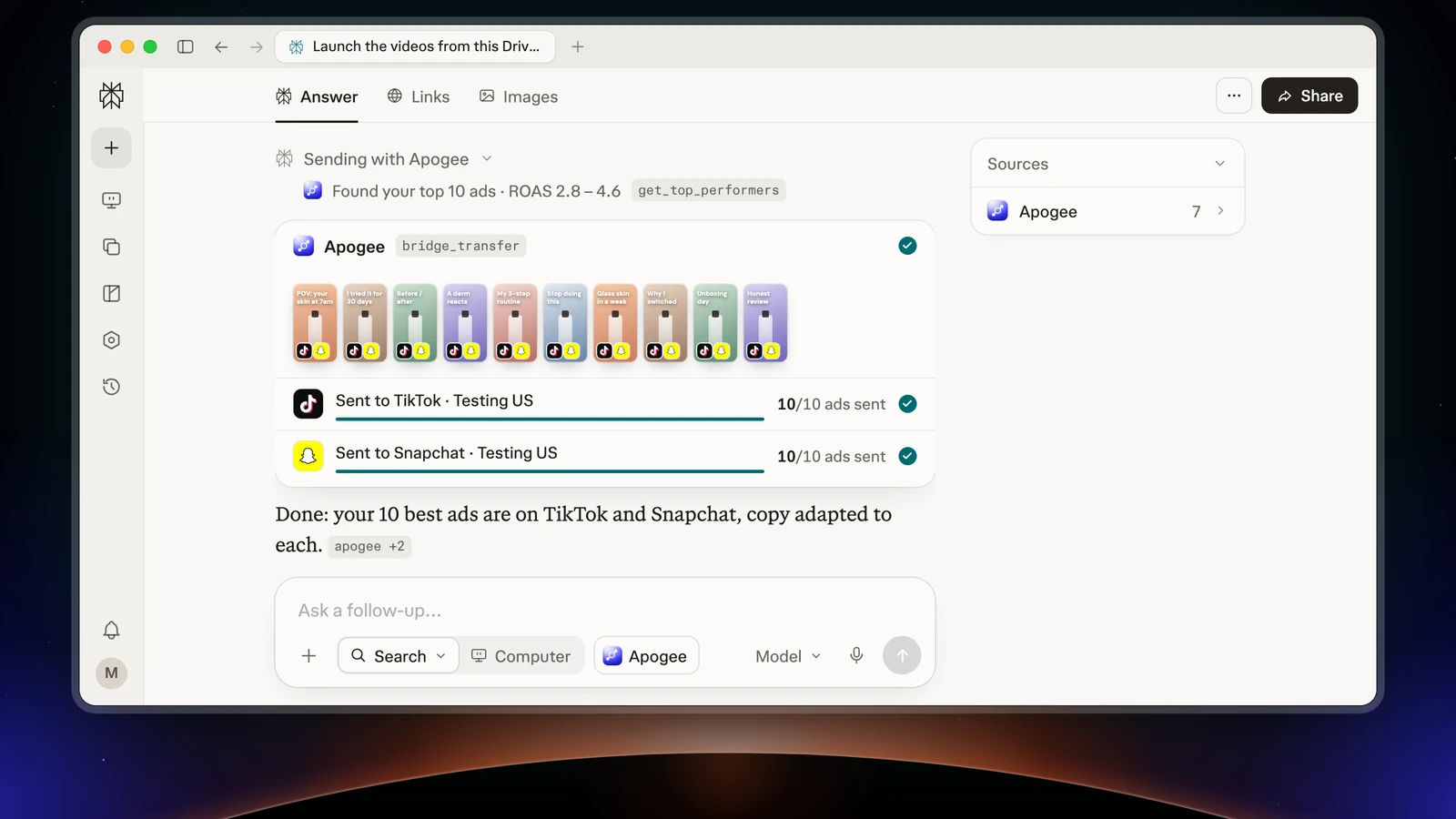
Send Meta winners to TikTok and Snapchat
Apogee’s Bridge prepares the copies with prepare_bridge_transfer and only creates them after your yes. Only videos go across, and the original Meta ads are not touched.
Limits and safety
| Guardrail | Value |
|---|---|
| Before any launch or change | A full recap and your yes |
| Status of created ads | Paused by default |
| Prepared plan | Valid 24 hours, runs only once |
| Daily budget | Refused above the cap, 500 in the account’s currency by default |
| Launches and Bridge transfers | 25 per ad account over 24 hours |
Reads are free up to 5,000 a day on Pro and 10,000 on Growth and Scale, then cost 1 credit each; a change or a created ad uses credits only if it succeeds. When Meta throttles an account, Apogee stops calling it for 2 minutes. Each platform keeps its currency: no Meta, TikTok and Snapchat total. To cut the access: Settings → MCP, Connected assistants list, Disconnect next to Perplexity. You can also delete the connector in Perplexity, from the ⋮ menu on its card.
Common problems
- The Add button stays greyed out: it only turns on once the required fields are filled in and the acknowledgement is ticked.
- No option to add a connector (Enterprise): the organization policy blocks it. An admin must turn on Allow members to add custom connectors.
- An error tag on the Apogee card: server validation failed. Check the address, the Streamable HTTP transport and the OAuth authentication, then reconfigure.
- The connection does not go through: the authentication is set to API Key or None. Switch it to OAuth. Apogee only sends the sign-in back to
www.perplexity.aiandenterprise.perplexity.ai. - A 401 error or a request to reconnect: the credential is missing or expired. The access token lasts one hour and renews itself, the refresh token 60 days; after that, or after a Disconnect, click the Apogee card again.
- An
upgrade_requiredrefusal (403): the Apogee plan does not include the MCP server. Move to the Pro, Growth or Scale plan. - Perplexity says it cannot launch: the Launch access was unticked. Reconnect and tick it.
- An ad account is missing: it is not connected to Apogee. Connect it in the app, then ask again.
Going further
- Connecting Apogee to Claude and connecting Apogee to ChatGPT, the same server in two other assistants;
- Apogee vs the official Meta Ads MCP;
- The Perplexity technical sheet of Apogee’s MCP server, with every tool named here.