More articles 11 min read
Cursor MCP server: add Apogee to run your Facebook Ads
Cursor MCP setup: put an Apogee API key in ~/.cursor/mcp.json, and Cursor's agent launches, reads and pauses your Meta, TikTok and Snapchat ads.

Contents
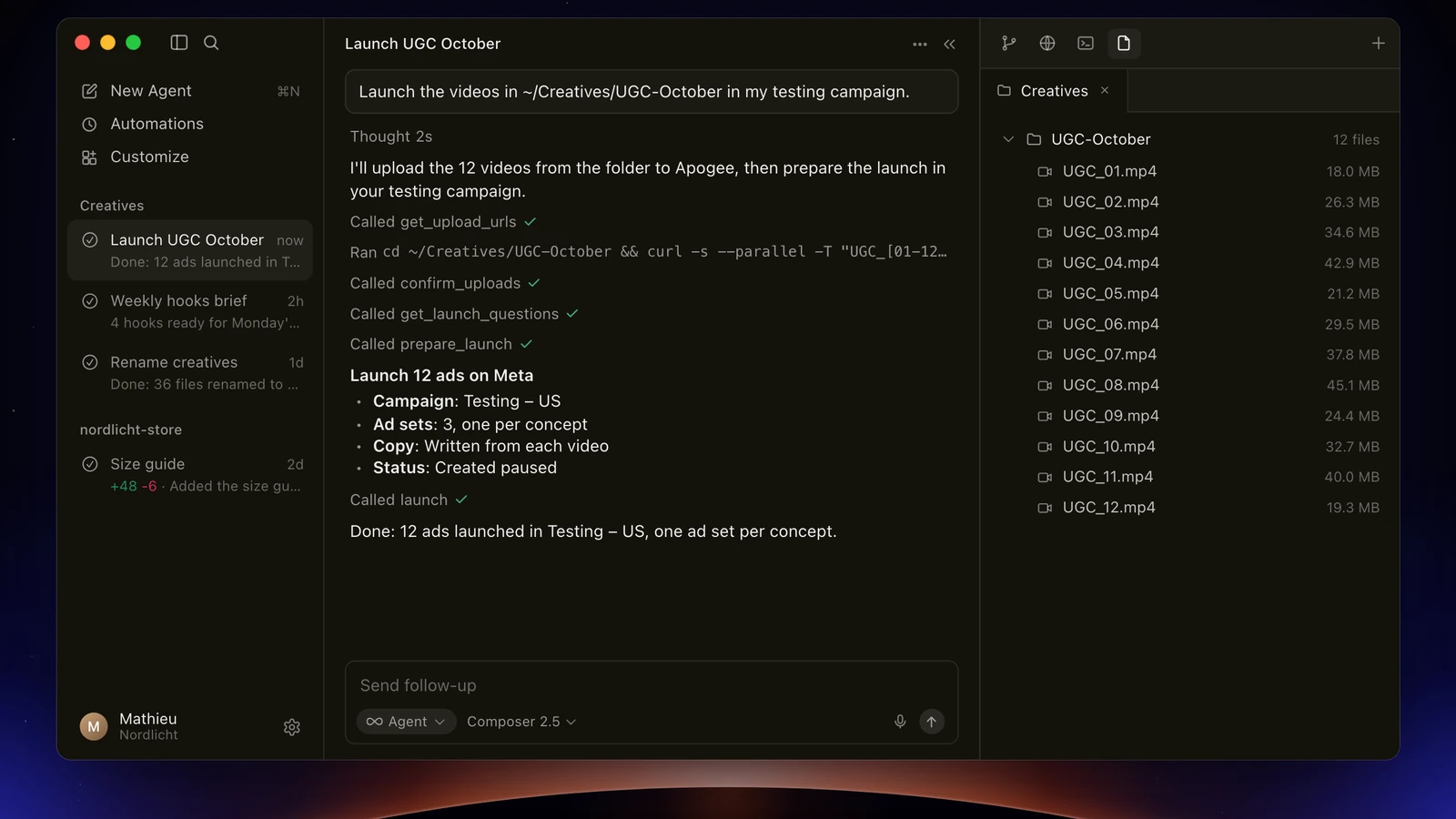
Cursor MCP in practice: one Apogee API key in ~/.cursor/mcp.json, and Cursor’s agent reads, launches and pauses your Meta, TikTok and Snapchat ads without leaving the editor. Because it works on your computer, it launches the very folder your video editor drops the exports into. You need an Apogee plan that includes the MCP server, from Pro up, and a key limited to the scopes Cursor needs. Nothing goes live without your yes.
Before you start
| Side | What you need |
|---|---|
| Cursor | The desktop app. Its MCP page sets no minimum plan; on Enterprise, an admin can restrict the allowed servers (MCP Allowlist) |
| Apogee | A plan that includes the MCP server: Pro, Growth or Scale, 7-day trial for €1; Starter does not have it |
| Sign-in | An Apogee API key (apk_), the path Apogee’s guide gives; Cursor can also sign in with OAuth |
| Ad accounts | Your Meta, TikTok or Snapchat accounts, already connected to Apogee |
Grok Bot, xAI’s personal agent run with Cursor, goes through this same MCP client: if that is the one you want to connect, follow the Grok Bot guide with Apogee. To compare Apogee with other servers, Meta’s official MCP included, see the Meta Ads MCP landscape.
Cursor MCP server setup in three steps
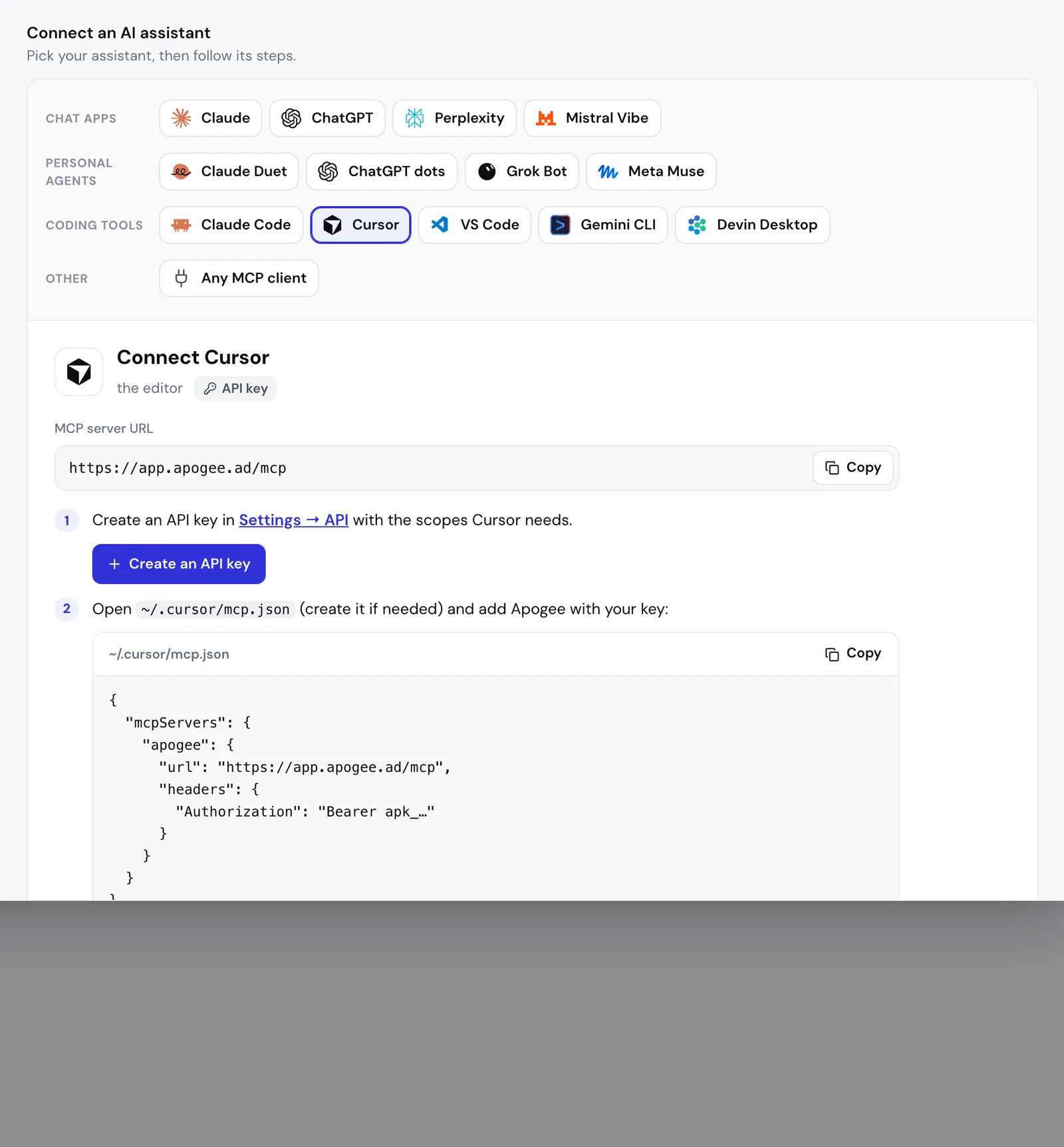
Step 1: create an API key in Apogee
- In Apogee, open Settings → API and create a key. Under Settings → MCP, with Cursor selected, the Create an API key button leads to the same place.
- Fill in Name: a name that says what the key is for, such as “Cursor”.
- Under Scopes, tick only what Cursor needs (table below).
- Under Expires, pick 30 days, 90 days (the default), 1 year, or a date up to a year away.
- Create the key and copy it right away: Apogee shows it only once.
| What you ask Cursor for | Scopes to tick |
|---|---|
| The morning recap, the weekly review | Read |
| Launching ads, sending winners with the Bridge | Read and Launch |
| Pausing ads, changing budgets | Read and Actions |
Give the key only the scopes it needs. If you also plug in a reporting script, give it its own read-only key.
Step 2: add Apogee to ~/.cursor/mcp.json
Open ~/.cursor/mcp.json (create it if needed) and add Apogee with your key:
{
  "mcpServers": {
    "apogee": {
      "url": "https://app.apogee.ad/mcp",
      "headers": {
        "Authorization": "Bearer apk_…"
      }
    }
  }
}
Replace apk_… with your key. If the file already lists other servers, add the apogee block next to them, inside mcpServers.
Two safety rules:
- Keep the key in
~/.cursor/mcp.json, which is yours only, never in the.cursor/mcp.jsonof a project you share: that file often ends up in the Git repository. - To keep the key out of plain text, set the value to
"Bearer ${env:APOGEE_API_KEY}"and defineAPOGEE_API_KEYin your environment. Cursor resolves these variables inurlandheaders.
Step 3: turn Apogee on in Customize
In Cursor, open Customize in the sidebar, find Apogee and switch its toggle on. A disabled server does not load or appear in chat. Then open the agent chat.
Check the connection
By default, Cursor asks for your approval before it uses an MCP tool. The agent calls whoami, which answers with the Apogee account, the credential type (here an API key) and its scopes, then list_ad_accounts. Two reads, nothing changes. If the agent cannot find Apogee, open the Output panel (Cmd+Shift+U) and pick MCP Logs.
What about signing in with OAuth?
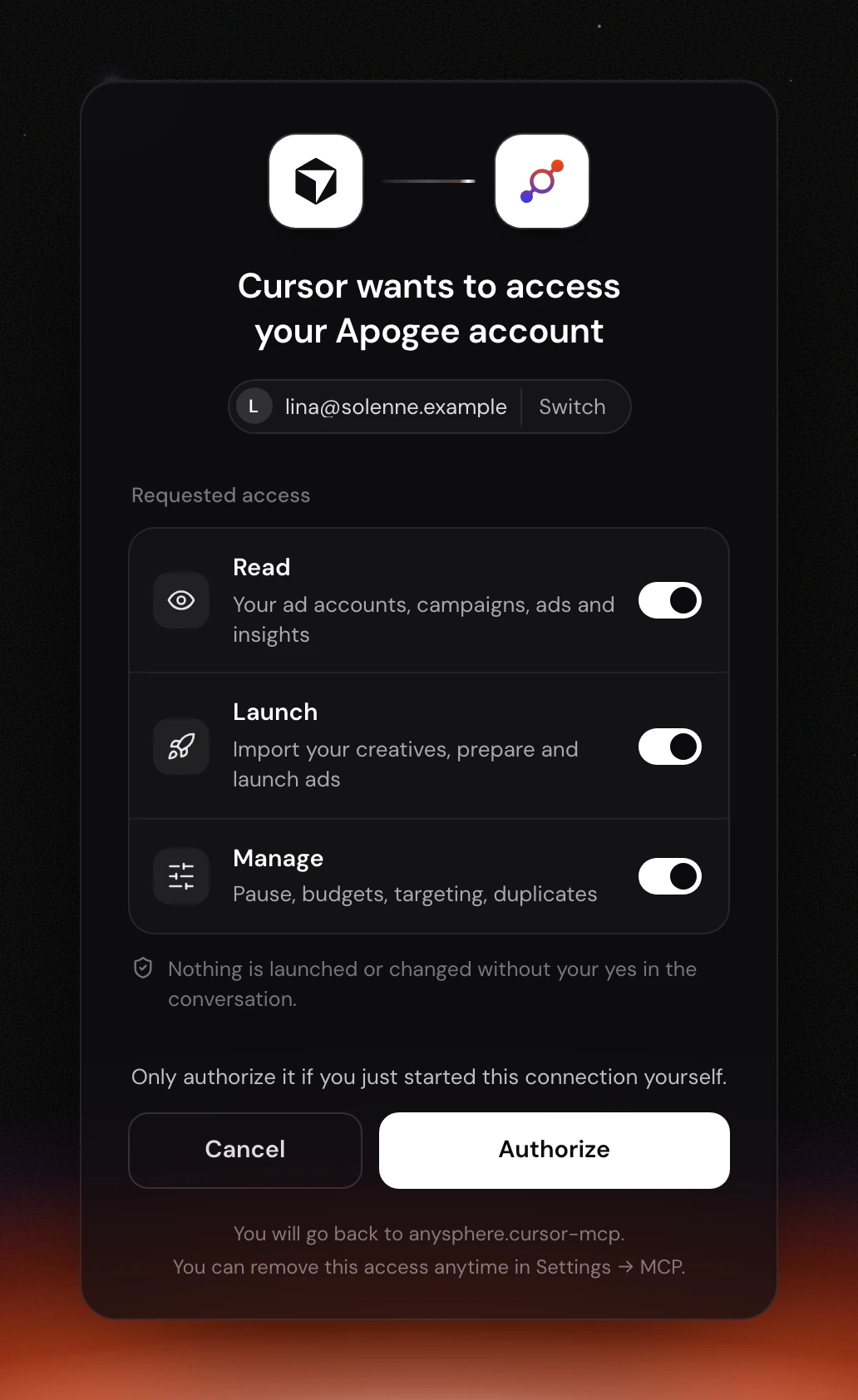
According to Apogee’s guide, Cursor also signs in with OAuth, with no key to copy. The guide does not describe Cursor’s menus for this path: if yours differ, stick with the key. When Cursor opens Apogee’s page, it reads “Cursor wants to access your Apogee account”, shows the account in use with Switch, the Read, Launch and Manage access to tick, then Cancel and Authorize. For the desktop app, the last line says “You will go back to anysphere.cursor-mcp”.
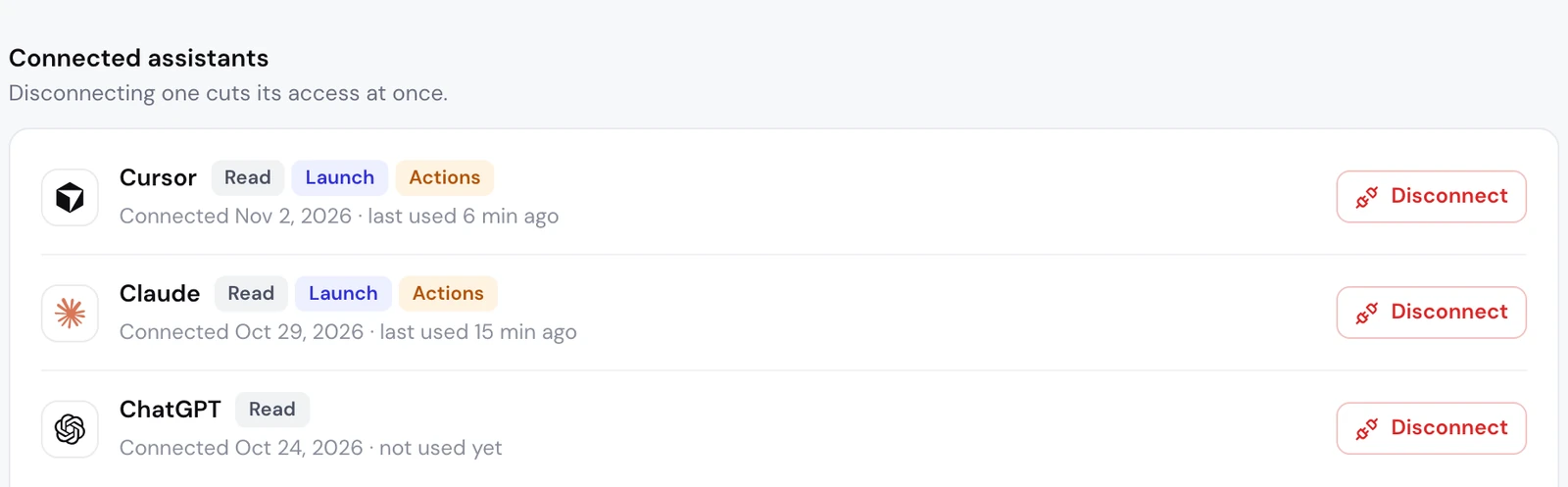
After Authorize, Cursor shows up under Settings → MCP, Connected assistants list, with its access, connection date and last use. That list only shows OAuth connections: an API key is managed under Settings → API, API keys list.
What to ask Cursor next: the media buyer’s job
Cursor has one edge over chat apps: it reads the files on your computer and uploads them to Apogee itself, with no Google Drive or Dropbox in between.
Launch a folder from your computer on Meta Ads
| Phase | Apogee tools | What you see |
|---|---|---|
| Account and campaign | list_, get_ | The account question if you have several, then the settings taken from the latest ad set and ad |
| Files | get_, confirm_ | Cursor uploads each file to a signed URL, then Apogee checks it arrived and is not empty |
| Interview | get_ | The app’s questions, one topic at a time, each with a recommended answer |
| Ads and texts | get_ | One ad per creative (9:16, 4:5 and 1:1 together), one primary text, headline and description per ad |
| Recap and launch | prepare_, launch, launch_ | The full recap, your yes, then tracking until it is done |
Cursor sends up to 50 files per call, 500 MB each at most, to URLs that stay valid for one hour. An Apogee account’s daily cap is 2,000 files and 100 GB on Pro, 4,000 files and 200 GB on Growth and Scale. Meta receives nothing before your yes.
The same folder on TikTok Ads and Snapchat Ads
TikTok and Snapchat take videos and images from Apogee’s storage; on TikTok, an image runs as a carousel. Name the platform, and the agent picks up the template you saved in the app (Quick Bulk Edit, then Save as template):
| Platform | What gets created | What the agent asks you |
|---|---|---|
| Meta | An ad set and its ads | Page and Instagram account, audience, pixel and event, texts |
| TikTok | An ad group and its ads | The TikTok identity, and whether to use Smart+ |
| Snapchat | An ad squad and its ads | The public profile, the pixel, the countries |
The agent reads your templates with list_platform_templates, without ever saving or deleting one. Each platform has its own recap, budget and currency, and waits for its own yes. The details are on the Meta, TikTok and Snapchat page.
Send Meta winners to TikTok and Snapchat
Your Meta winners can run on TikTok and Snapchat too: Apogee’s Bridge makes paused copies of them, and the Meta ads stay as they are:
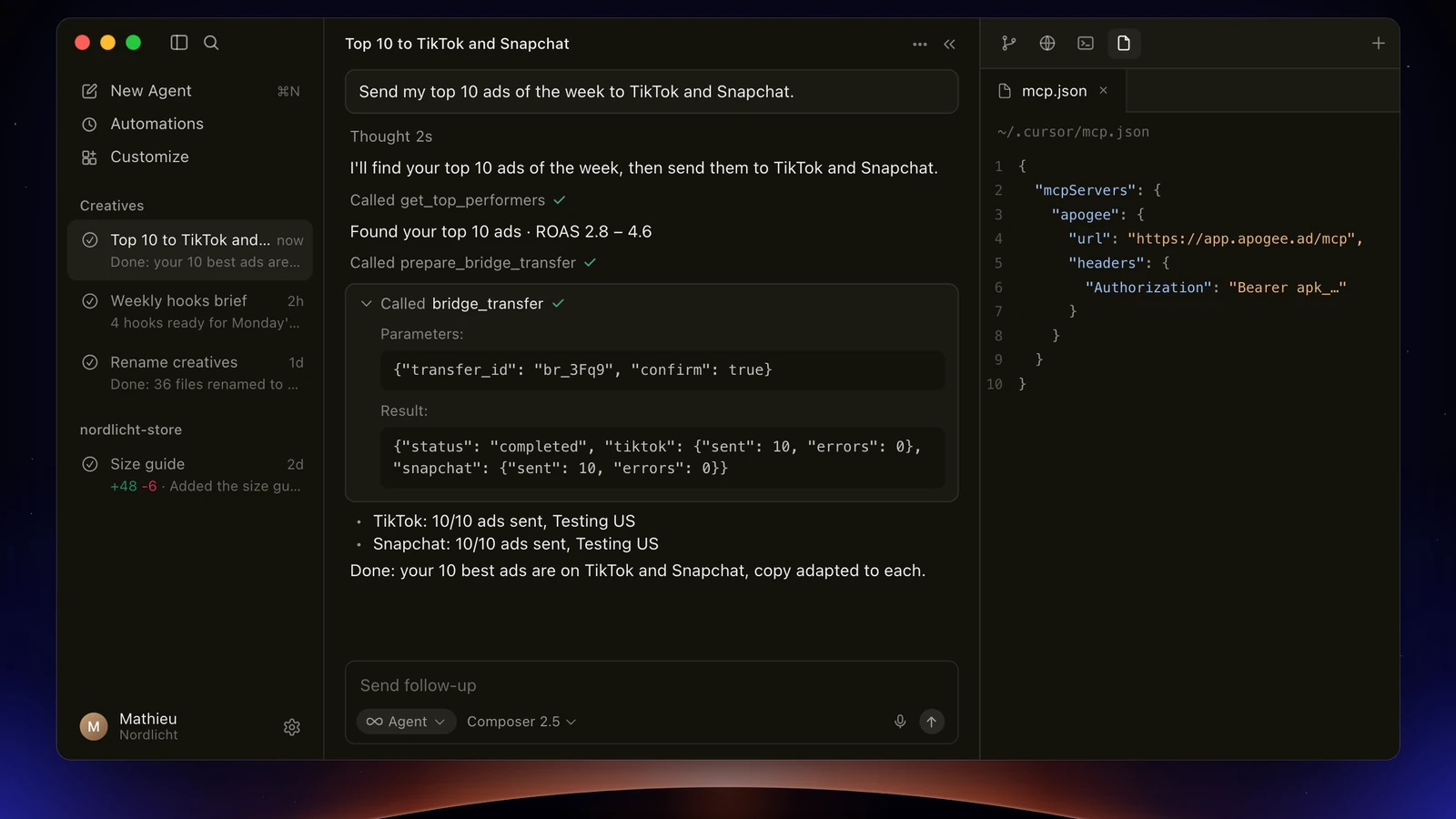
The agent ranks your ads with get_top_performers, uses list_bridge_transfers to drop those already sent, then shows the recap from prepare_bridge_transfer; bridge_transfer waits for your yes. On the first transfer, it asks you for the TikTok identity and the call to action, which Meta lacks. Image ads stay on Meta: the Bridge only carries videos.
The morning recap
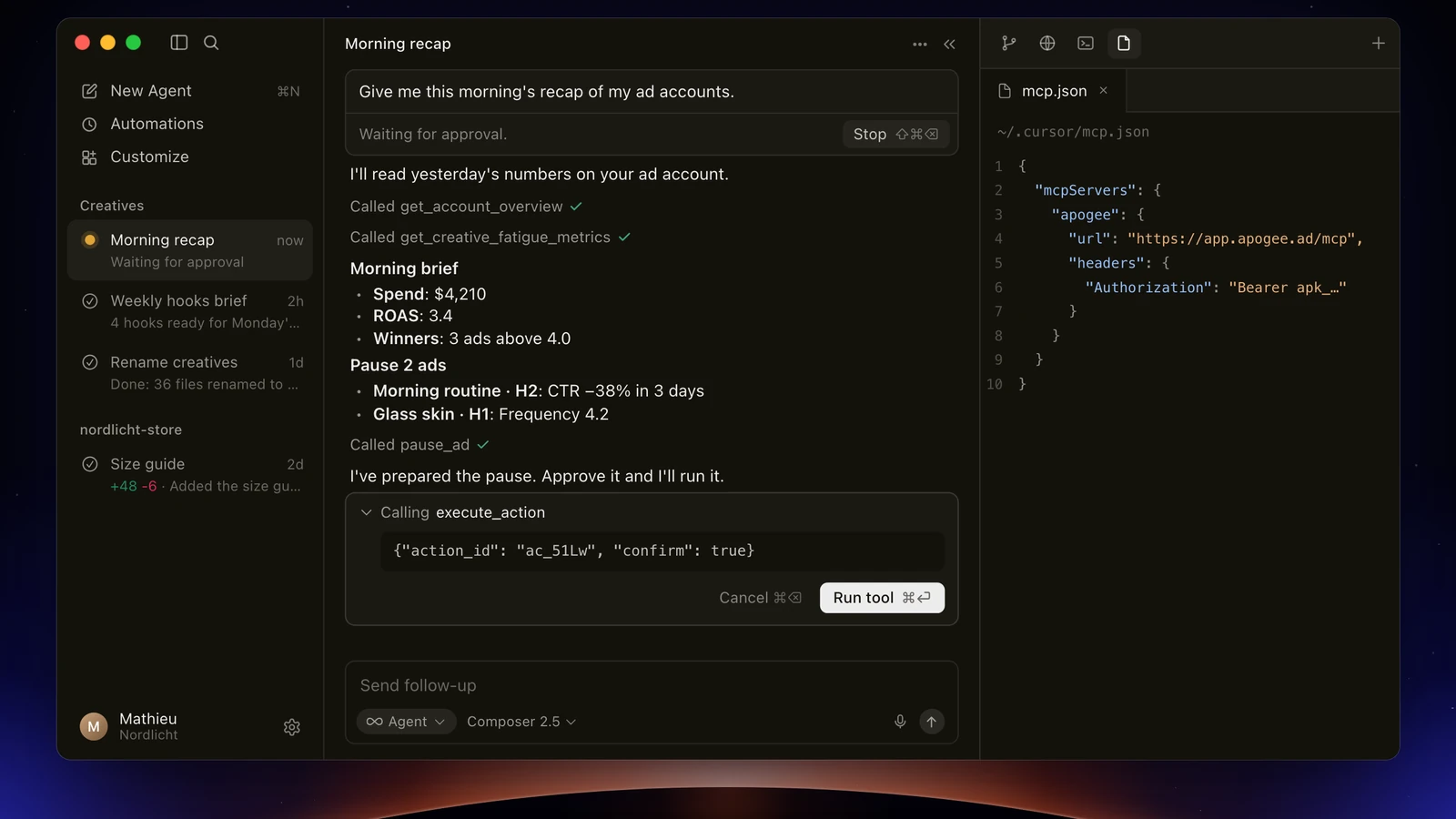
The recap only needs a key limited to the Read scope: get_account_overview and get_top_performers on Meta, get_platform_overview and get_platform_top_performers on TikTok and Snapchat, free within your plan’s daily limit (5,000 reads a day on Pro).
Cut the ads that are fatiguing
After reading the results and get_creative_fatigue_metrics, the agent stores the pauses as prepared actions (pause_ad on Meta, set_platform_status on TikTok); execute_action only runs with your yes and needs the Actions scope. A pause that runs costs 2 credits, only when it succeeds.
Limits and safety
On Cursor’s side. Cursor asks for your approval before it uses an MCP tool. In Auto-review mode, MCP tools on an allowlist run immediately: never put launch, execute_action or bridge_transfer there. On Enterprise, an admin can set an MCP Allowlist: the approved servers, and the tools that run without asking.
On the key’s side. One key per use, with an expiry. An Apogee account keeps 10 active keys at most. Regenerate creates a new key with the same name and scopes, and stops the old one.
On Apogee’s side, whatever Cursor’s settings:
| Guardrail | Value |
|---|---|
| Before any launch or change | A full recap and your yes |
| Status of created ads | Paused by default |
| Prepared plan | Valid 24 hours, runs only once |
| Daily budget | Refused above the cap, 500 in the account’s currency by default |
| Launches and Bridge transfers | 25 per ad account over 24 hours |
Apogee’s MCP server creates no catalog and no audience, and never adds up Meta, TikTok and Snapchat. To cut access: Revoke on the key under Settings → API, API keys list (final and immediate), or Disconnect next to Cursor under Settings → MCP for an OAuth connection. Ads already launched stay in place.
Common problems
- 401: the key is missing, mistyped, unknown, revoked or expired; Apogee answers the same 401 in every case. Check the
Bearer apk_…header, or regenerate the key. With${env:APOGEE_API_KEY}, check the variable is set where Cursor starts. - 403 upgrade_required: your Apogee plan does not include the MCP server (Starter). Move to Pro, Growth or Scale.
- 403 insufficient_scope, or the agent cannot find a tool: the key lacks the matching scope, such as Launch for a launch. Create a key with the right scopes.
- Apogee does not show up in chat: it is turned off in Customize, or the JSON in
~/.cursor/mcp.jsonis invalid. Check MCP Logs in the Output panel. - Admin policy: on Cursor Enterprise, if your company uses an MCP Allowlist, Apogee has to be on it. Ask your admin to add it.
- 409 too_many_keys: the account already has 10 active keys. Revoke one first.
- The key was pushed to a repository: revoke or regenerate it at once, then put the new one in
~/.cursor/mcp.json. - 429, too many requests: the MCP server takes 600 calls per 15 minutes on Pro, 1,200 on Growth and Scale. A launch only needs a handful.
Going further
- the other coding tools: VS Code with GitHub Copilot, Claude Code, Gemini CLI and Devin Desktop;
- Apogee vs the official Meta Ads MCP, and the same comparison for TikTok Ads and Snapchat Ads;
- the technical docs for Cursor with Apogee, with every tool named here.