More articles 17 min read
ChatGPT dots for Meta Ads: your AI media buyer on TikTok and Snap too
Make a ChatGPT dot your media buyer on Meta, TikTok and Snapchat with Apogee: the MCP plugin, the plans it needs, brief, launches, pauses and Bridge prompts.

Contents
- A ChatGPT dot’s job description as a media buyer
- Hiring a dot: the Apogee MCP plugin in ChatGPT
- ChatGPT dots on Meta Ads: launching the new batch of creatives
- ChatGPT dots on TikTok Ads and Snapchat Ads
- Its morning routine: the brief, then the pauses
- The Monday report, platform by platform
- Prompts to copy
- Its rules: what it never does without you
- ChatGPT dots or ChatGPT: which one should run your ads?
- What if the connection gets stuck?
- Going further
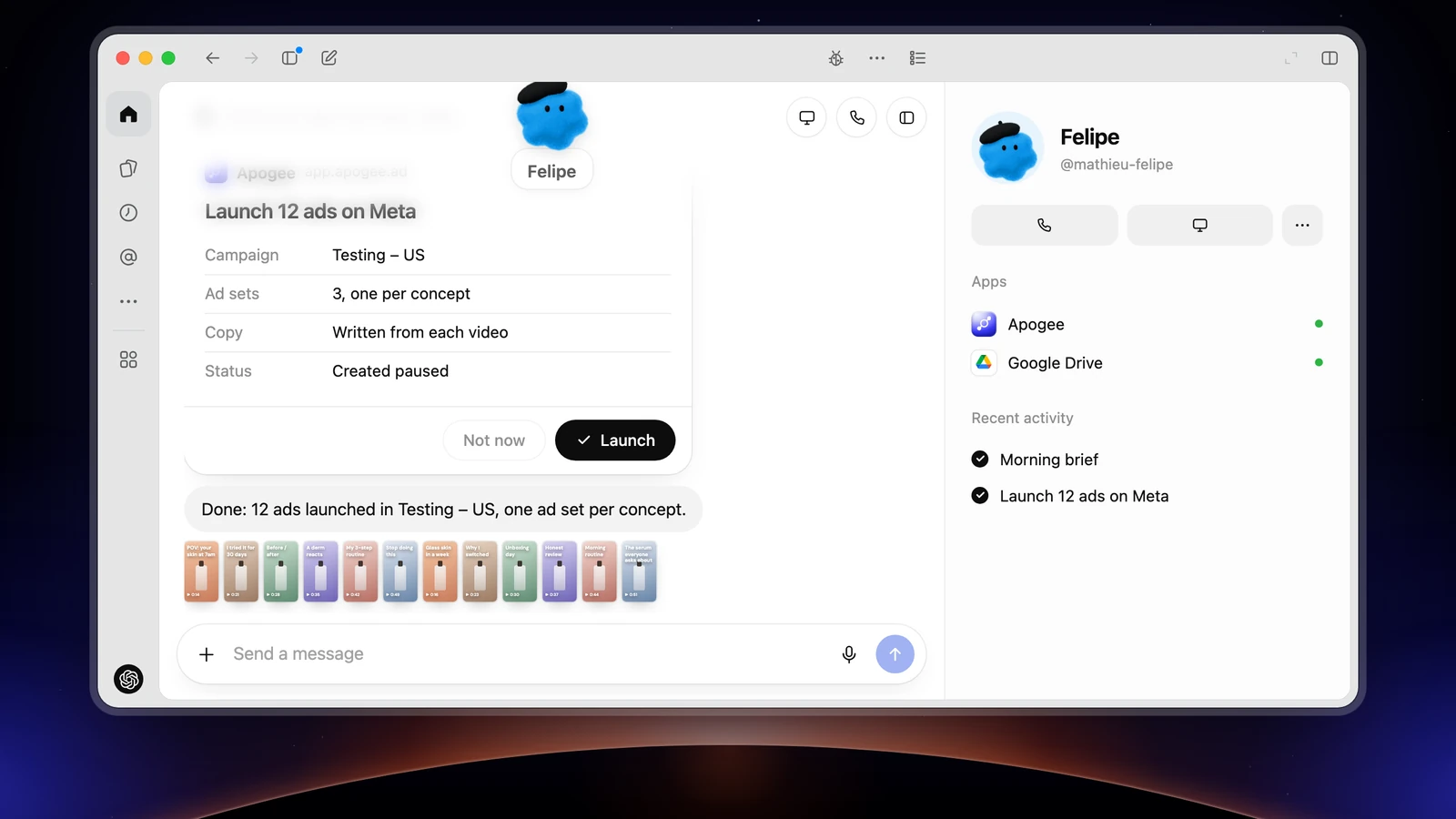
ChatGPT dots, ChatGPT’s personal agents, can take the media buyer job on Meta, TikTok and Snapchat as soon as Apogee is plugged in as an MCP plugin. Your dot prepares the morning brief, the launch of the creatives that land in Drive, the pause of ads that burn budget and the transfer of your Meta winners to TikTok and Snapchat; nothing goes live without your yes. To launch, you need ChatGPT Business Premium or Enterprise: on Pro, available outside the EEA, the UK and Switzerland, the dot reads your numbers without changing anything.
A ChatGPT dot’s job description as a media buyer
Each dot has a name, a look and an @ handle; it works in the background, repeats tasks at set times, uses the plugins installed and enabled on your account, and keeps its work and its review requests in its Activity. A dot only reaches your ad accounts through a plugin. Plugged into Apogee, an advertising MCP for Meta Ads that also covers TikTok and Snapchat, it works within Apogee’s guardrails.
| Its task | Platform | When | What you approve |
|---|---|---|---|
| The morning brief | Meta, TikTok, Snapchat | Every morning | Nothing, it only reads |
| Launch the new batch of creatives | Meta, TikTok, Snapchat | As soon as a batch lands in Drive | The launch recap |
| Prepare the pause of ads that burn budget | Meta, TikTok | Every evening | The list of pauses, in its Activity |
| Send Meta winners to TikTok and Snapchat | Bridge | Every Monday | The Bridge recap |
| The weekly report | Platform by platform | Every Monday | Nothing, it only reads |
In every case, it launches or changes nothing without your yes, never totals platforms together and only touches accounts connected to Apogee.
Hiring a dot: the Apogee MCP plugin in ChatGPT
Two OpenAI rules overlap: who gets dots, and who can write through an MCP server you add yourself. According to OpenAI’s documentation, as of November 3, 2026:
| ChatGPT plan | ChatGPT dots | Apogee through a custom MCP server |
|---|---|---|
| Pro (100, 200, 500) | Yes, over 18, outside the European Economic Area, the UK and Switzerland | Read-only, according to OpenAI’s help |
| Business Premium | Yes, rolling out | Reads and actions |
| Enterprise | Yes, off by default: an admin turns it on | Reads and actions |
In the EEA, the UK and Switzerland, only Business Premium and Enterprise include dots. On Apogee’s side, you need the Pro, Growth or Scale plan, MCP server included, or the 7-day trial for €1.
In a Business or Enterprise workspace, an admin opens the rights first: Permissions & roles, search “plugins”, then Upload plugins, Upload plugins with custom MCP servers and Create plugins with MCPs. On Enterprise, the admin also turns dots on: Admin Console > Permissions, Workspace default > Workspace capabilities, Use dots (Beta); the apps and actions allowed are picked in Plugin controls.
Then, on ChatGPT on the web, from a computer:
- In Apogee, open Settings → Personal agents and pick the Dots tile, ChatGPT’s agent: the server URL shows with a Copy button.
- Open chatgpt.com/plugins, click +, then Add custom MCP server.
- Give it a display name, Apogee, and a description if you like. Under Connection, set
https://app.apogee.ad/mcpas the Server URL. - Choose OAuth as the authentication, then click I understand and want to continue.
- Click Create as a plugin, review the tools it found and install the plugin. Apogee’s page opens: log in and click Authorize.
- Open your dot, from the desktop app, the mobile app or a computer browser (not the mobile web): it uses the plugins installed and enabled on your account.
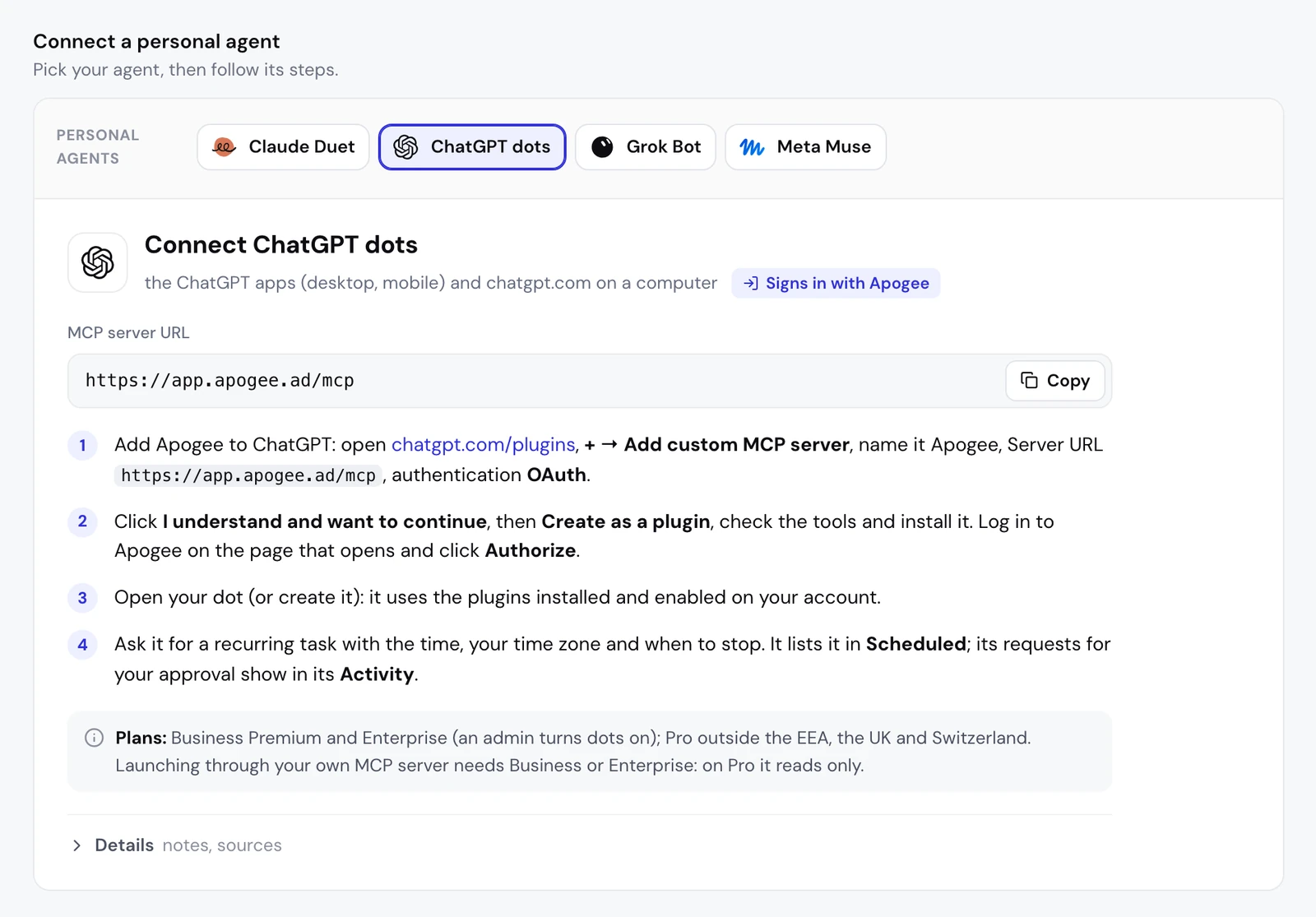
These steps follow OpenAI’s documentation, read on November 2, 2026, part of which was only readable as an excerpt; we have not run them in a dot yet, for lack of a ChatGPT plan that includes one. No OpenAI page says in black and white that a plugin created from your own MCP server works in a dot: if it is installed and enabled, it should count, and the first test below checks it in a minute. If your screen differs, go by your screen. ChatGPT cannot send an API key: with Apogee, it only goes through the authorization page.
The access you grant
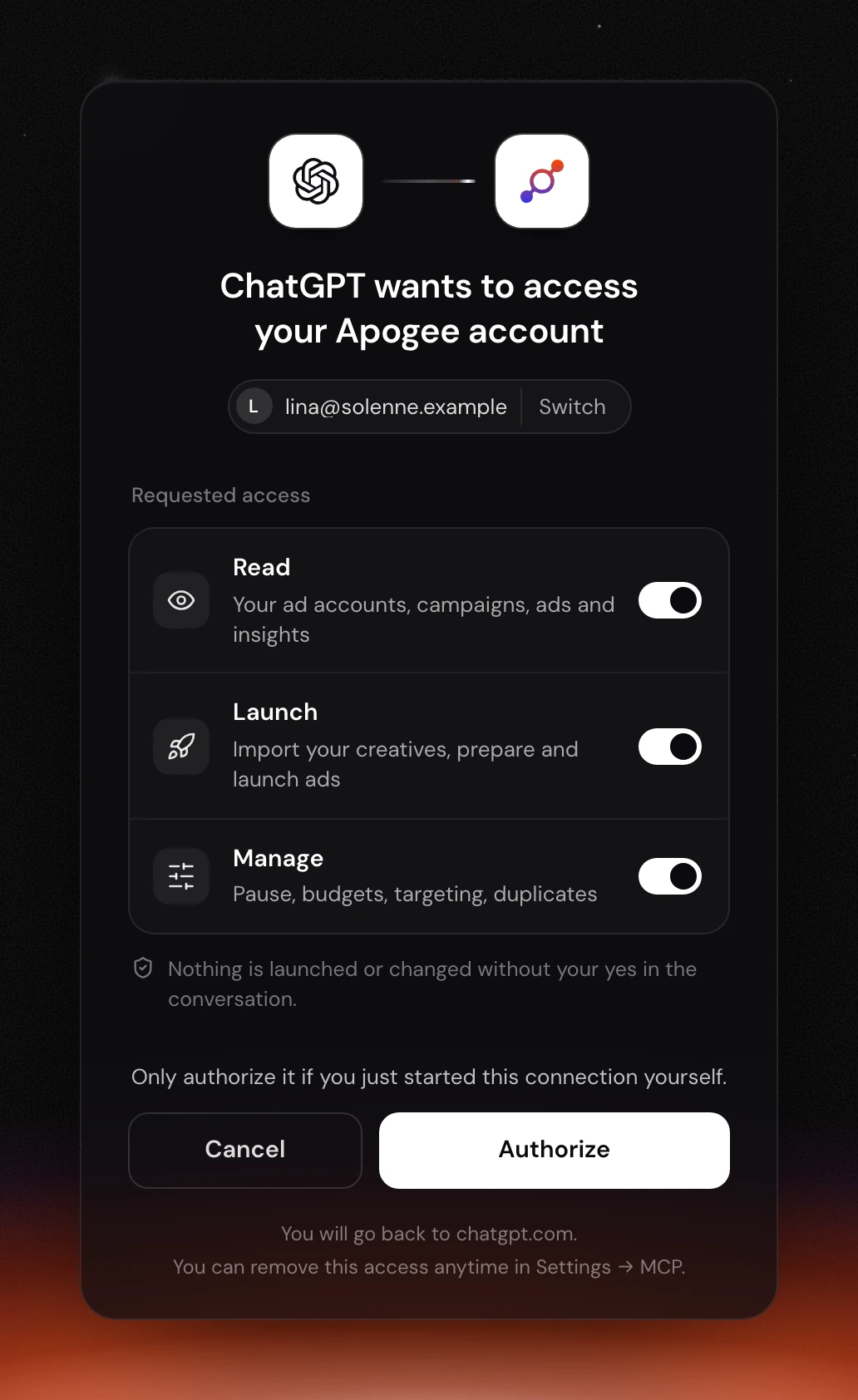
Apogee does not see the dot itself, only your ChatGPT account, so its page is titled “ChatGPT wants to access your Apogee account”. Check the Apogee account shown (Switch to change it), then set the three toggles:
| Access | What it allows | For which task |
|---|---|---|
| Read | Read accounts, campaigns, ads and statistics | Brief, report |
| Launch | Import creatives, prepare and launch ads | Launches, Bridge |
| Manage | Pauses, budgets, targeting, duplicates | Cutting an ad, adjusting a budget |
A dot that only sends briefs is fine with Read. On Pro, which only connects reads, Read alone is enough anyway.
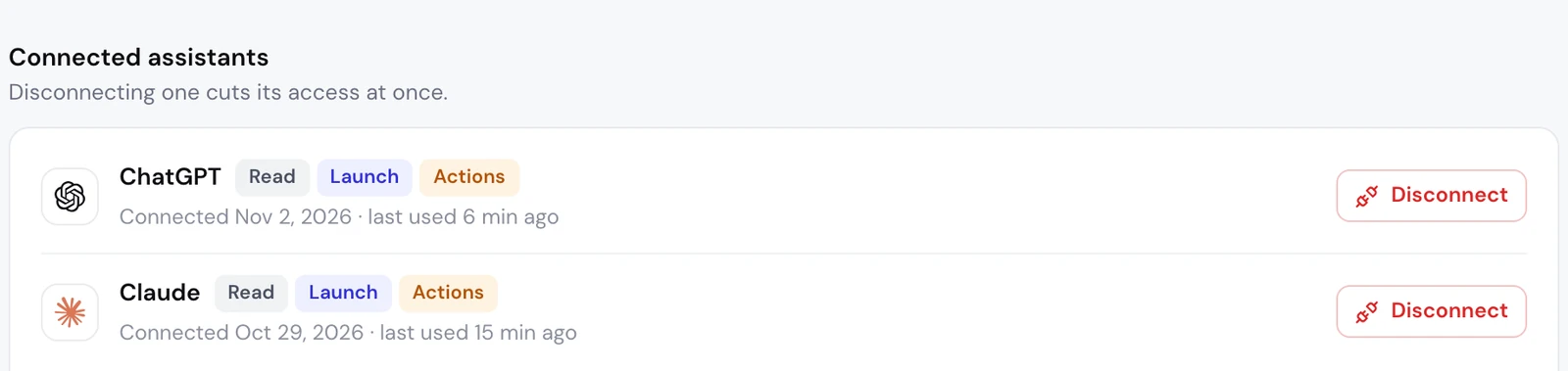
In Apogee, the connection shows under Settings → Personal agents, as ChatGPT: Apogee does not tell a dot from a ChatGPT conversation, the connection serves both. Manage shows there with the Actions label, along with the last used date.
Day one: check that it sees your accounts
The dot calls list_ad_accounts, then list_campaigns. If it answers without an error, the plugin works in the dot. If it cannot find Apogee’s tools, check that the plugin is installed and enabled, then open a new conversation.
ChatGPT dots on Meta Ads: launching the new batch of creatives
The Meta launch is the core of the job. If your files follow a naming convention, the most efficient route is one ad set per concept:
The dot follows the Apogee app’s order:
- The account:
list_ad_accounts, and a question if you have several. - The creatives:
import_linkandimport_statuscopy the files of the link (Google Drive, Dropbox, Frame.io) into Apogee; for a Drive folder,list_drive_folderlists them first. Nothing reaches Meta at this stage. - The interview:
get_launch_questionsreturns the app’s questions, with your account’s choices and a recommended answer. For One Concept One Adset, the dot also asks where the new ad sets’ settings come from (a copied ad set, a saved template, or from scratch) and their budget if the campaign has none. - Ads and texts: one creative in 9:16, 4:5 and 1:1 makes a single ad; one primary text, one headline and one description per ad, in the market’s language, for you to approve.
- The recap, then the launch:
prepare_launchcreates nothing. After your yes,launch, thenlaunch_statusuntil it is done.
It is the same logic as the dots’ automatic review. OpenAI puts it this way: asking for a draft does not authorize sending it. Here, asking for a launch only authorizes preparing it. If Meta rejects an ad, launch_status explains what to fix, and the dot does not relaunch the same thing until the cause is sorted.
The launch routine: the new batch, every morning
OpenAI advises giving a dot the time, the time zone and the end date of a recurring task, then having it confirm what it saved:
As with any link, the folder must be open to “Anyone with the link”, unless it lives in the Drive connected to Apogee. The dot asks every question on its first run, then reuses your answers.
ChatGPT dots on TikTok Ads and Snapchat Ads
Sending Meta winners over with the Bridge
The Bridge is for winners: your dot spots the best Meta ads and Apogee’s Bridge creates paused copies on TikTok and Snapchat, with texts adapted to each platform, without changing the original:
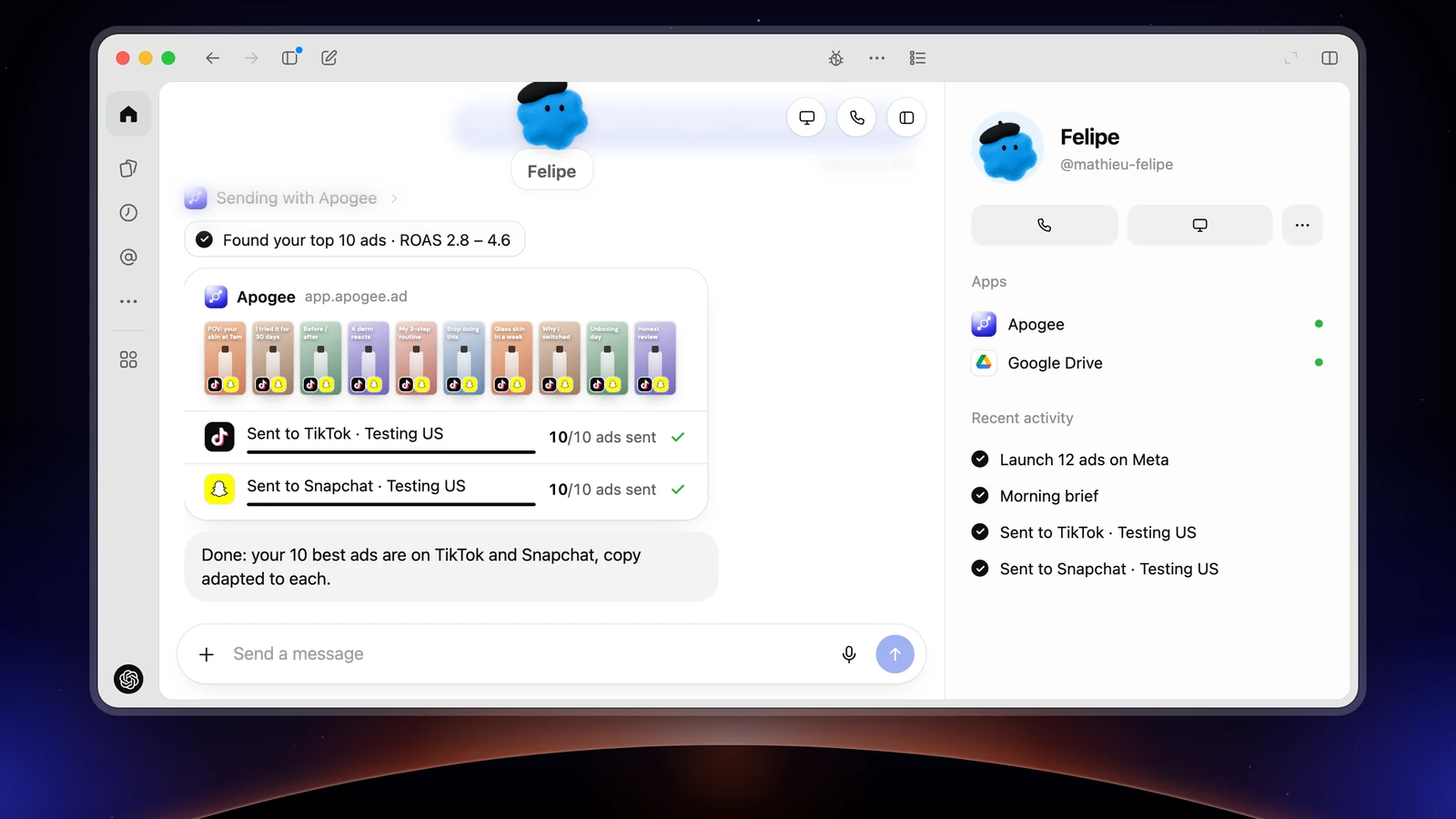
To avoid sending anything twice, the dot checks get_top_performers against list_bridge_transfers, then prepares the transfer with prepare_bridge_transfer; bridge_transfer only runs after your yes. On the first transfer, it asks you for the TikTok identity and the call to action, which Meta does not provide. Images stay on Meta: only videos go through.
As a routine, every Monday:
Launching straight on TikTok and Snapchat
To launch without going through Meta, name the TikTok or Snapchat account in the prompt: the dot creates an ad group on TikTok (an image becomes a carousel there) or an ad squad on Snapchat. See TikTok Ads bulk upload and Snapchat Ads bulk upload for what each platform accepts.
For a big sales moment on all three platforms at once:
The dot asks you what each platform requires: on Meta the objective, the pixel, the Page and the Instagram account; on TikTok the identity and whether to use Smart+; on Snapchat the public profile, the pixel and the countries. Each platform gets its own recap, in its account’s currency, and waits for its own yes. One limit on TikTok: GMV Max campaigns, legacy Smart+ campaigns and the ads TikTok generates in Smart+ ad groups are changed in TikTok Ads Manager, not through Apogee.
Its morning routine: the brief, then the pauses
There is no form: you describe the task to the dot in the conversation. OpenAI recommends six elements, then asking the dot to confirm what it saved:
| Element | Example for an ads brief |
|---|---|
| What to check | Yesterday on Meta, TikTok and Snapchat, through Apogee |
| The time | 8 AM, on weekdays |
| The time zone | Your own, for example Eastern Time |
| The end date | In four weeks, or a set date |
| When to notify | Every morning, or only on an alert |
| Where to deliver | In the conversation with the dot |
The task then shows in Scheduled (desktop app), where you can turn it off or delete it; the dot can also list, change or cancel it when you ask. OpenAI describes no notification setting for dots: your prompt decides when it writes to you. The time zone matters twice: each ad account has its own, and Apogee reads each platform in its account’s time zone.
The morning brief, read-only:
The dot reads Meta with get_account_overview and get_top_performers, TikTok and Snapchat with get_platform_overview and get_platform_top_performers. The first time, if Apogee does not know your targets yet, it asks you for them (get_business_profile). Add “only write to me if there is an alert” to get a message only when something drifts. The numbers come from Apogee’s cross-platform stats.
The pause of the ads that burn budget, prepared every evening:
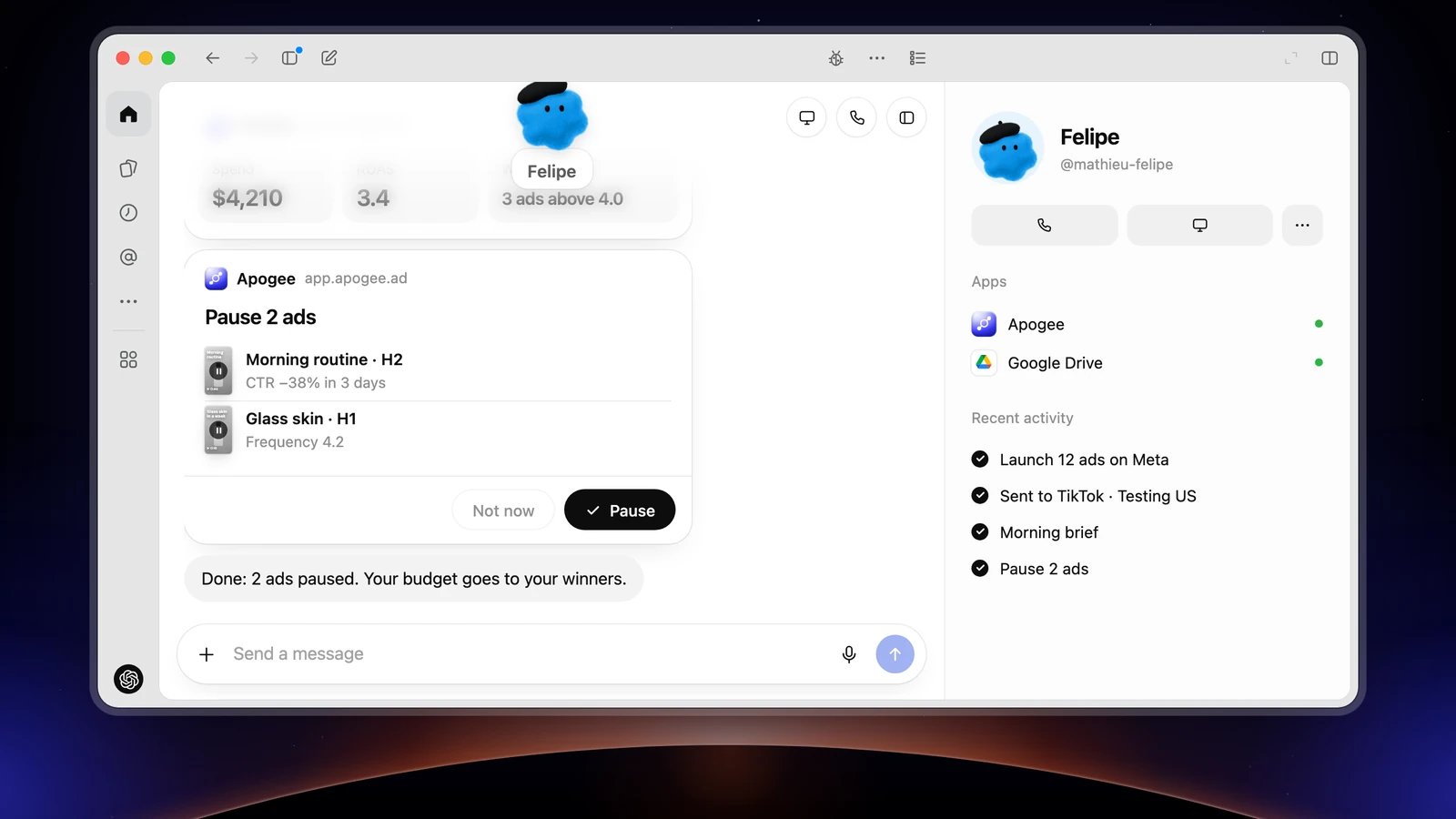
The dot prepares the pauses in Apogee: pause_ad or pause_adset on Meta, set_platform_status on TikTok. Nothing is cut yet. You say yes to all of them, or only to the ads you name, and it runs them with execute_action. Each prepared action is valid 24 hours and runs only once: a list approved the next evening has to be prepared again. A dot can also react to an event when the connected service allows it, but adding a plugin creates no monitoring on its own.
The Monday report, platform by platform
The report comes platform by platform, each in its own currency, time zone and attribution: a total would mix TikTok and Meta conversions that are not counted the same way, and Apogee never makes one.
Prompts to copy
On top of the routines above, six prompts that earn their keep every week:
Its rules: what it never does without you
The dots run every action that touches an account through an automatic review: the action goes through, waits for your approval, or is handed back to you. Your personal rules decide which:
- on a computer or the web: Settings > Personalization, Permissions, Custom rules;
- on mobile: sidebar, Customize > Custom rules, Add.
Describe the action (launching, pausing or changing the budget of ads with Apogee), pick from Take action without asking, Take action when you say so, Ask before taking action and Hand off to you, then Add rule. For Apogee, keep Ask before taking action; avoid Take action without asking for ad spend. Plugin rights are set separately: Open Plugins, Plugin permissions. OpenAI also says that ChatGPT asks for confirmation by default before the write actions of a custom MCP server. Pause stops a dot’s main task, not its scheduled tasks: those are managed in Scheduled.
Apogee keeps its own guardrails, whatever the dot’s settings:
| Guardrail | Value |
|---|---|
| Before any launch or change | A full recap and your yes |
| Status of created ads | Paused by default |
| Prepared plan | Valid 24 hours, runs only once |
| Daily budget | Refused above the cap, 500 in the account’s currency by default |
| Launches and Bridge transfers | 25 per ad account over 24 hours |
Reading costs nothing within your plan’s daily limit (5,000 reads on Pro, 10,000 on Growth and Scale); only successful actions use credits, 2 per change and 15 per ad created. To cut access: Settings → Personal agents in Apogee, then Disconnect next to ChatGPT. Access stops at once for ChatGPT, and so for the dots that go through this plugin; ads already launched are not touched.
ChatGPT dots or ChatGPT: which one should run your ads?
Both use the same Apogee MCP server, added once in ChatGPT:
| Product | What it is | What it is for |
|---|---|---|
| A dot | The personal agent, in the background, with its scheduled tasks | The brief every morning, the pauses every evening, the Bridge every Monday |
| ChatGPT | The conversation on chatgpt.com | A one-off request: a launch, an analysis, a review |
For a media buyer that works while you are away, the dot is the right pick, on the plans that include it. For a one-off request, the conversation is enough: see the Apogee connector in ChatGPT, which also covers the older developer mode route, and Facebook Ads launches and reviews in ChatGPT.
What if the connection gets stuck?
- Apogee’s tools changed: reopen the connection in ChatGPT Plugins, click Refresh, then open a new conversation.
- Your menus look different: OpenAI is moving custom MCP servers to chatgpt.com/plugins. The older route went through Settings → Apps → Advanced settings → Developer mode, then Settings → Apps → Create.
- The dot reads but launches nothing: on a Pro plan, ChatGPT only reads through a custom MCP server. Also check that the Launch access is ticked on Apogee’s side.
- No option to create the plugin: in a Business or Enterprise workspace, an admin has to open the rights described above.
- You cannot create a dot on mobile: two OpenAI pages contradict each other on this; use the desktop app.
- The wrong Apogee account shows on the authorization page: click Switch before Authorize.
Going further
- Apogee vs the official Meta Ads MCP, and the same comparison for TikTok Ads and Snapchat Ads;
- The other personal agents: Claude Duet as a media buyer, Grok Bot as a media buyer and Muse as a media buyer;
- The technical guide to ChatGPT dots with Apogee, with every tool named here.