More articles 14 min read
Meta Muse connector: your AI media buyer on TikTok and Snap too
The Apogee connector makes Meta Muse your media buyer on Meta, TikTok and Snapchat: setup, API key, morning brief, launches, pauses and Bridge, step by step.

Contents
- Muse’s job description as a media buyer
- Hiring Muse: the Meta Muse connector for Apogee, step by step
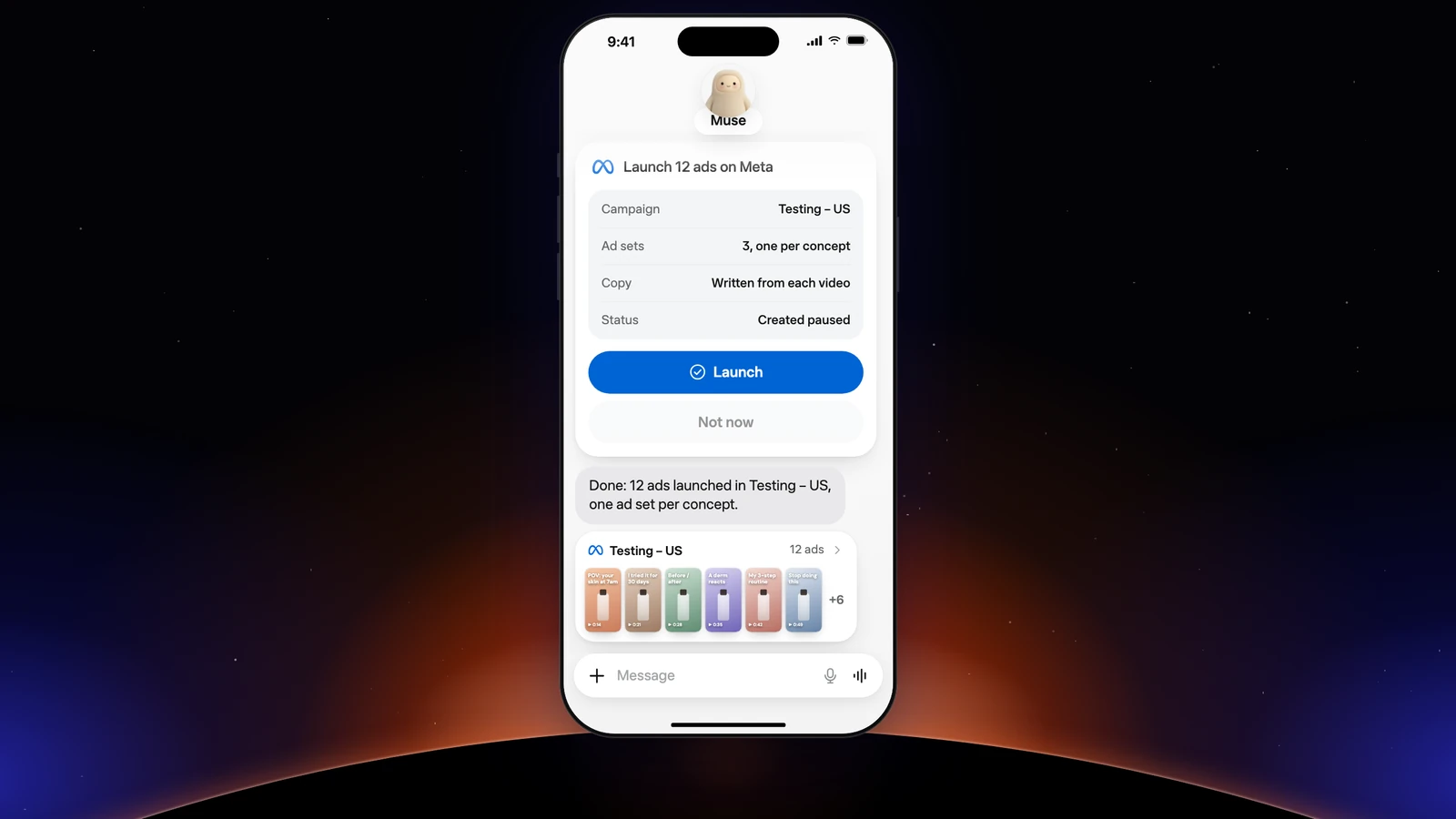
- Muse on Meta Ads: launching the new batch of creatives
- Muse on TikTok Ads and Snapchat Ads
- Its morning routine: the brief, then the pauses
- The Monday report, platform by platform
- Prompts to copy
- Its rules: what it never does without you
- What if the connection gets stuck?
- Going further
Apogee’s Meta Muse connector turns Muse, Meta’s personal agent, into a media buyer on your Meta, TikTok and Snapchat accounts. Muse already connects your Meta ad accounts; with Apogee, it sends the morning brief, launches your new creatives in bulk, prepares the pause of ads that burn budget and moves your Meta winners to TikTok and Snapchat. It prepares, you approve: nothing goes live without your yes. Here is its job description, how to plug it in and the prompts to copy.
Muse’s job description as a media buyer
Muse is Meta’s personal agent, available in the United States and Canada. It plugs into your services through connectors, can ask for your approval before every write and every important read, and repeats tasks at the frequency you give it. Muse for Small Business already connects Meta ad accounts in a few clicks; Apogee adds, through its advertising MCP server, TikTok, Snapchat, bulk launches and the Bridge, with guardrails.
| Its task | Platform | When | What you approve |
|---|---|---|---|
| The morning brief | Meta, TikTok, Snapchat | Every morning | Nothing, it only reads |
| Launch the new batch of creatives | Meta, TikTok, Snapchat | As soon as a batch lands in Drive | The launch recap |
| Prepare the pause of ads that burn budget | Meta, TikTok | Every evening | The list of pauses, with Allow once |
| Send Meta winners to TikTok and Snapchat | Bridge | Every Monday | The Bridge recap |
| The weekly report | Platform by platform | Every Monday | Nothing, it only reads |
With Apogee, three things are off limits: no action without your yes, no total across platforms, no account that is not connected to Apogee.
Hiring Muse: the Meta Muse connector for Apogee, step by step
You need access to Muse, open in the United States and Canada according to Meta, and Apogee’s Pro, Growth or Scale plan, MCP server included; the 7-day trial for €1 is enough to test it.
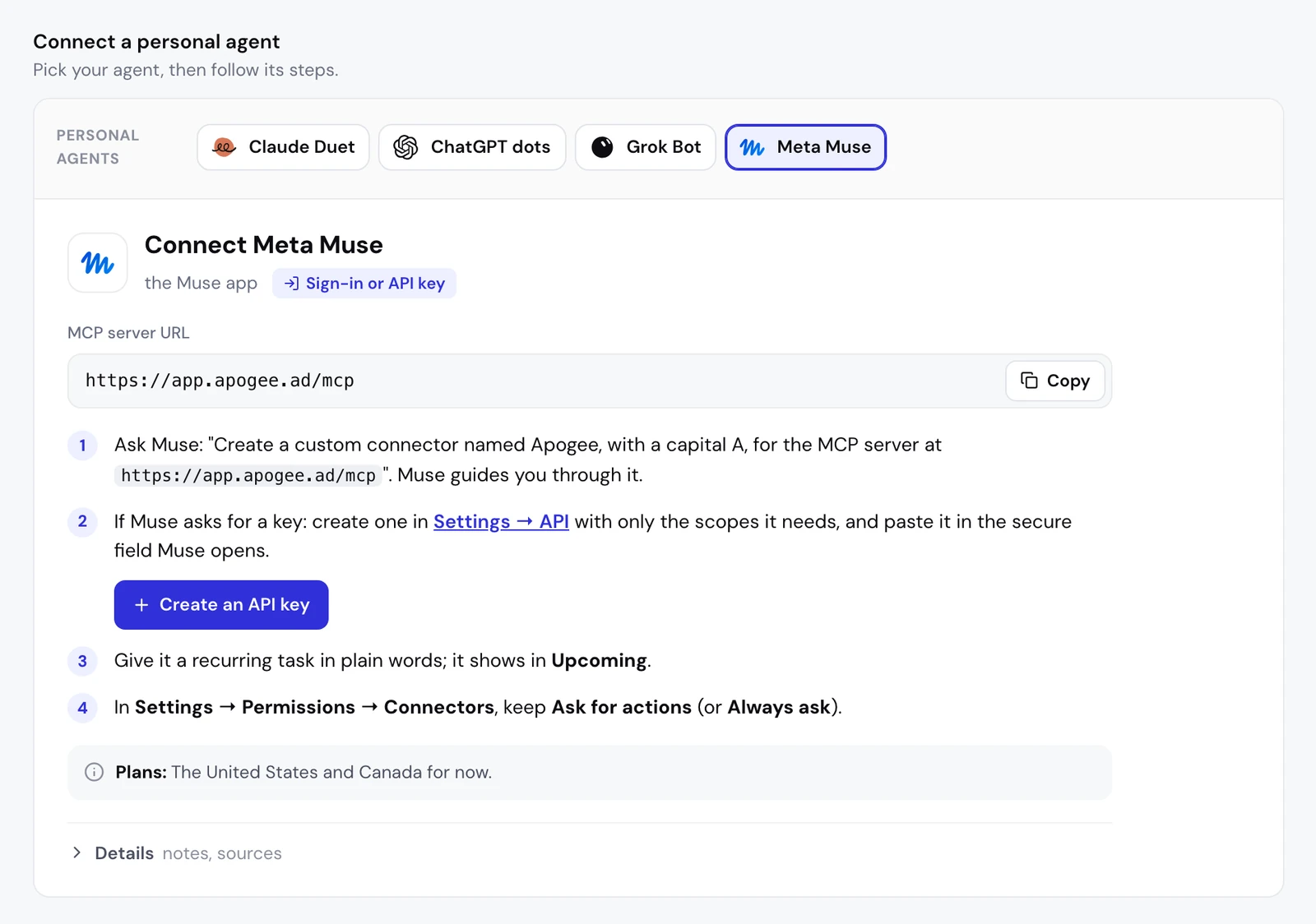
Muse plugs into services in two ways. Connectors from its catalog are added under Settings > Connectors: Connect, read the screen, Continue, then sign in to the service. For a service missing from the list, Meta’s help says to ask Muse to create a custom connector: it guides the setup, can look up the service’s API details and keeps the credentials in its vault. That is how Apogee plugs into Muse, with its MCP server URL.
The message to send Muse:
- In Apogee, open Settings → Personal agents and pick Meta Muse: the server URL shows with Copy, and a Create an API key button is ready if Muse asks for one.
- Send the message above to Muse and follow its questions.
- If it asks for a key, create it as shown below and paste it in the secure field Muse opens, never in a message in the conversation.
- In Muse, check Settings > Permissions, Connectors section: keep Ask for actions, or Always ask.
- Test with a question that only reads.
What Meta’s help says about custom connectors
| Point | According to Meta, as of November 3, 2026 |
|---|---|
| Setup | Requested from Muse in the conversation; it guides the setup |
| Credentials | Kept in Muse’s vault |
| Review by Meta | None: Meta does not review custom connectors |
| MCP server URL, OAuth sign-in | Not documented by Meta: Muse may ask for a key instead |
| Countries | United States and Canada |
Apogee accepts both modes, its sign-in page or an API key. These steps follow Meta’s help and Apogee’s guide; if your screens differ, look for connectors and their permissions in Muse’s settings.
The API key, if Muse asks for one
- In Apogee, open Settings → API, API keys section, then click Create key.
- Name: a name that says what the key is for, such as “Muse”.
- Scopes: only what Muse needs, at least one.
- Expires: 30 days, 90 days (the default), 1 year, or a date of your choice up to a year ahead.
- Click Create key and copy the key (
apk_…): Apogee shows it only once. Close with I saved it, then paste it in Muse’s secure field.
| Access | What it allows | For which task |
|---|---|---|
| Read | Read accounts, campaigns, ads and statistics | Brief, report |
| Launch | Import creatives, prepare and launch ads, transfer with the Bridge | Launches, Bridge |
| Actions | Pauses, activations, budgets, targeting, duplicates | Cutting an ad, adjusting a budget |
Give Muse its own key, not shared with a script or another assistant: you can revoke it without breaking anything else. An Apogee account holds at most 10 active keys.
Day one: check that it sees your accounts
Muse should answer with the accounts connected to Apogee, through the list_ad_accounts tool. If it fails, check that the key has not expired and that it has the Read access.
Muse on Meta Ads: launching the new batch of creatives
Muse already connects your Meta accounts. Apogee does not replace that link: it brings what a media buyer’s launch needs.
| Need | With Apogee in Muse |
|---|---|
| Bulk launches on Meta | Dozens of creatives read with your naming convention, one ad per creative, all formats together |
| Importing creatives | From a Google Drive, Dropbox or Frame.io link, without downloading |
| Reusing your settings | The latest ad set and ad of the campaign, or a saved template |
| Guardrails | A recap and an explicit yes, paused by default, 25 launches per account over 24 hours |
What it does next, with Apogee’s tools:
- The creatives:
import_linkthenimport_statusbring them into Apogee. Nothing reaches Meta at this stage. - The settings:
get_latest_in_campaignpicks up the latest ad set and the latest ad in the campaign. - The interview:
get_launch_questionsreturns the Apogee app’s questions, each with a recommended answer. Muse asks them one topic at a time, without answering for you. - Ads and texts: one creative in 9:16, 4:5 and 1:1 makes a single ad; one primary text, one headline and one description per ad, in the market’s language.
- The recap, then the launch:
prepare_launchcreates nothing. After your yes,launch, thenlaunch_statusuntil it is done. Answer Allow once to Muse’s approval request.
A Meta rejection shows up in launch_status, with the cause and the fix; until you confirm the fix, Muse does not relaunch the same error.
The launch routine: the new batch, every morning
For a folder, two options: sharing with “Anyone with the link”, or the Drive connected to Apogee. The first run asks every question, the next ones reuse your answers.
Muse on TikTok Ads and Snapchat Ads
Sending Meta winners over with the Bridge
Muse sees your Meta ads; Apogee’s Bridge takes them further. It creates paused copies of your best videos on TikTok and Snapchat, with texts adapted to each platform, without exporting a file or touching the original Meta ads:
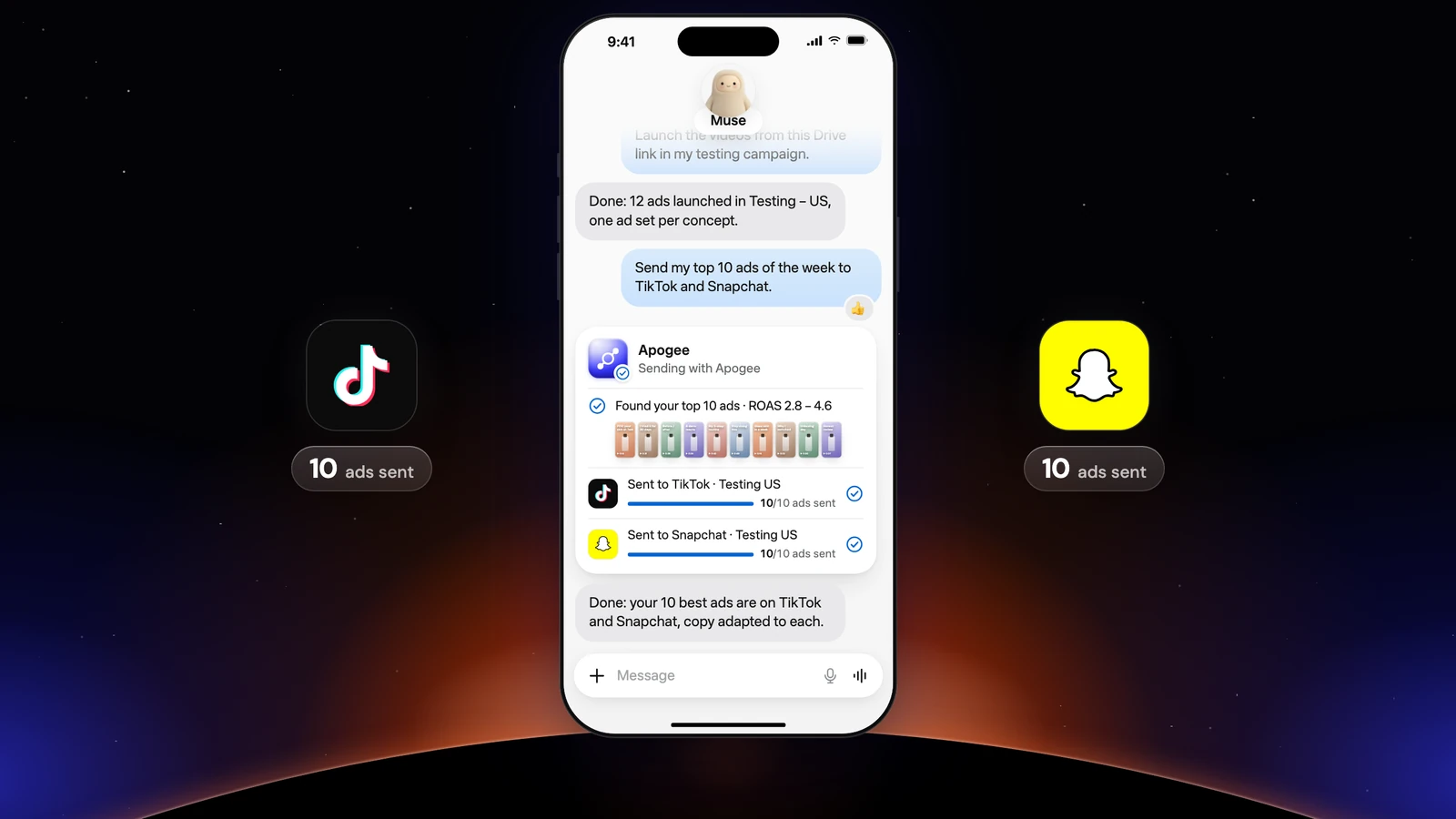
The transfer chains four tools: get_top_performers picks, list_bridge_transfers skips ads already sent, prepare_bridge_transfer shows the recap, bridge_transfer runs after your yes. The first time, it asks you for what the destination requires and Meta does not provide: the TikTok identity, the Snapchat public profile, the call to action. Only videos go through the Bridge; TikTok texts are capped at 100 characters with no emoji, Snapchat headlines at 34 characters.
As a routine, every Monday:
Launching straight on TikTok and Snapchat
Name a TikTok or Snapchat account in the prompt and Muse launches there as it does on Meta. TikTok creates an ad group (an image becomes a carousel there, and your existing posts can run as Spark Ads with list_tiktok_posts), Snapchat an ad squad. Templates saved in the app (Quick Bulk Edit, Save as template) save you from repeating everything; Muse reads them with list_platform_templates, and never creates or deletes one:
See Meta, TikTok and Snapchat in Apogee for what each platform accepts. Each platform gets its own recap, in its account’s currency, and waits for its own yes.
Its morning routine: the brief, then the pauses
According to Meta’s help, you describe a recurring task to Muse with its frequency. Muse confirms it, sends you a message at each run and lists it in the Upcoming tab, from the assistant icon at the top of the screen. It runs in your time zone until you cancel it; to change or stop it, just ask Muse. Under Manage permissions, the Artifacts and scheduled tasks section lets you give one approval per scheduled task.
The morning brief, read-only:
Muse reads Meta with get_account_overview and get_top_performers, TikTok and Snapchat with get_platform_overview, get_platform_daily_breakdown and get_platform_top_performers. The numbers come from Apogee’s cross-platform stats.
The pause of the ads that burn budget, prepared every evening:
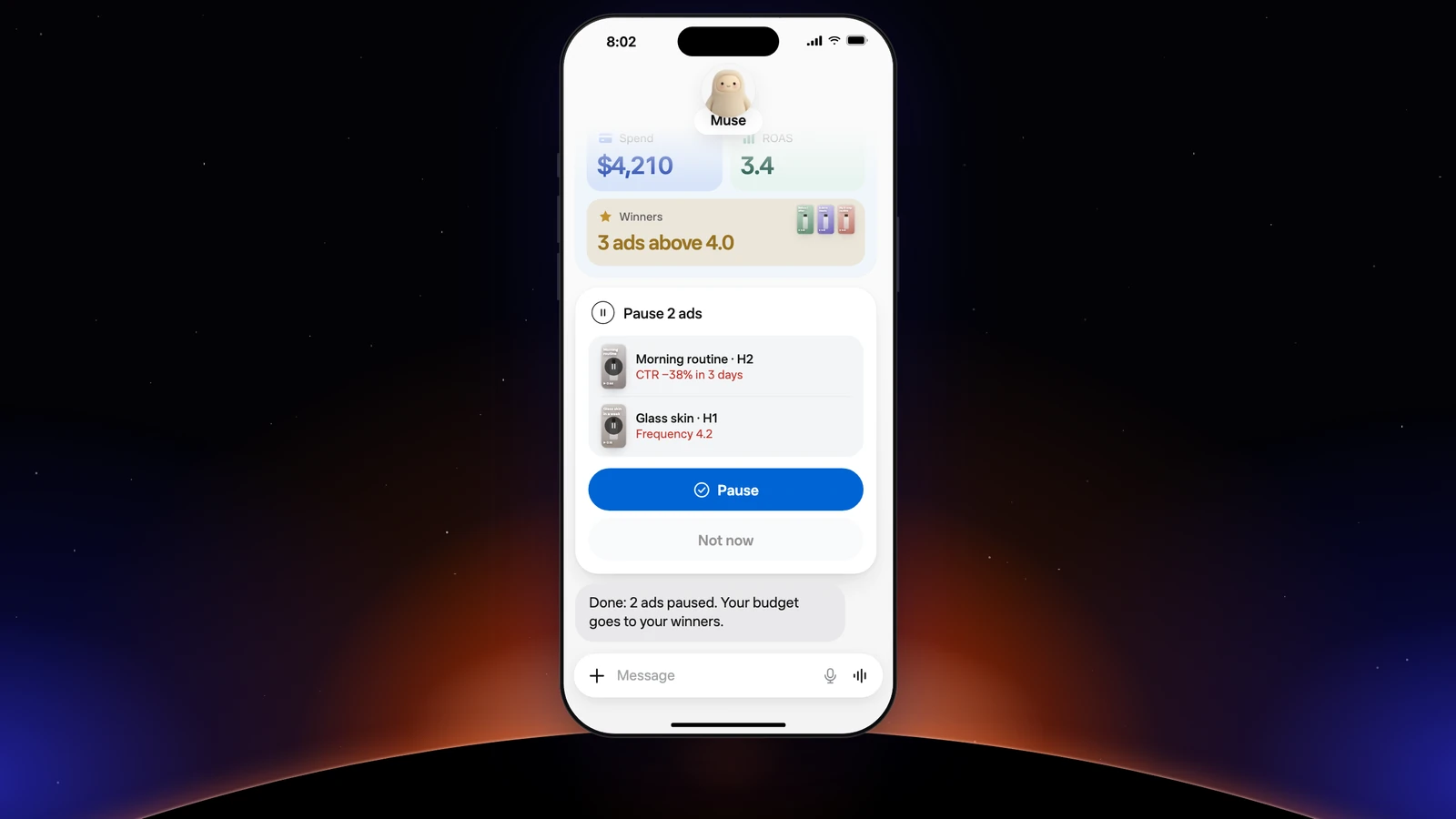
Preparing changes nothing: pause_ad or pause_adset on Meta and set_platform_status on TikTok store the action in Apogee. You say yes for every ad or only for the ones you name, and Muse then calls execute_action. The plan stays valid 24 hours and runs only once.
The Monday report, platform by platform
The report stays per platform, in each account’s currency, time zone and attribution: Apogee never makes a total, since a TikTok conversion is not counted like a Meta conversion. The Bridge results come from get_bridge_stats.
Prompts to copy
On top of the routines above, six prompts that earn their keep every week:
Its rules: what it never does without you
Muse asks for your approval based on its settings, according to Meta’s help:
- Settings > Permissions, Connectors section: Ask for actions asks before every write and every important read; Always ask asks every time.
- Manage permissions breaks permissions down by Connectors, Artifacts and scheduled tasks and Allowed websites.
- On a request, the buttons are Allow once, Allow for this task, Allow for this site, Always allow (for that connector) and Deny, with View task details to read the details before you choose.
For an Apogee launch, pause or budget, answer Allow once, never Always allow. Muse’s connector documentation points the same way: a sensitive write is always approved once, or denied.
Apogee keeps its own guardrails, whatever Muse’s settings:
| Guardrail | Value |
|---|---|
| Before any launch or change | A full recap and your yes |
| Status of created ads | Paused by default |
| Prepared plan | Valid 24 hours, runs only once |
| Daily budget | Refused above the cap, 500 in the account’s currency by default |
| Launches and Bridge transfers | 25 per ad account over 24 hours |
Reads stay free up to your plan’s daily limit (5,000 on Pro, 10,000 on Growth and Scale); an ad created costs 15 credits and a change 2, charged only on success. To cut access: with a key, Settings → API in Apogee, API keys list, Revoke next to Muse’s key, which stops everything using it at once; with Apogee’s sign-in page, Settings → Personal agents, Disconnect. Either way, also ask Muse to cancel the scheduled tasks that went through Apogee.
What if the connection gets stuck?
- Muse is not available where you are: it is limited to the United States and Canada. The same prompts work with Claude Duet, ChatGPT dots or Grok Bot.
- Muse cannot find Apogee: ask it again to create the custom connector, with the exact URL https://app.apogee.ad/mcp.
- Calls fail: the key may have expired or been revoked. Create a new one under Settings → API and replace it in Muse.
- Muse reads but launches nothing: the key lacks the Launch access. Create a key with the right access.
- A scheduled task waits and does nothing: check its approval under Manage permissions → Artifacts and scheduled tasks.
Going further
- Apogee vs the official Meta Ads MCP, and the same comparison for TikTok Ads and Snapchat Ads;
- The technical guide to Muse with Apogee, with every tool named here.