More articles 11 min read
Claude MCP: add Apogee as a custom connector, step by step
Claude MCP setup: add Apogee as a custom connector with OAuth, check what Claude may do, then run your Meta, TikTok and Snapchat ads from Claude. Tested.

Contents
- Before you start: Claude and Apogee plans
- Add Apogee to Claude’s connectors, step by step
- The access you give Claude
- Check your Claude MCP connection with a read-only test
- What to ask Claude next: the media buyer’s job
- Limits and safety
- Common problems and fixes
- Claude, Claude Duet or Claude Code: which one to connect?
- Going further
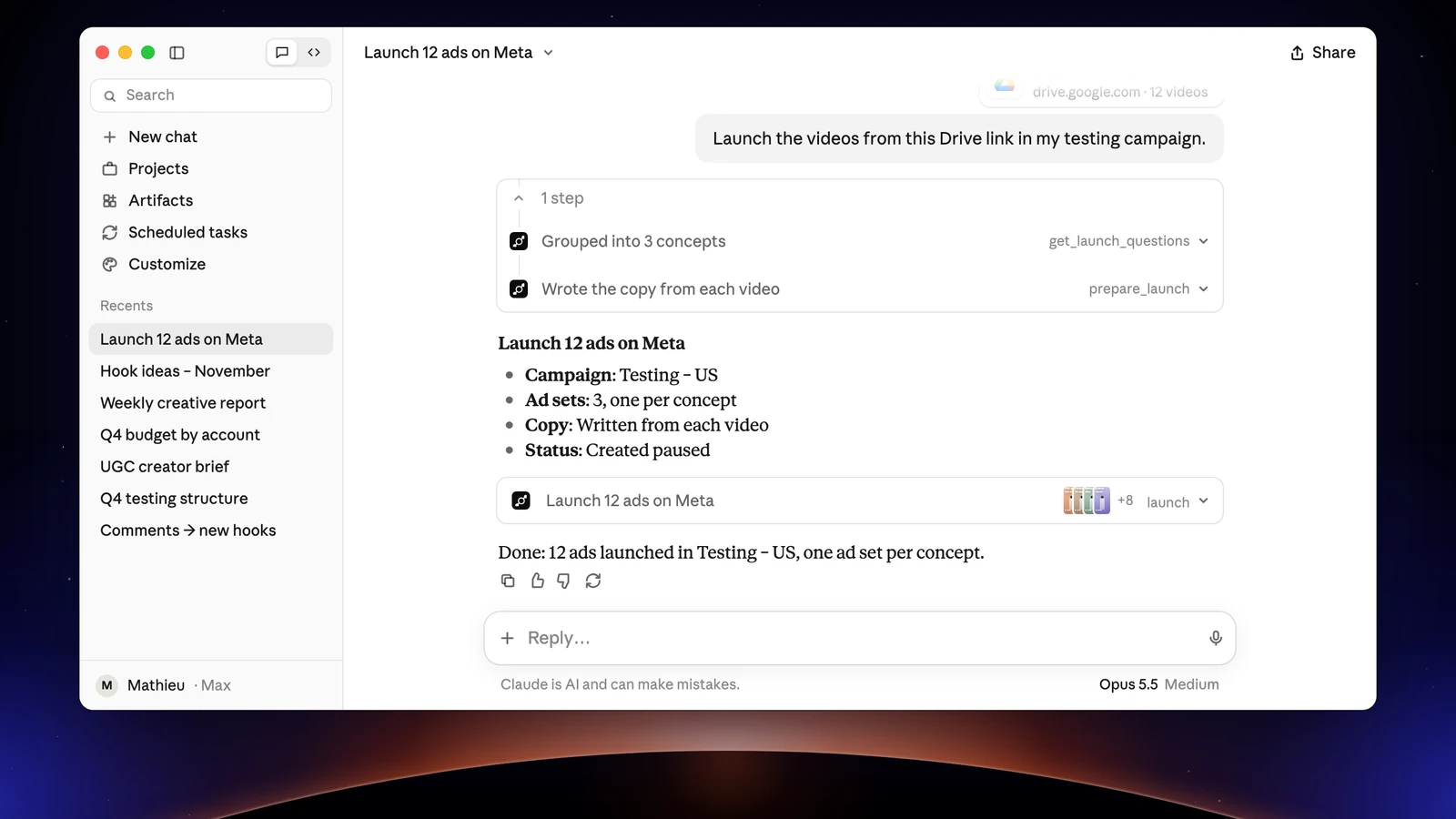
Claude MCP is how Claude plugs into an MCP server to use its tools. Add Apogee as a custom connector, at https://app.apogee.ad/mcp, and Claude reads your Meta, TikTok and Snapchat accounts, prepares your launches, pauses and budgets, then waits for your yes before it acts. It is built for media buyers, e-commerce brands and agencies. Two prerequisites: a Claude plan that accepts custom connectors, even the free one for a single connector, and an Apogee plan that includes the MCP server.
Before you start: Claude and Apogee plans
Two subscriptions are involved: Claude’s, to add a custom connector, and Apogee’s, to open the MCP server.
| Side | Plans that work | Good to know |
|---|---|---|
| Claude | Free, Pro, Max, Ultra, Team, Enterprise | The Free plan accepts one custom connector only. On Team and Enterprise, an owner adds the connector for the organization first. |
| Apogee | Pro, Growth or Scale, MCP server included | 7-day trial for €1. The Starter plan has no MCP and no API. |
The connector works on claude.ai and in the Claude desktop app. The connection uses OAuth: you sign in to Apogee on its own page, with no API key to copy. You also need at least one Meta, TikTok or Snapchat ad account connected to Apogee, because Claude only sees what Apogee sees. To see how Apogee compares with Meta’s official MCP and open-source servers, read our Meta Ads MCP guide.
Add Apogee to Claude’s connectors, step by step
In Apogee, Settings → MCP, the Connect an AI assistant section shows the server URL with a Copy button and, once you pick Claude, its steps.
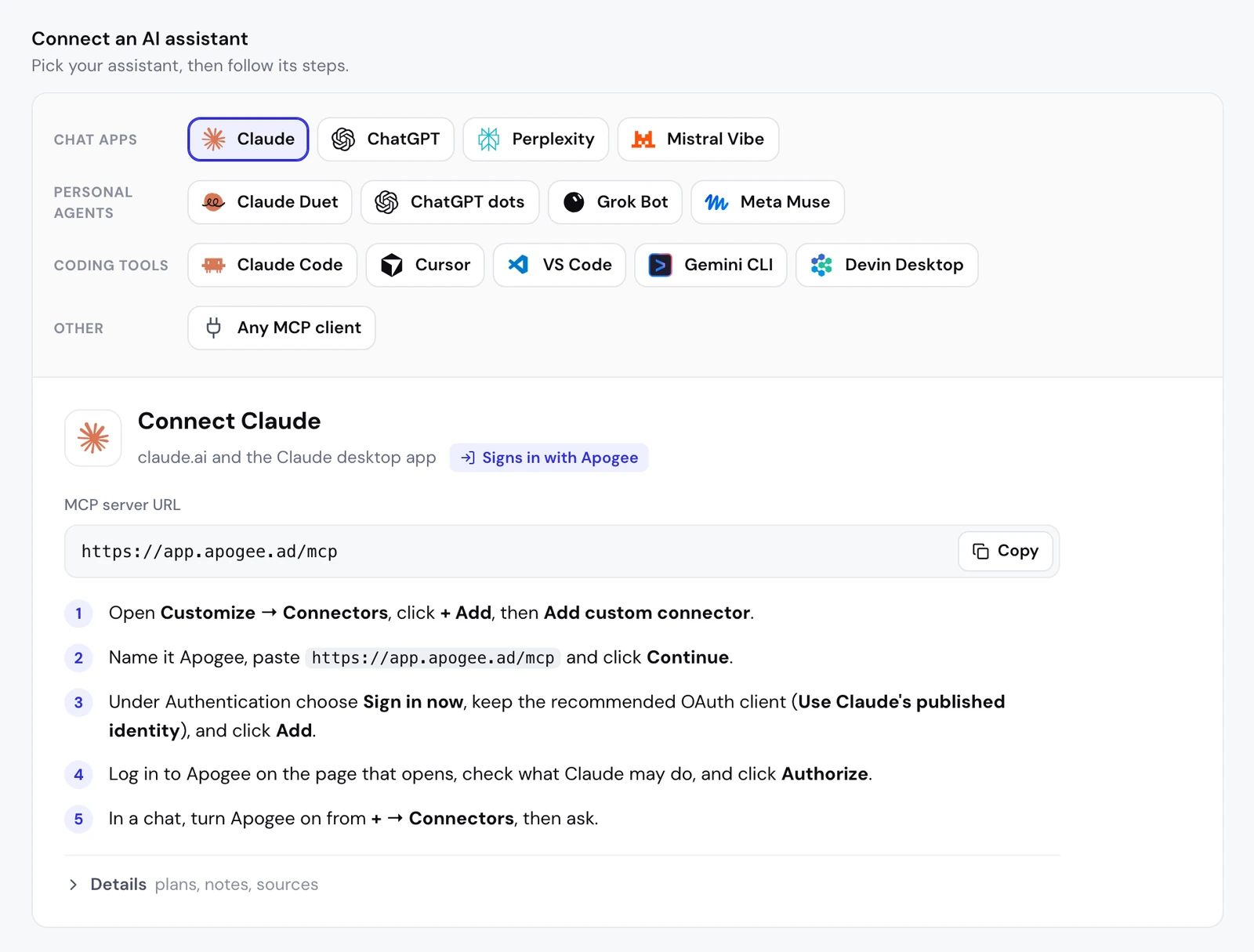
- In Claude, open Customize → Connectors, click + Add, then Add custom connector.
- Name the connector Apogee, paste
https://app.apogee.ad/mcpand click Continue. - Claude shows the sign-in method it detected for Apogee: confirm with Continue.
- Under Authentication, choose Sign in now. Under OAuth client, keep Use Claude’s published identity (Recommended), then click Add.
- Apogee’s page opens: log in, check the access requested and click Authorize. You land back in Claude.
- In a chat, click + at the bottom left, open Connectors and turn Apogee on.
In our test on claude.ai on November 2, 2026, Claude detected Apogee’s OAuth sign-in on its own at step 3: there is nothing to set by hand.
Team and Enterprise: the owner adds the connector
In an organization, an owner adds Apogee once for everyone: Organization settings → Connectors, then Add → Custom → Web, the server URL and Add. Each member then finds the connector, marked Custom, in Customize → Connectors, and clicks Connect to sign in to their own Apogee account.
The access you give Claude
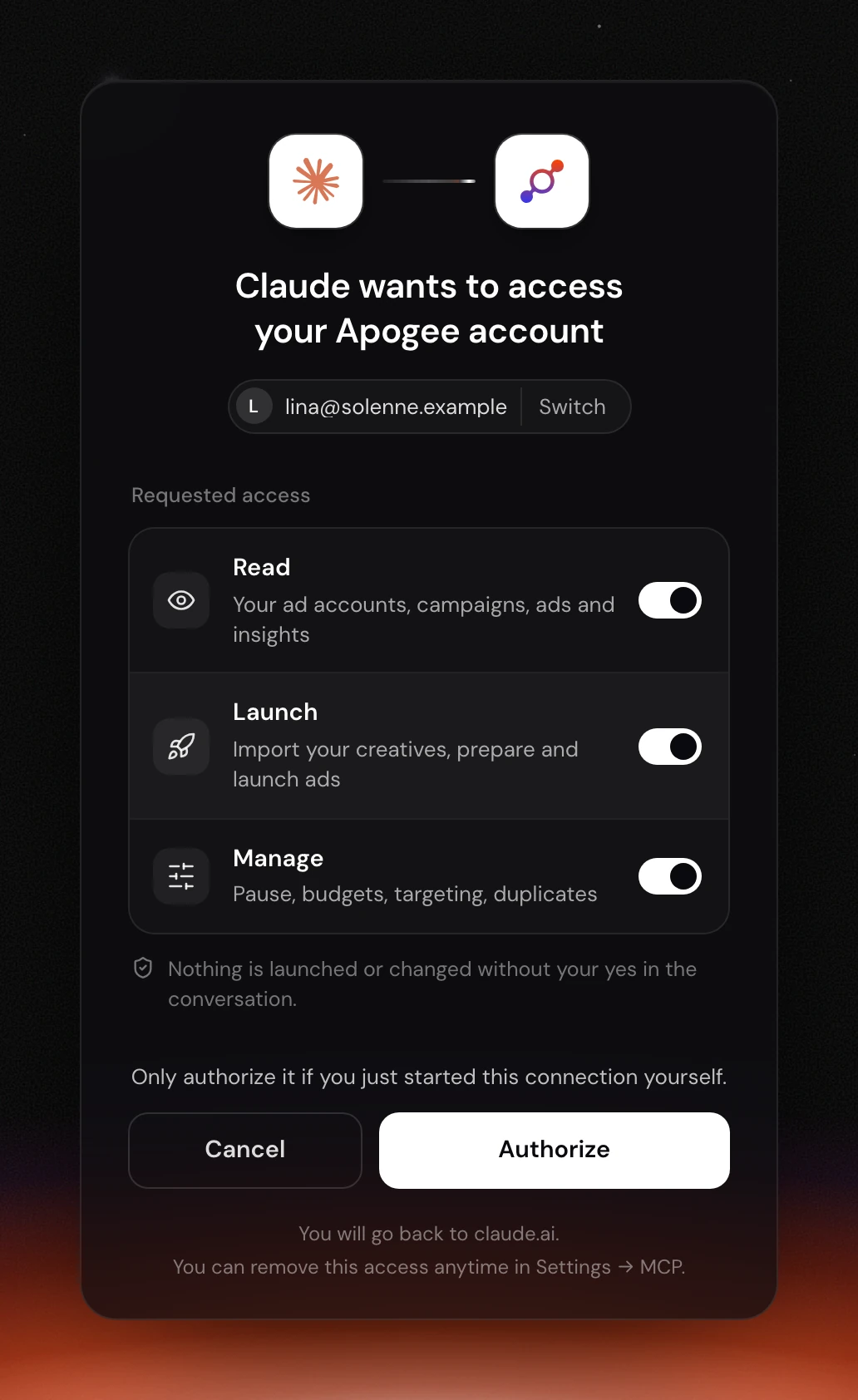
At step 5, Apogee shows its own page, on its own domain: “Claude wants to access your Apogee account”. It names the Apogee account in use, with Switch to change it, and lists three kinds of access, each with a toggle.
| Access | What it lets Claude do | For which tasks |
|---|---|---|
| Read | Read your ad accounts, campaigns, ads and insights | Analysis, daily brief, weekly report |
| Launch | Import creatives, prepare and launch ads, run Bridge transfers | Launches, Bridge |
| Manage | Pauses, budgets, targeting, duplicates | Cutting an ad, scaling a budget |
Each access can be switched off, as long as one stays on. A tool that needs an access you switched off is not even listed to Claude: with Read alone, Claude analyzes but prepares nothing. The page also states that nothing is launched or changed without your yes in the conversation, and asks you to authorize only if you just started the connection yourself.
Check your Claude MCP connection with a read-only test
Open a new chat, turn Apogee on in + → Connectors and paste:
Claude calls whoami, which returns the Apogee account, the connection used and its access, then list_ad_accounts, which lists the ad accounts connected to Apogee. If an account is missing, it is not connected to Apogee. If Claude finds no Apogee tool, the connector is not turned on in that chat.
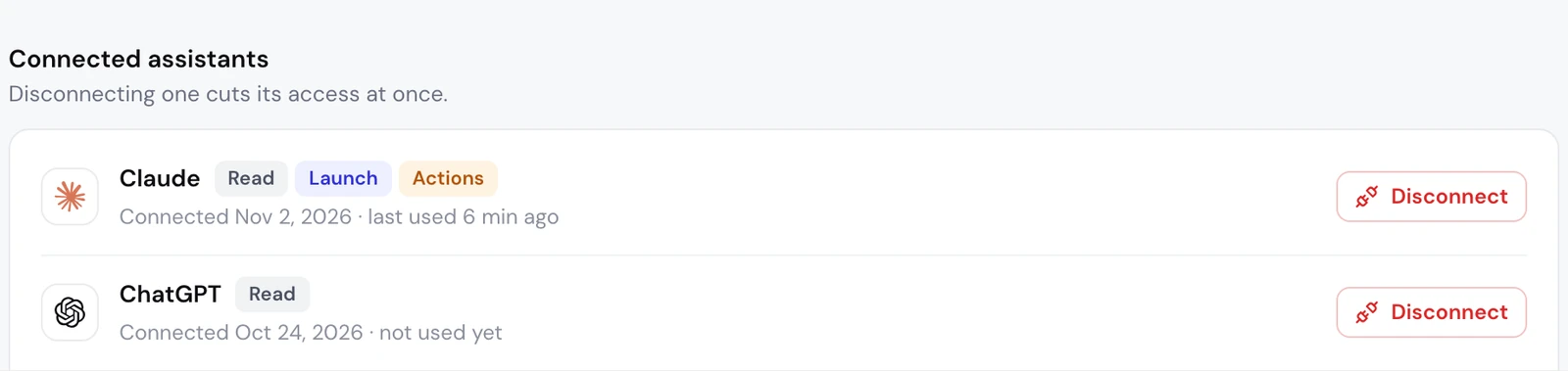
On Apogee’s side, Settings → MCP, the Connected assistants list shows Claude with its access, when it was connected and when it was last used. The Manage access shows there as Actions.
Claude sorts Apogee’s 80 tools into two groups: 54 read-only and 26 write tools (checked on November 2, 2026). Of those 26, only three create or change anything on your ad accounts: launch, bridge_transfer and execute_action, and Apogee runs them only after your yes. The others prepare an action, import creatives into Apogee or update Apogee’s own data.
What to ask Claude next: the media buyer’s job
Once connected, Claude can cover part of a media buyer’s job on three ad platforms. It reads, it prepares, you approve.
| Task | Platform | What you approve |
|---|---|---|
| Read the best and the worst ads | Meta, TikTok, Snapchat | Nothing, Claude only reads |
| Launch a new batch of creatives | Meta, TikTok, Snapchat | The launch recap |
| Cut what burns budget, scale what works | Meta, TikTok, Snapchat | Each change |
| Move a Meta winner to TikTok or Snapchat | Bridge | The transfer recap |
Meta Ads: read first, then launch paused
Start with a read:
Claude uses get_top_performers, which ranks campaigns, ad sets or ads by ROAS, CPA, CTR or spend. Then a new batch of creatives from a Google Drive, Dropbox or Frame.io link:
Claude asks the Apogee app’s questions one at a time and proposes the ads it reads from your file names; prepare_launch returns the recap without creating anything, and launch only runs after your yes. On November 2, 2026, a real launch from claude.ai followed this flow (interview, recap, yes) and created one ad set and one ad, paused, on a test account.
TikTok Ads: the week in numbers, then the pauses
Claude reads with get_platform_overview and get_platform_top_performers, then prepares the pauses with set_platform_status. Nothing moves on TikTok before execute_action, which it only calls after your yes. GMV Max campaigns and legacy Smart+ campaigns are changed in TikTok Ads Manager.
Snapchat Ads: receive a Meta winner with the Bridge
Apogee’s Bridge recreates the ad on Snapchat without touching the Meta ad. prepare_bridge_transfer returns the recap and asks for what Snapchat requires and Meta does not provide, such as the public profile; bridge_transfer only runs after your yes. Only videos go to Snapchat and TikTok. Snapchat results are read with the same tools as TikTok’s, one platform at a time.
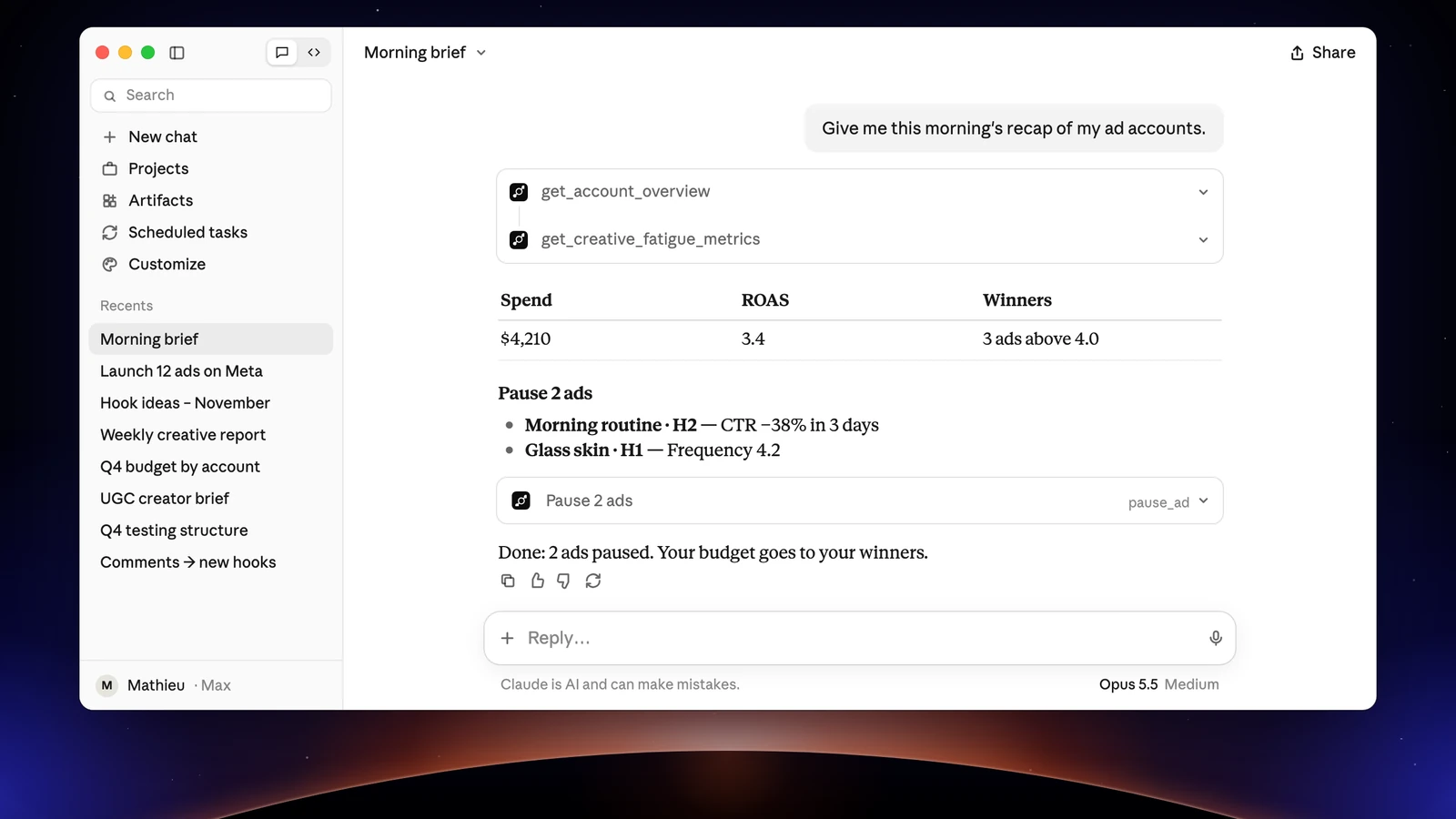
Each task in detail, with the prompt, what Claude returns and what to check before you approve, is in Claude for Meta Ads: launch, analyze and cut ads. What each platform accepts is on the Meta, TikTok and Snapchat in Apogee page.
Limits and safety
On Claude’s side. The Free plan accepts one custom connector. A custom connector cannot be edited: to change its name or URL, remove it and add it again. In Customize → Connectors → Apogee, a tool can be blocked, and a permission prompt also offers Always allow. Keep the prompt for launch, bridge_transfer and execute_action.
On Apogee’s side, the guardrails hold whatever Claude’s setting:
| Guardrail | Value |
|---|---|
| Before any launch or change | A full recap and your yes |
| Status of created ads | Paused by default |
| Prepared plan | Valid 24 hours, runs only once |
| Daily budget | Refused above the cap, 500 in the account’s currency by default |
| Launches and Bridge transfers | 25 per ad account over 24 hours |
Reads are free within your plan’s daily limit: 5,000 a day on Pro, 10,000 on Growth and Scale. A change that runs costs 2 credits and an ad created 15 credits, only when it succeeds.
What Apogee’s MCP server does not do: create audiences or catalogs, add up Meta, TikTok and Snapchat (each platform keeps its currency and attribution), move images to TikTok or Snapchat with the Bridge, or read a folder on your computer from claude.ai. A local folder needs a tool that runs commands, such as Claude Code.
Cutting access: in Apogee, Settings → MCP, Connected assistants list, click Disconnect next to Claude. Access stops at once and ads already launched stay as they are. On Claude’s side, remove the connector in Customize → Connectors.
Common problems and fixes
- Error 401, or Claude asks you to sign in again: the connection is no longer valid. An access token lasts one hour and is renewed with a token valid for 60 days; after a Disconnect or past that delay, restart the connection from Customize → Connectors and click Authorize again.
- Error 403 on the first tool: your Apogee plan does not include the MCP server (Starter, or a trial that ended). Move to Pro, Growth or Scale.
- Error 403 on one kind of action only: that access was switched off at sign-in. Click Disconnect in Apogee, then connect Claude again with Launch or Manage on.
- The connector does not show up (Team, Enterprise): in an organization, an owner adds it first in Organization settings → Connectors; ask them.
- The Free plan refuses a second connector: remove the other one, or move to a paid Claude plan.
- Claude does not use Apogee: the connector is added but not turned on. Click +, Connectors, Apogee’s toggle.
- An ad account is missing: it is not connected to Apogee. Connect it in Settings → Ad accounts.
Claude, Claude Duet or Claude Code: which one to connect?
All three use the same Apogee MCP server, for different jobs.
| Product | What it is | Adding Apogee | What for |
|---|---|---|---|
| Claude | The chat on claude.ai and in the desktop app | Customize → Connectors → Add custom connector | Launch from a link, analyze, prepare pauses and budgets |
| Claude Duet | Anthropic’s personal agent, in preview in the United States (Pro, Max, Ultra) | It uses the connectors already added in Claude | The morning brief and pauses in the background |
| Claude Code | The coding agent in your terminal | claude mcp add --transport http apogee https://app.apogee.ad/mcp, see the Claude Code walkthrough | Launch a folder from your computer and pull a weekly report |
Going further
- Apogee vs the official Meta Ads MCP, and the same comparison for TikTok Ads and Snapchat Ads;
- Claude’s technical page in Apogee’s developer docs, with every tool named here;
- Claude’s help on custom connectors and on remote MCP connectors.