More articles 13 min read
Claude for Meta Ads: launch, analyze and cut ads with Apogee
Claude for Meta Ads with Apogee: launch from a Drive link, read results, pause or scale, and send winners to TikTok and Snapchat. Exact prompts and checks.

Contents
- Claude for Meta Ads: a media buyer’s week
- Monday: prepare and approve a Meta launch
- Every morning: read your ads’ results
- Cut or scale: pauses and budgets after your yes
- Send Meta winners to TikTok and Snapchat with the Bridge
- The Monday review: Meta, TikTok and Snapchat, platform by platform
- Claude for marketing: what it does not do, and when to stay in Apogee
- Going further
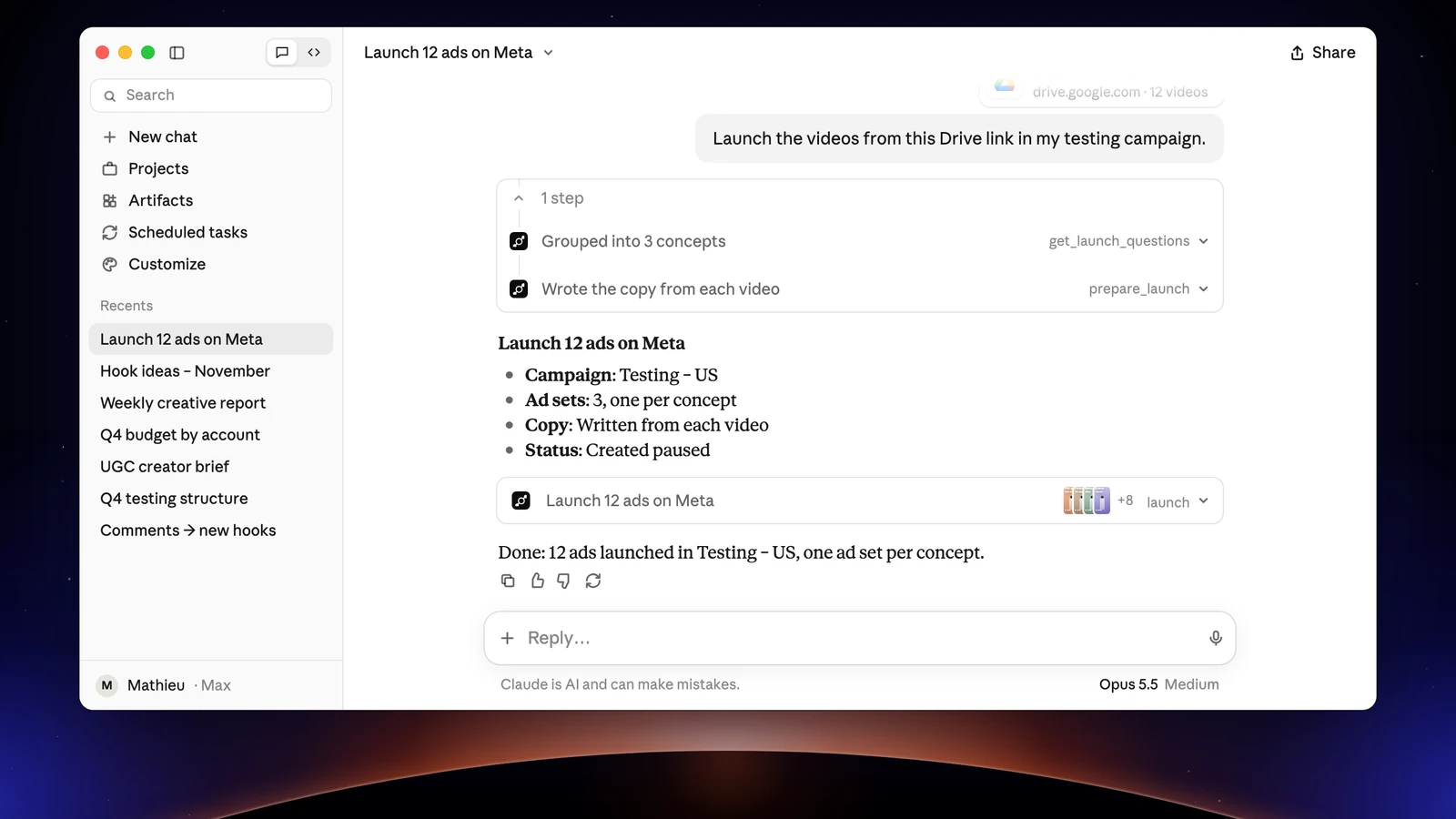
Claude and Meta Ads, linked by Apogee, cover a media buyer’s week. On Monday, Claude launches twelve new creatives from a Drive link into your testing campaign; every morning, it reads the results; when an ad burns budget, it prepares the pause; when a winner shows up, it sends it to TikTok and Snapchat; the next Monday, it runs the review. It prepares, you approve. For each task: the exact prompt, what Claude returns, what to check before you say yes and the MCP tools it calls. To connect Apogee first, follow the Claude MCP guide to add Apogee as a custom connector.
Claude for Meta Ads: a media buyer’s week
| When | Task | Platform | What you approve |
|---|---|---|---|
| Monday | Launch the new batch of creatives | Meta | The launch recap |
| Every morning | Read the results | Meta, TikTok, Snapchat | Nothing, Claude only reads |
| When an ad slips | Cut or scale | Meta, TikTok, Snapchat | Each change |
| When a winner shows up | Send it with the Bridge | Meta to TikTok and Snapchat | The transfer recap |
| Next Monday | The weekly review | Platform by platform | The proposed changes |
You need Apogee connected to Claude with the Read, Launch and Manage access, and your ad accounts connected to Apogee. With Read alone, Claude analyzes but prepares nothing. Apogee is one of the MCP options to run Meta Ads from an assistant, with TikTok and Snapchat on top.
Monday: prepare and approve a Meta launch
Open a chat, turn Apogee on in + → Connectors and paste:
Replace [link] with a Google Drive, Dropbox or Frame.io link to a folder or a file, [testing campaign] with the campaign’s name as it shows in Meta and [ad account] with the account’s name. Links go through the account you connected in Apogee. A public Frame.io share also works without an account when downloads are allowed (reading it takes 20 to 30 seconds); a password-protected share does not.
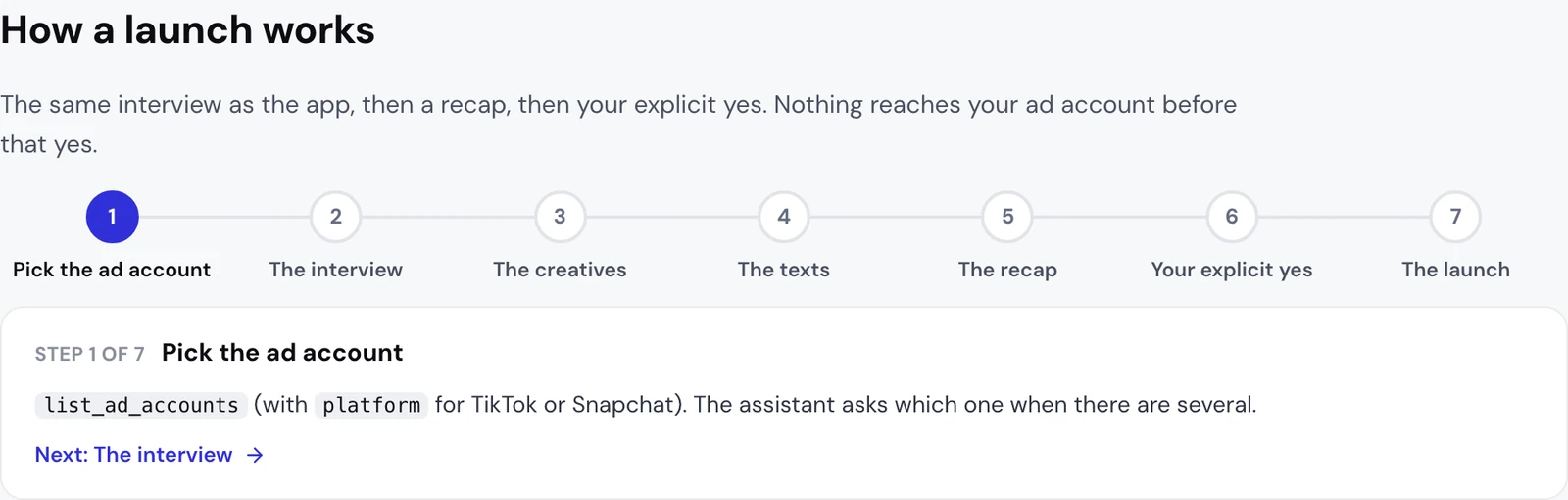
What Claude returns. It follows the Apogee app’s order and asks one topic at a time, in your language, with the choices read from your account, and never answers for you:
- The ad account, when you have several.
- What it copies from the latest ad set (audience, conversion event, bid, budget) and the latest ad (Page, Instagram account, URL, call to action, texts), and whether anything should change.
- The files it found behind the link, then the ads it reads from their names with your naming convention: one creative in 9:16, 4:5 and 1:1 is one ad.
- The new ad set’s name, the Advantage+ enhancements to turn on (the ones you don’t pick stay off) and, when the account has a catalog, whether to show your products.
- The full recap, with the defaults it applied, then it waits for your yes.
With no ad to copy, Claude proposes a primary text, a headline and a description per ad, in the language of the targeted market, and you approve them before the recap.
Check before your yes:
- the ad account, the campaign and the new ad set’s name;
- the budget, in the account’s currency;
- the destination URL and the call to action;
- the language of the texts, which must match the targeted market;
- the Advantage+ enhancements and the defaults applied.
Any correction runs prepare_launch again and produces a new recap: your yes always applies to the latest version. A plan is valid 24 hours and runs once. On November 2, 2026, a real launch from claude.ai followed this flow and created one ad set and one ad, paused, on a test account: nothing went out before the yes.
MCP tools: list_ad_accounts, get_latest_in_campaign, import_link, import_status, list_drive_folder for a Drive folder, get_launch_questions, prepare_launch, then launch and launch_status.
Test by concept, by ad or all together
The other structures work the same way: One Adset One Ad (each ad in its own ad set) or All in One (every ad in one new ad set you name). For file names your convention reads without fail, see the Meta Ads naming convention guide.
File names that mean nothing
Files named IMG_4512.mp4 or final_v3_OK(1).mov can be launched too:
Apogee then groups by hand, like the app’s “Group by hand” option: the formats of one creative are linked when their names differ only by the format, and every other file becomes its own ad. For two files of the same length in different formats, Claude asks you before linking them.
After the launch: turn ads on, or fix an error
Ads are created paused unless you chose another status. To turn them on, ask Claude: it prepares the activation with activate_ad and only calls execute_action after your yes. If Meta refuses an ad, launch_status says what was refused and how to fix it. When the error needs a fix, Claude does not launch the same thing again before you confirm the cause is fixed. A launch marked interrupted was cut by an Apogee deploy: check Ads Manager before you launch again.
Every morning: read your ads’ results
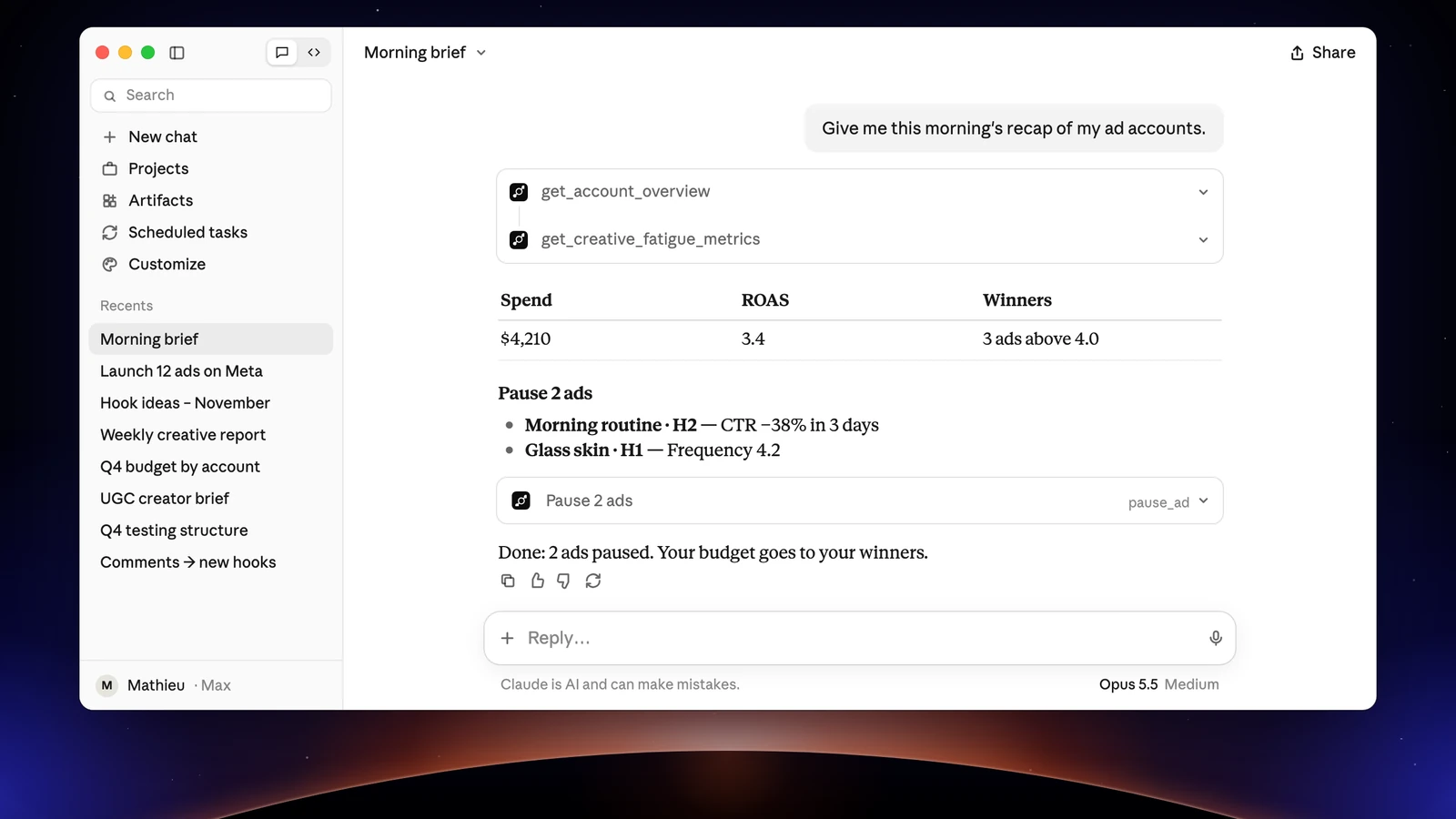
What Claude returns. The numbers come from Apogee, which gets them from Meta: they are the same as in the app. Claude ranks the ads, flags those whose frequency rises while their CTR drops, and reads the video metrics. Since your ad names follow your naming convention, you can ask for results by concept or by hook. On request, it also splits by placement, by age and gender or by device.
Check: the period and the metric Claude judges on, and your targets. If Apogee does not know your target CPA or ROAS yet, Claude asks you, then can save them in the brand profile with update_business_profile. That tool only touches Apogee’s data, never the ad account, but it replaces what was saved: Claude asks you first.
MCP tools: get_account_overview, get_daily_breakdown, get_top_performers, get_ads, get_creative_fatigue_metrics, get_video_metrics, get_ad_performance_by_placement, get_ad_performance_by_age_gender, get_business_profile.
Reads are free within the daily limit of your Apogee plan, 5,000 a day on Pro.
Cut or scale: pauses and budgets after your yes
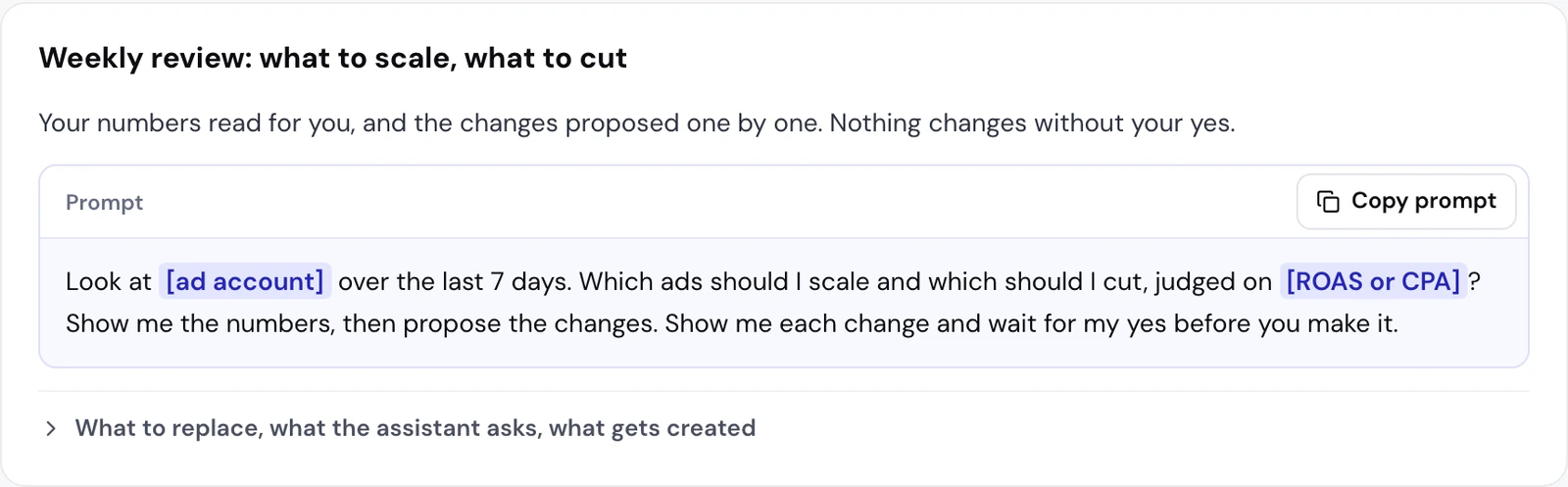
What Claude returns. The numbers first, then a list of prepared changes: pausing an ad (pause_ad) or its ad set when the ad is alone in it (pause_adset), a budget increase in percent (scale_budget) or a new daily budget (update_budget). Each prepared action says exactly what it will change; nothing moves on Meta at this point. You can accept all of it or part of it: “yes to the first and the third, not the second”. execute_action then applies what you accepted.
Check before your yes:
- the level: cut one ad, or its whole ad set;
- the increase: +100% at most per change;
- the daily budget: above the safety cap, 500 in the account’s currency by default, Apogee refuses even if you say yes;
- the timing: a prepared action is valid 24 hours and runs once.
On November 3, 2026, an ad set pause prepared from Claude and never confirmed changed nothing on the account: without your yes, the action expires.
The same review works on TikTok and Snapchat: Claude prepares pauses with set_platform_status and budgets with set_platform_daily_budget, in the account’s currency. Apogee refuses a lifetime budget, an ad set whose campaign holds the budget and TikTok’s Smart+ budgets.
For an evening rule, to ask whenever you want:
MCP tools: get_top_performers, get_creative_fatigue_metrics, pause_ad, pause_adset, scale_budget, update_budget, set_platform_status, set_platform_daily_budget, execute_action.
Send Meta winners to TikTok and Snapchat with the Bridge
For a single ad:
What Claude returns. The week’s ranking, without the ads already bridged, then the transfer recap: the source ads, the destination campaign, the ad group or ad squad, existing or new, and the incompatibilities listed, which your yes accepts. The first time, it asks for what TikTok or Snapchat requires and Meta does not provide: the TikTok identity, the Snapchat public profile, the website. After your yes, bridge_transfer answers within about 25 seconds, or says the transfer is still running.
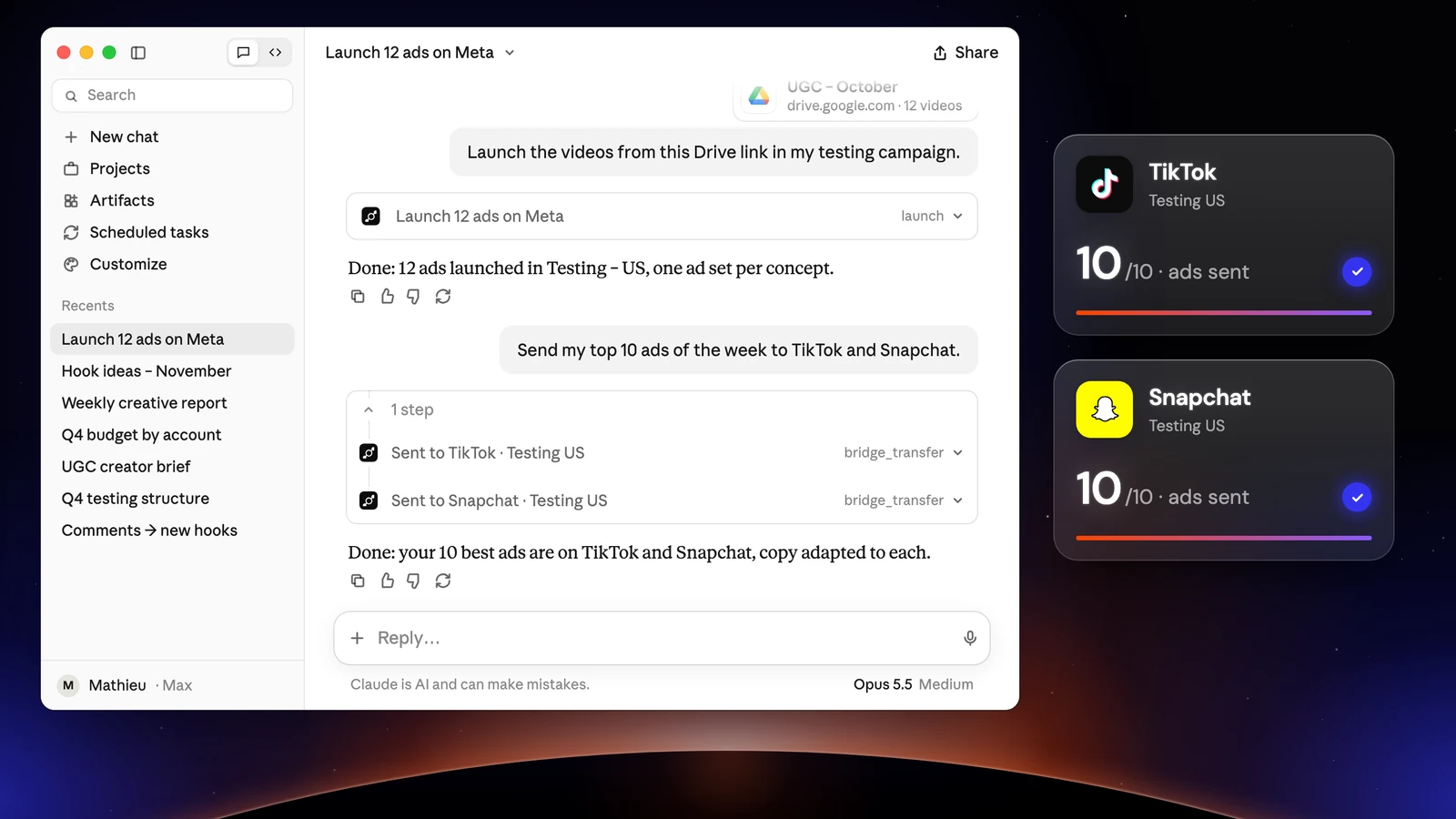
Check before your yes:
- only videos go to TikTok and Snapchat: an image ad stays on Meta;
- the destination campaign and ad group or ad squad;
- the identity, call to action and website on each platform;
- the volume: 25 launches and Bridge transfers per ad account over 24 hours, 15 credits per ad created.
Apogee’s Bridge leaves the Meta ad intact and creates the copies paused.
MCP tools: get_top_performers, list_bridge_transfers, prepare_bridge_transfer, bridge_transfer, bridge_transfer_status, get_bridge_stats.
The Monday review: Meta, TikTok and Snapchat, platform by platform
What Claude returns. One block per platform, each in its account’s currency and over the days of its time zone: spend and results against the week before, best and worst ads, what the Bridge’s copies did, then the proposed changes, which wait for your yes.
Check: that no total adds the platforms up. A TikTok conversion and a Meta conversion are not measured the same way, and Apogee never adds them up. The Bridge’s stats compare each Meta creative with its TikTok and Snapchat copies using 7-day click attribution everywhere. The detail is on the cross-platform stats page.
MCP tools: get_account_overview and get_top_performers for Meta; get_platform_overview, get_platform_top_performers and get_platform_daily_breakdown for TikTok and Snapchat; get_bridge_stats for the Bridge.
Schedule the review every week
Claude reruns a prompt on a schedule with its scheduled tasks, in Cowork. According to Claude’s help on scheduled tasks, they exist on the Pro, Max, Ultra, Team and Enterprise plans.
- Open Scheduled in the sidebar, then New task.
- Choose Create with Claude (Claude asks a few questions, then Schedule) or Set up manually.
- Set up manually, the Create scheduled task window asks for a name, the prompt, an approval mode and the frequency: hourly, daily, weekdays, weekly or manual. Click Save.
Claude’s help says a scheduled task can use the connectors already set up, without naming custom connectors: check on the first run that Apogee answers. What the approval mode does is not described; keep the sentence “Show me each change and wait for my yes”, and answer within 24 hours, before the prepared action expires. In the United States, Claude Duet does this media buying work in the background, with the connectors already added in Claude.
Claude for marketing: what it does not do, and when to stay in Apogee
Claude does nothing without your yes: Apogee’s server enforces that rule, not just the prompt. It only sees the ad accounts connected to Apogee, never adds platforms up, creates no audiences and no catalogs, and does not read a folder on your computer from claude.ai. For a local folder, use Claude Code for marketing, which sends the files of a local folder to Apogee from your machine.
Stay in the Apogee app to:
- save a naming convention: Claude reads the ones that exist, it does not create one;
- save a Quick Bulk Edit template for TikTok or Snapchat: Claude uses them, it never saves or deletes one;
- bind a creator’s Spark code before running their post on TikTok (TikTok › Ad params › Source);
- connect an ad account, Google Drive, Dropbox or Frame.io;
- review your launch history, which Claude also reads with
list_launches.
TikTok GMV Max campaigns and legacy Smart+ campaigns are changed in TikTok Ads Manager.
Going further
- Apogee vs the official Meta Ads MCP, and the same comparison for TikTok Ads and Snapchat Ads;
- Connect Apogee to Claude Code in one command, to work from the terminal;
- Claude’s technical page in Apogee’s developer docs, with every tool named here.