More articles 12 min read
Mistral Vibe MCP: connect Apogee to your ads (formerly Le Chat)
Mistral Vibe MCP setup: add Apogee as a custom connector in Mistral Vibe (formerly Le Chat), then launch, read and pause Meta, TikTok and Snapchat ads.

Contents
Le Chat is now called Mistral Vibe, and the Mistral Vibe MCP connector is all it takes to plug it into Apogee. Once connected, Mistral Vibe reads your Meta, TikTok and Snapchat accounts, launches new creatives from a link, sends your Meta winners to TikTok and Snapchat and writes your morning recap. It prepares, you approve: nothing goes live without your yes. Two requirements: admin rights on your Mistral workspace, and an Apogee plan that includes the MCP server, from Pro up.
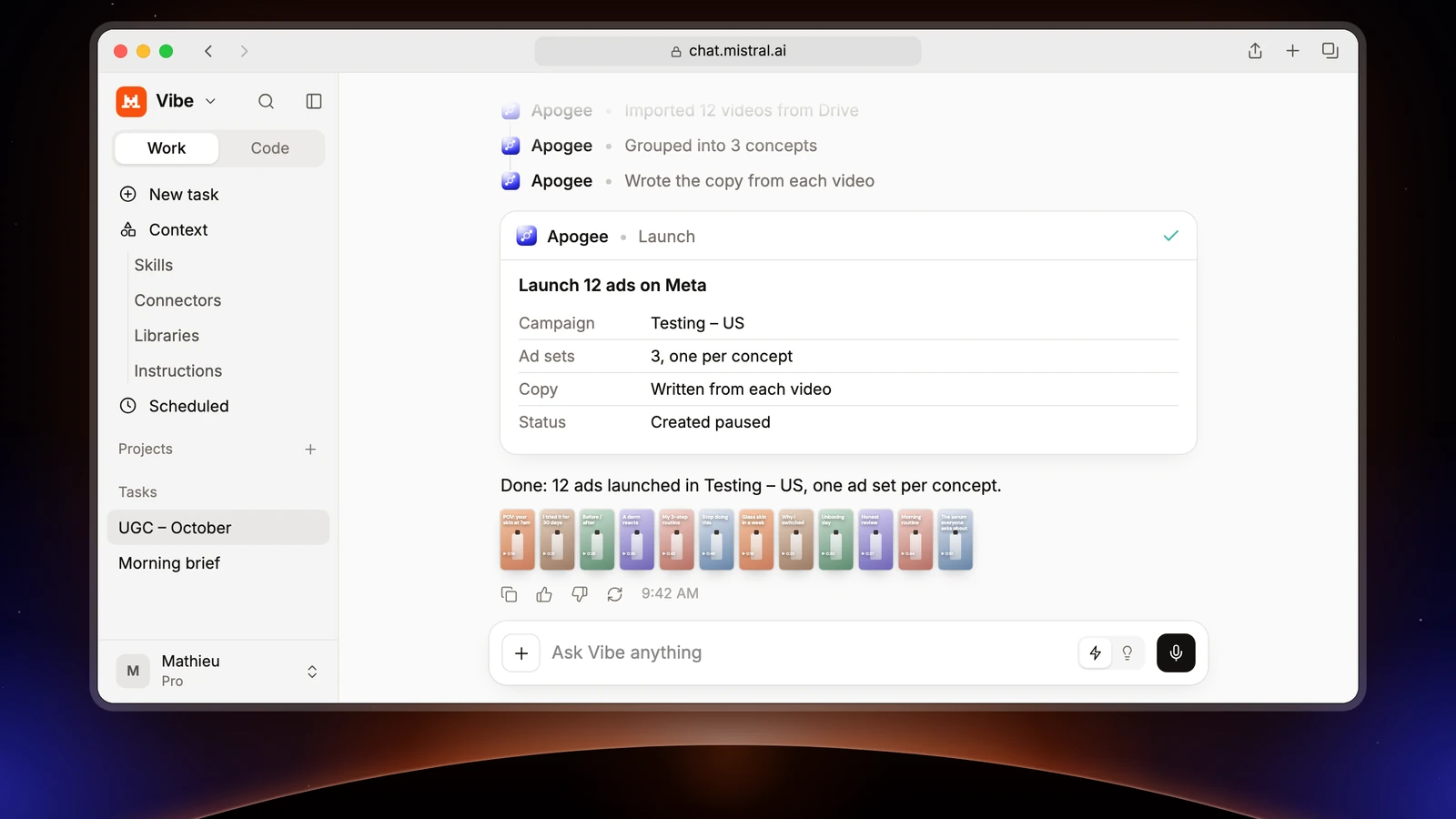
Le Chat became Mistral Vibe
According to Mistral’s help center, in an article dated August 12, 2026, Le Chat has become Vibe, Mistral’s agent for work and coding. The address stays the same (chat.mistral.ai): your account, plan and conversations move with you. MCP connectors are now documented in the Vibe section of Mistral’s documentation.
In Apogee, the assistant is listed as Mistral Vibe among the chat apps. On Apogee’s consent page, it shows the name it declares itself: Le Chat, on our screens of November 2, 2026.
Before you start
| Mistral Vibe | Apogee | |
|---|---|---|
| Who adds the connector | An administrator; on Free, Pro and Student, the account owner is one by default | A plan that includes the MCP server: Pro, Growth or Scale, 7-day trial for €1 |
| In an organization | Administrators can turn connectors off | Your Meta, TikTok or Snapchat accounts already connected to Apogee |
| Sign-in | OAuth, detected from the server URL, or HTTP Bearer Token | Apogee’s consent page, or an apk_ API key |
Mistral Vibe only sees the ad accounts connected to Apogee. Connect your accounts in the app first. Apogee is one of the MCP server options for Meta Ads, and it covers TikTok and Snapchat too.
Mistral Vibe MCP setup: add Apogee as a connector
- In Mistral Vibe, open Connectors from the sidebar.
- Click + Add Connector, then the Custom MCP Connector tab.
- In Connector name, type
Apogee. - In Server URL, paste
https://app.apogee.ad/mcp. The Description field is optional. - Click Connect: Vibe detects Apogee’s sign-in and opens its page.
- Log in to Apogee, check the requested access and click Authorize.
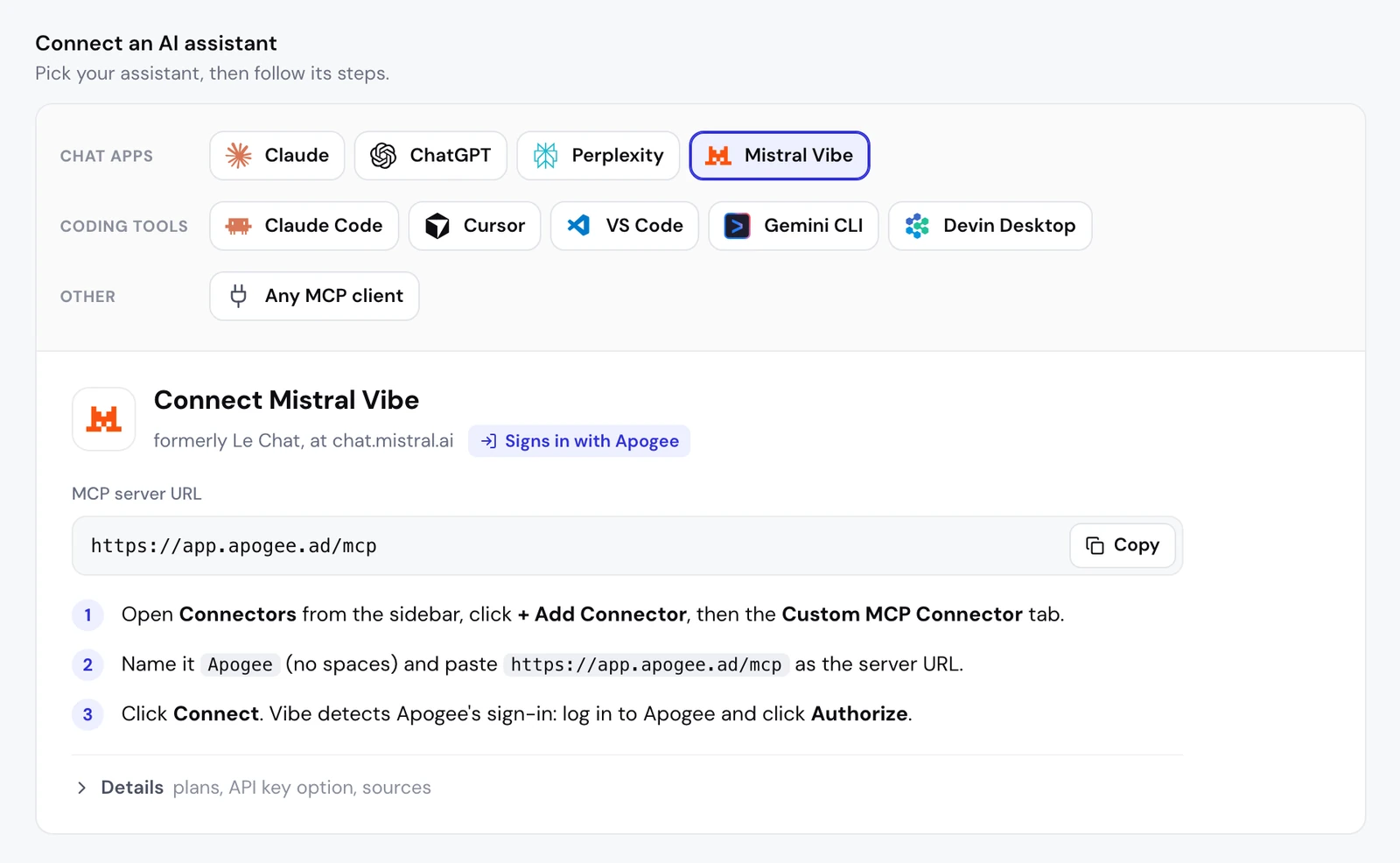
The connector name: Apogee, one word
Mistral wants a unique connector name with no spaces or special characters. Apogee works; “Apogee MCP” is refused because of the space. If a connector already has that name in your workspace, pick another single word. You then use the name in your requests: “Using the Apogee connector, …”.
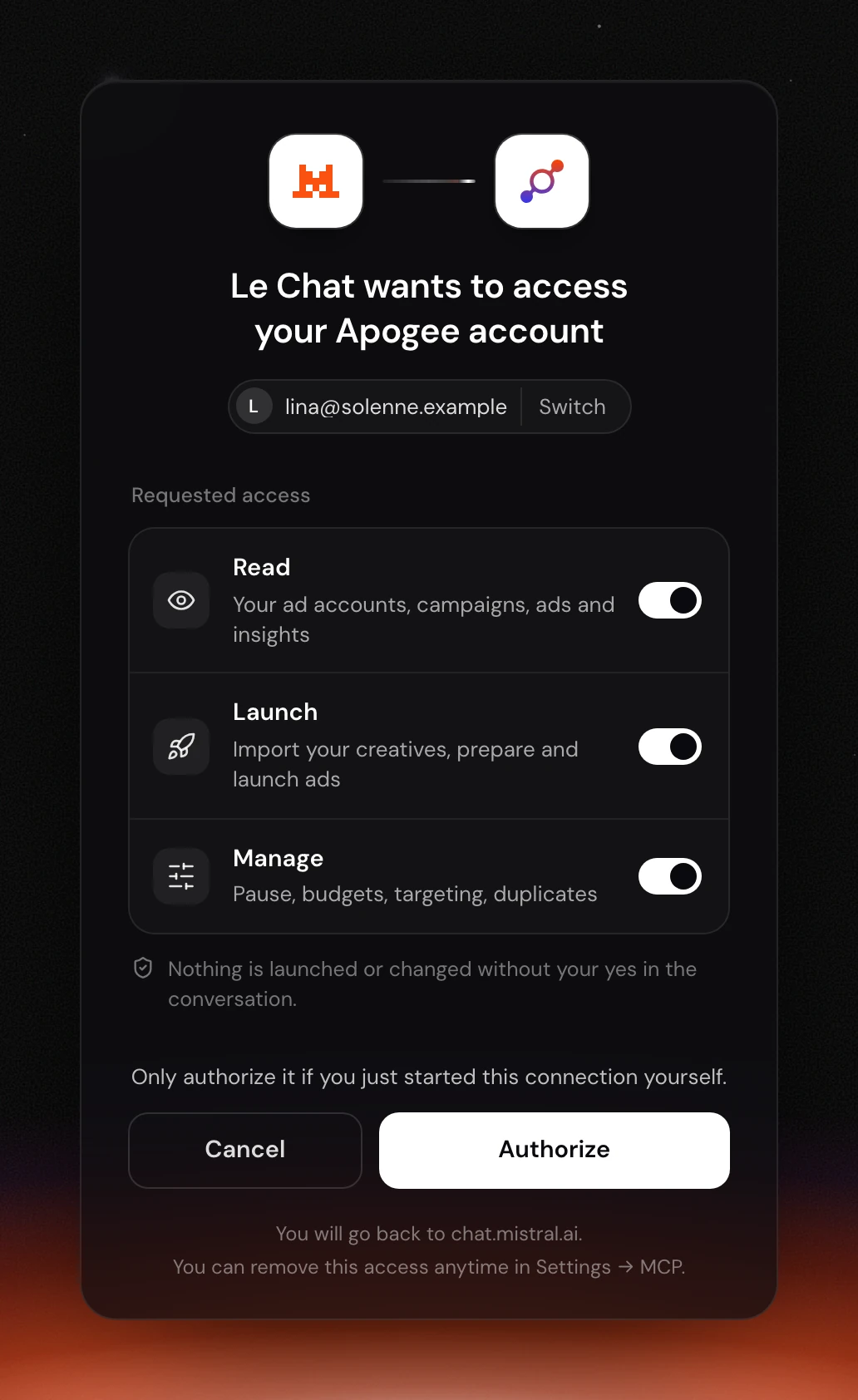
Apogee’s consent page
The page is titled “Le Chat wants to access your Apogee account”, shows the Apogee account in use (with Switch to change it) and offers three access levels, each with its own toggle:
| Access | What it allows | For which task |
|---|---|---|
| Read | Read your accounts, campaigns, ads and stats | The morning recap, the weekly review |
| Launch | Import creatives, prepare and launch ads | Launches, the Bridge |
| Manage | Pauses, budgets, targeting, duplicates | Cutting an ad, adjusting a budget |
Keep at least one. For read-only use, Read is enough. The page reminds you that nothing is launched or changed without your yes in the conversation, then offers Cancel or Authorize. The line “You will go back to chat.mistral.ai” confirms where you land.
If the sign-in fails: an API key
Mistral does not document the address its OAuth sign-in returns to. Apogee accepts chat.mistral.ai and console.mistral.ai, but nothing guarantees Mistral will always use one of them. If Apogee’s page does not open or does not bring you back to Mistral, use an API key:
- In Apogee, open Settings → API and create a key: a name (Mistral, for example), only the scopes you need among Read, Launch and Actions, and an expiry (30 days, 90 days by default, 1 year, or a date of your choice up to a year).
- Copy the
apk_…key right away: Apogee shows it only once. - In the Mistral connector, choose HTTP Bearer Token as the authentication and paste the key.
Give Mistral its own key: an Apogee account keeps 10 active keys at most, and revoking one cuts off everything that uses it at once.
Check the connection
Open a conversation and start with a request that only reads:
Vibe asks your permission before calling one of the connector’s functions, then calls list_ad_accounts and answers with the accounts connected to Apogee. An answer listing your accounts confirms the Mistral Vibe MCP connection works.
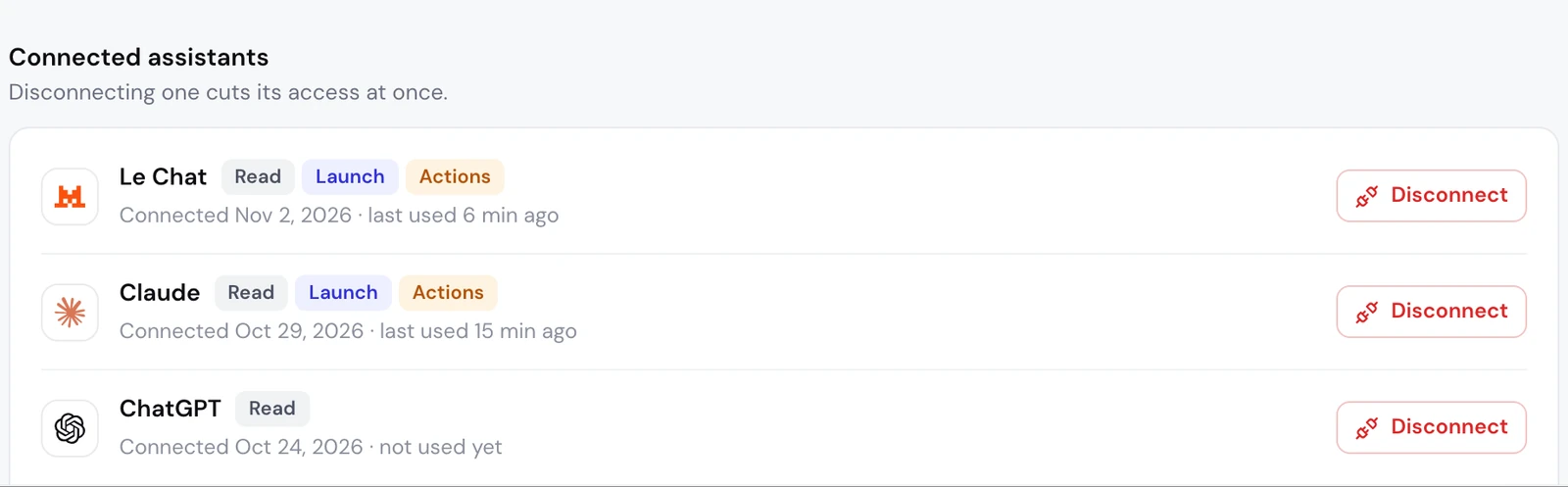
On Apogee’s side, Settings → MCP, Connected assistants list: Le Chat shows up with its access, its connection date and its last use. The Manage access from the consent page appears there as Actions.
What to ask Mistral Vibe next: the media buyer’s job
In the browser, Mistral Vibe cannot read a folder on your computer: your creatives go through a Google Drive, Dropbox or Frame.io link. Apogee imports them through the account connected in the app; a public Frame.io share works without an account when downloads are allowed, but not when it is password-protected.
Launch the new batch of creatives on Meta Ads
What happens next, with Apogee’s tools:
- The creatives:
import_linkimports them into Apogee andimport_statusfollows the import (for a Drive folder,list_drive_folderlists the files first). Nothing reaches Meta at this stage. - The settings:
get_latest_in_campaignpicks up the latest ad set (audience, event, bid, budget) and the latest ad (Page, Instagram, URL, call to action, texts). - The interview:
get_launch_questionsreturns the Apogee app’s questions, each with a recommended answer. Mistral asks them one topic at a time, without answering for you. - The ads: one creative in 9:16, 4:5 and 1:1 makes a single ad, read from your naming convention. You confirm, fix, rename.
- The recap, then the launch:
prepare_launchcreates nothing. After your yes,launch, thenlaunch_statusuntil it is done.
After the yes, and only then: a new ad set, paused, and one ad per creative, paused. Each ad created uses 15 credits, and a failed ad costs nothing. If Meta rejects an ad, launch_status says why and what to fix; Mistral does not relaunch the same thing until you have sorted the cause.
Send Meta winners to TikTok Ads and Snapchat Ads
Monday’s job: take the best Meta videos further. Apogee’s Bridge recreates them, paused, on TikTok and Snapchat, and the original Meta ads do not move:
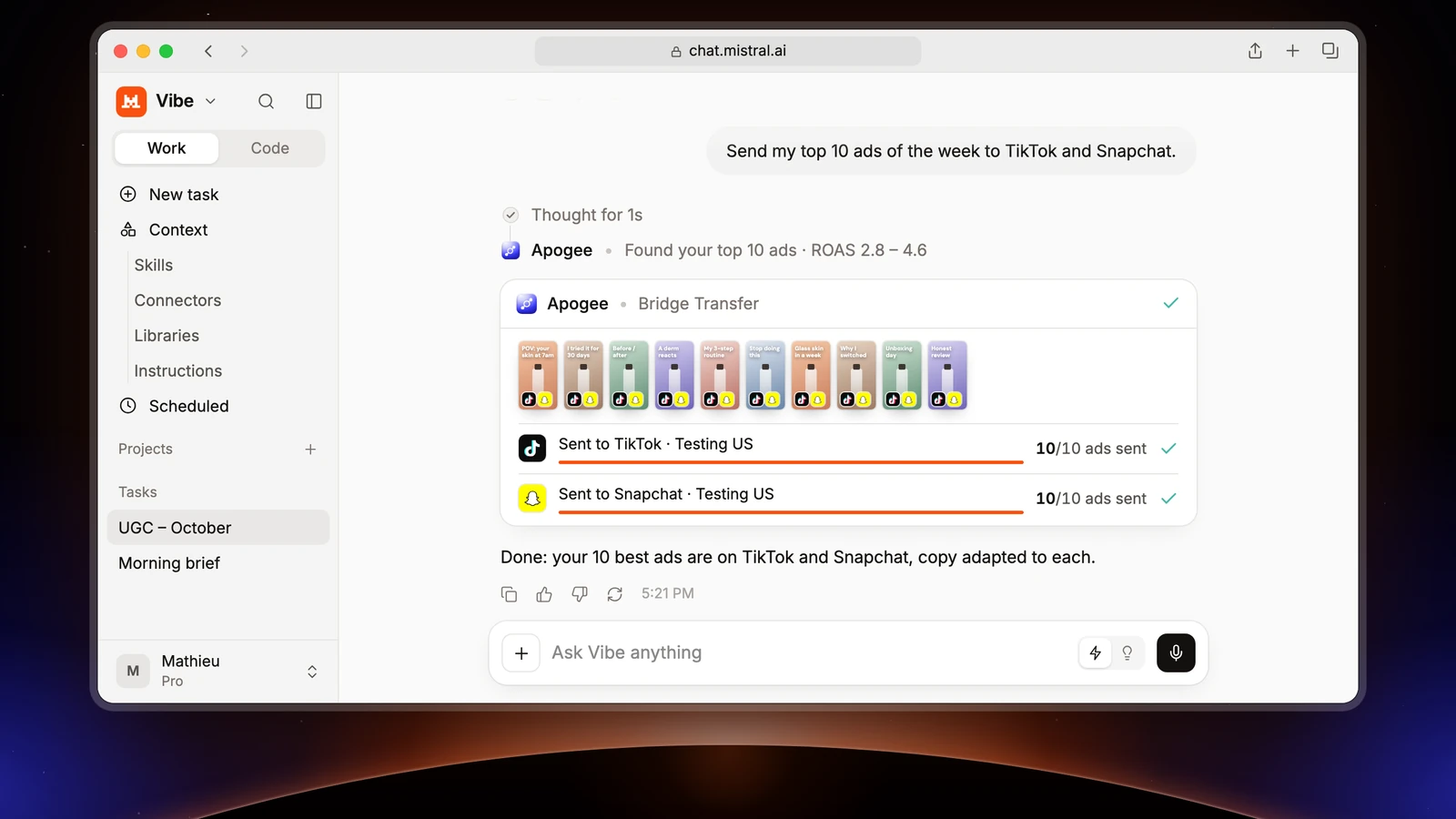
Vibe asks your permission before each connector function: you will see get_top_performers, then list_bridge_transfers, which drops the ads already sent, then prepare_bridge_transfer and its recap. bridge_transfer only runs after your yes. On the first transfer, expect a question about the TikTok identity and the call to action, which Meta does not provide; only videos go through.
Launch straight on TikTok Ads and Snapchat Ads
The flow is the same as on Meta, with the TikTok or Snapchat account named in the request. TikTok creates an ad group (an image runs there as a carousel), Snapchat an ad squad. With a template saved in the app (Quick Bulk Edit, then Save as template):
Mistral reads your templates with list_platform_templates and applies them, without ever saving or deleting one. Each platform gets its own recap and waits for its own yes.
The morning recap
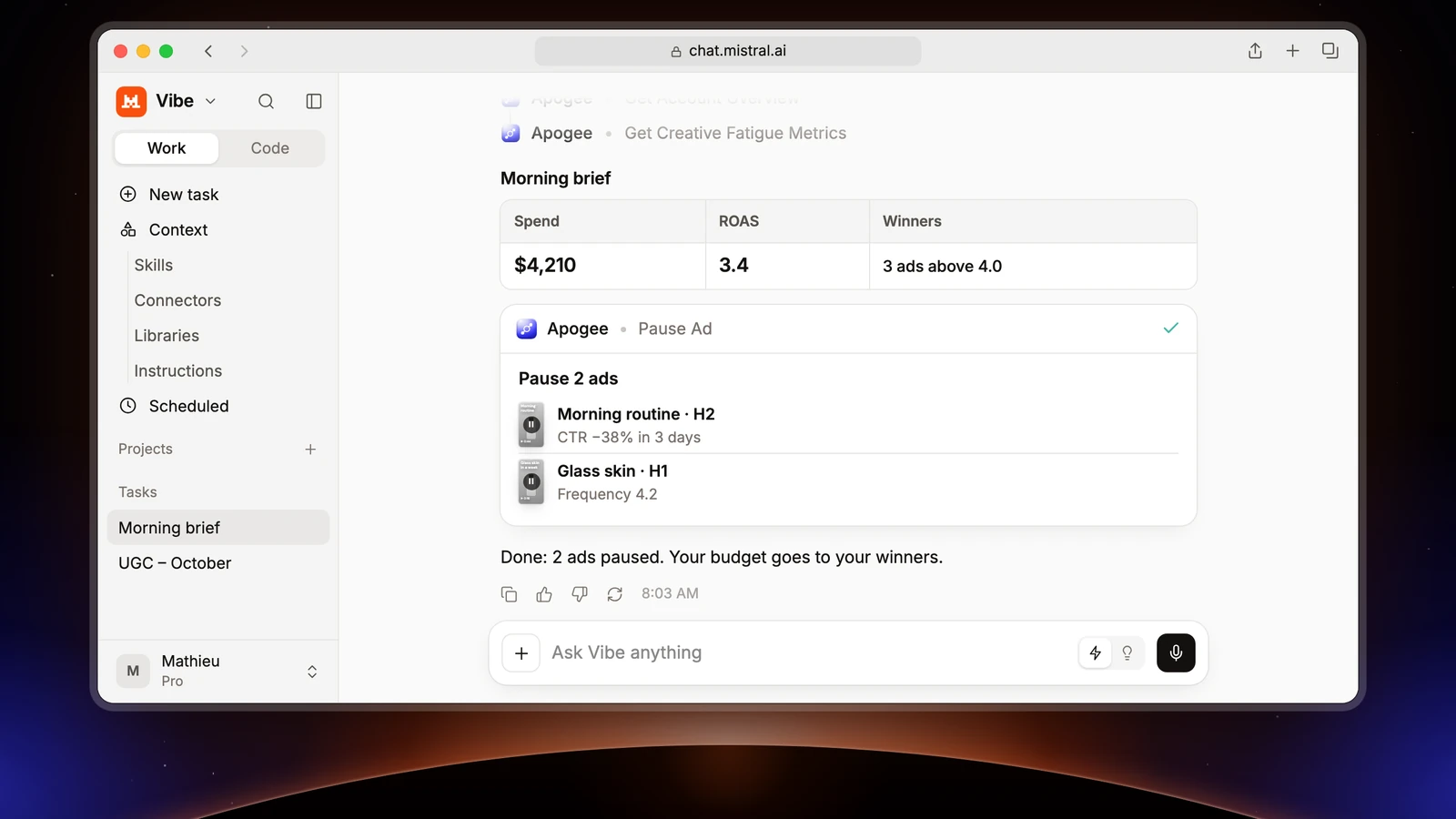
For Meta, Mistral calls get_account_overview and get_top_performers; for TikTok and Snapchat, get_platform_overview and get_platform_top_performers. These are reads, free within your plan’s daily limit (5,000 a day on Pro). The numbers come from Apogee’s cross-platform stats. Mistral Vibe answers when you ask: for a recap that arrives on its own every morning, you need a personal agent with routines, such as Grok Bot connected to Apogee.
Cut the ads that are fatiguing
Mistral reads get_creative_fatigue_metrics and the results, then prepares the pauses: pause_ad on Meta, set_platform_status on TikTok. Nothing changes before your yes, which triggers execute_action. This needs the Manage access; each change that runs uses 2 credits.
Three more requests for the week
Limits and safety
On Mistral’s side. Vibe asks your permission before each function call, unless you pre-authorized it: Connectors, My Connectors tab, the connector’s card, Functions tab, Always allow toggle. Mistral advises keeping the functions that write on manual approval. For Apogee: reads (list_ad_accounts, get_top_performers…) can go to Always allow, never launch, execute_action or bridge_transfer. Custom connectors do not support resources or automatic prompt templates yet: copy the requests from this page.
On Apogee’s side, whatever Mistral’s settings:
| Guardrail | Value |
|---|---|
| Before any launch or change | A full recap and your yes |
| Status of created ads | Paused by default |
| Prepared plan | Valid 24 hours, runs only once |
| Daily budget | Refused above the cap, 500 in the account’s currency by default |
| Launches and Bridge transfers | 25 per ad account over 24 hours |
Apogee’s MCP server creates no catalog and no audience, and never adds up Meta, TikTok and Snapchat. To cut access: Settings → MCP, Disconnect next to Le Chat; with a key, Revoke under Settings → API, API keys list. You can also delete the connector from Connectors on Mistral’s side. Ads already launched stay in place.
Common problems
- No + Add Connector button: you are not an administrator of the Mistral workspace, or an administrator turned connectors off. Ask them.
- The name is refused: it contains a space or a special character. Type
Apogee. - 401, or Apogee’s page does not return to Mistral: the sign-in did not complete, or the key is unknown, revoked or expired (Apogee answers the same 401 in every case). Use an API key as an HTTP Bearer Token, or regenerate the key.
- 403 upgrade_required: your Apogee plan does not include the MCP server (Starter). Move to Pro, Growth or Scale.
- 403 insufficient_scope, or a tool is missing: the matching access was unticked. Disconnect Le Chat in Apogee, reconnect the connector and tick the access you need.
- Expired connection: the OAuth connection relies on a one-hour token, renewed by a token valid 60 days. If Apogee still refuses, run Connect again in Mistral and authorize once more.
- 402 credits_exhausted: this month’s credits are used. Reads keep working; the rest resumes on the 1st of the month or with a credit pack.
- An ad account is missing: it is not connected to Apogee. Add it in the app, then ask again.
Going further
- the other chat apps: Claude, ChatGPT and Perplexity; to launch a folder from your computer, a coding tool such as Claude Code;
- Apogee vs the official Meta Ads MCP, and the same comparison for TikTok Ads and Snapchat Ads;
- the technical docs for Mistral Vibe with Apogee, and Mistral’s help article on Le Chat becoming Vibe.