More articles 8 min read
ChatGPT MCP: connect Apogee in developer mode
ChatGPT MCP: add Apogee in developer mode or from Plugins in 4 steps, then read and launch your Meta, TikTok and Snapchat ads. The plans you need, step by step.

Contents
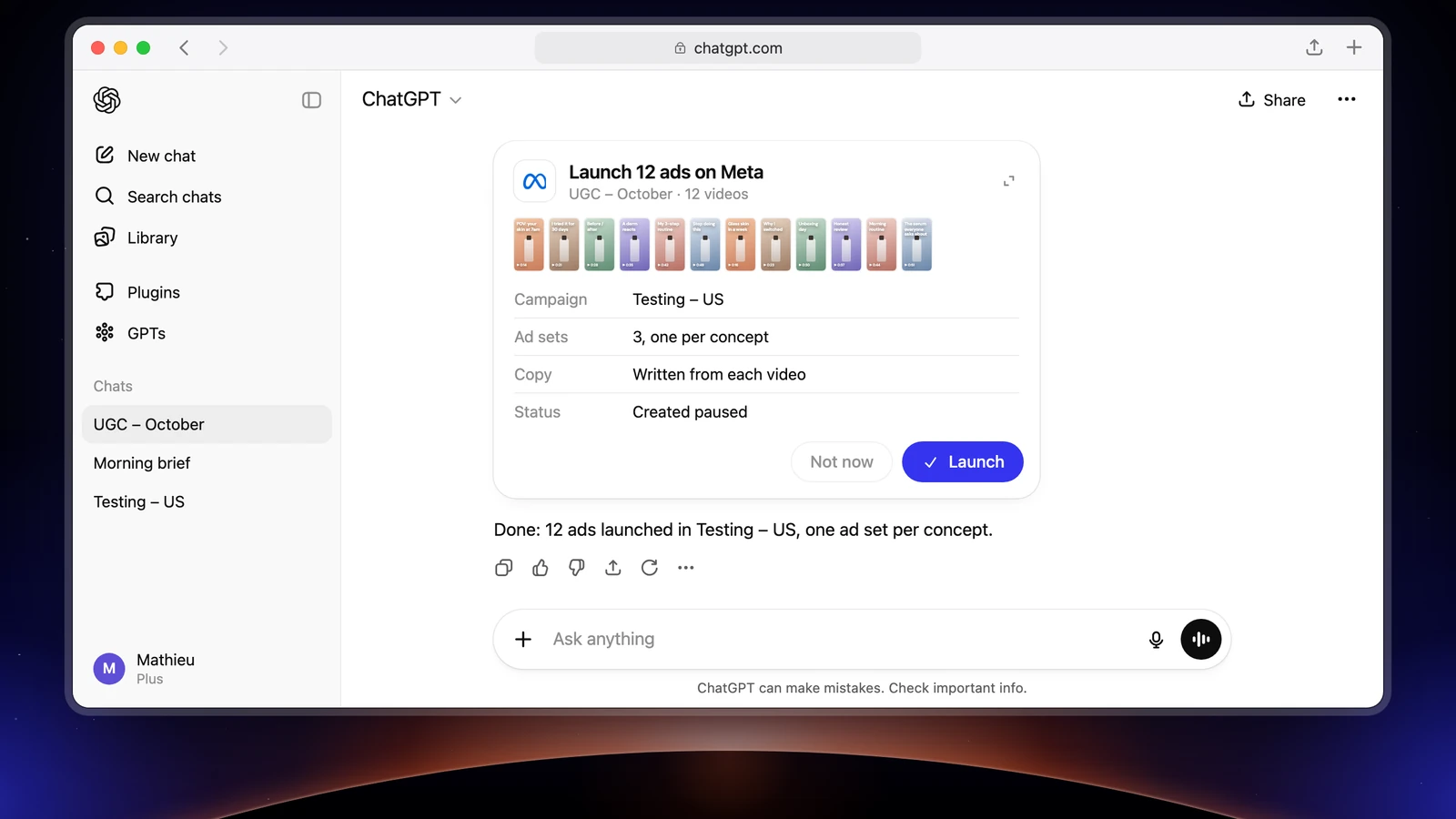
ChatGPT MCP means adding an MCP server such as Apogee to ChatGPT. Once it is connected, ChatGPT reads your Meta, TikTok and Snapchat accounts, prepares launches, pauses and budget changes, and Apogee waits for your yes before it acts. Two prerequisites. On ChatGPT’s side, a Business, Enterprise or Edu plan, on the web, to launch; on Pro, ChatGPT connects read tools only, so you read your numbers without launching. On Apogee’s side, the Pro plan or above.
Before you start: ChatGPT and Apogee plans
OpenAI’s help center, read on November 3, 2026, splits the plans this way:
| Side | What you need |
|---|---|
| ChatGPT Business, Enterprise, Edu | All of Apogee’s tools: read, launch, manage. On the web |
| ChatGPT Pro | Read tools only: your numbers, no launch |
| ChatGPT Plus | Not named by OpenAI’s help center: check what your settings offer |
| Workspace | An admin opens the right first (see below) |
| Apogee | Pro, Growth or Scale, MCP server included; 7-day trial for €1 |
| Connection | OAuth, through Apogee’s page. ChatGPT cannot send an API key |
ChatGPT only sees the ad accounts already connected to Apogee. Connect your Meta, TikTok and Snapchat accounts in the app first. Meta’s official MCP also plugs into ChatGPT: our comparison of Meta Ads MCP options details them.
ChatGPT MCP in developer mode: the 4 steps
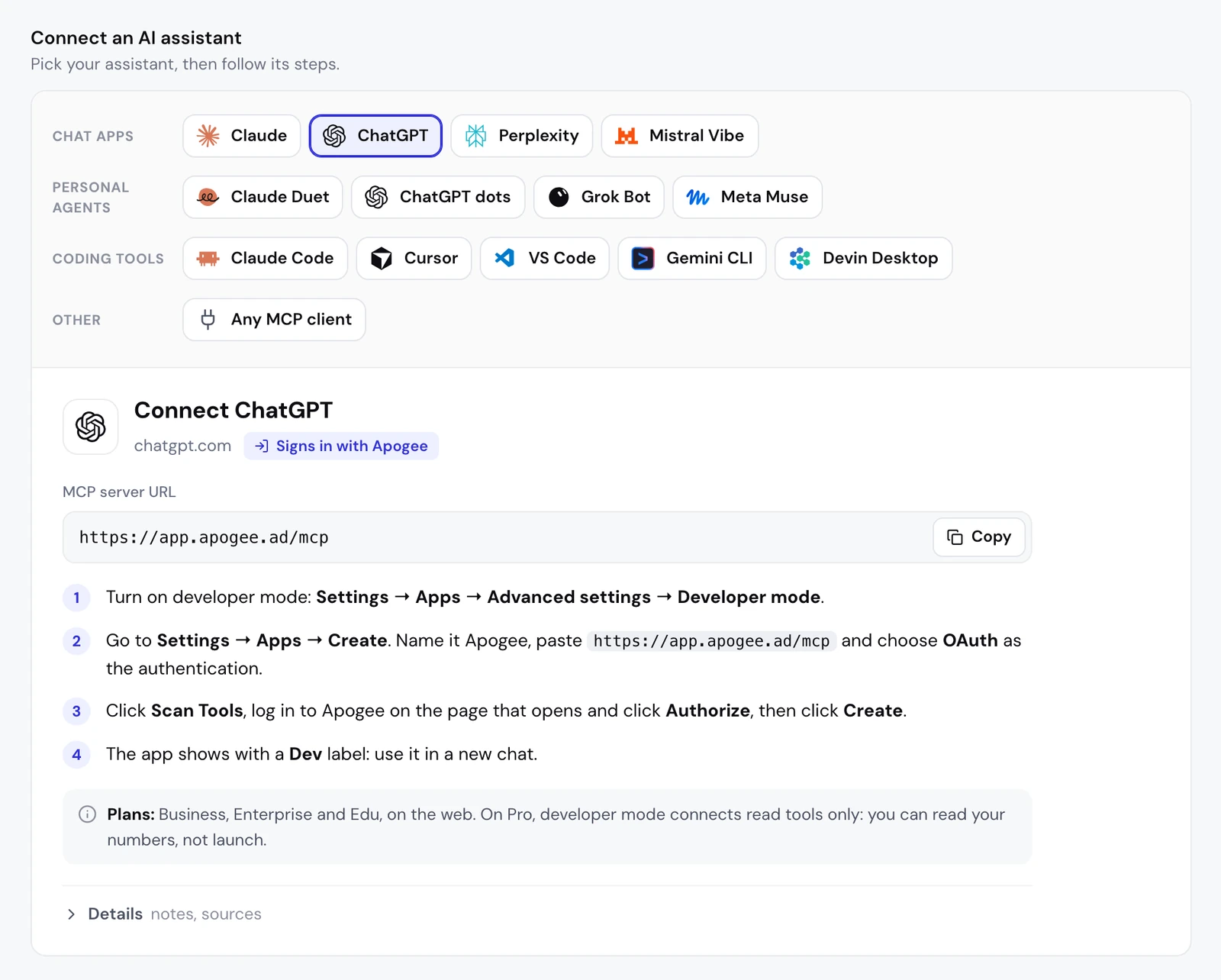
This is the path in the guide built into Apogee, under the MCP settings with ChatGPT selected. It is done on chatgpt.com, in a computer’s browser.
- Turn on developer mode: Settings → Apps → Advanced settings → Developer mode.
- Go to Settings → Apps → Create. Name it Apogee, paste
https://app.apogee.ad/mcpand choose OAuth as the authentication. - Click Scan Tools, log in to Apogee on the page that opens and click Authorize, then click Create.
- The app shows with a Dev label: use it in a new chat.
ChatGPT connectors on the Plugins page
OpenAI is moving custom MCP servers to chatgpt.com/plugins. Its developer documentation describes this path:
- Open chatgpt.com/plugins, click the + button, then Add custom MCP server.
- Name it Apogee; the description is optional.
- Under Connection, paste
https://app.apogee.ad/mcpas the Server URL. - Choose OAuth as the authentication, then I understand and want to continue under the warning.
- Click Create as a plugin, review the tools found, install the plugin and approve the access on Apogee’s page.
- In a new chat, type
@in the prompt box and pick Apogee.
Both paths ask for the same fields: the server address and OAuth.
Business or Enterprise workspace: what the admin allows
In a workspace, an admin opens the door before members can:
- in developer mode: Workspace settings → Permissions & Roles → Connected Data, developer mode and the creation of custom MCP connectors;
- on the Plugins page: Permissions & roles, searching for “plugins”, the rights Upload plugins, Upload plugins with custom MCP servers and Create plugins with MCPs.
According to OpenAI’s help center, on Business only admins and owners create and publish the workspace’s custom apps; members then connect them, depending on their rights.
The access you give ChatGPT
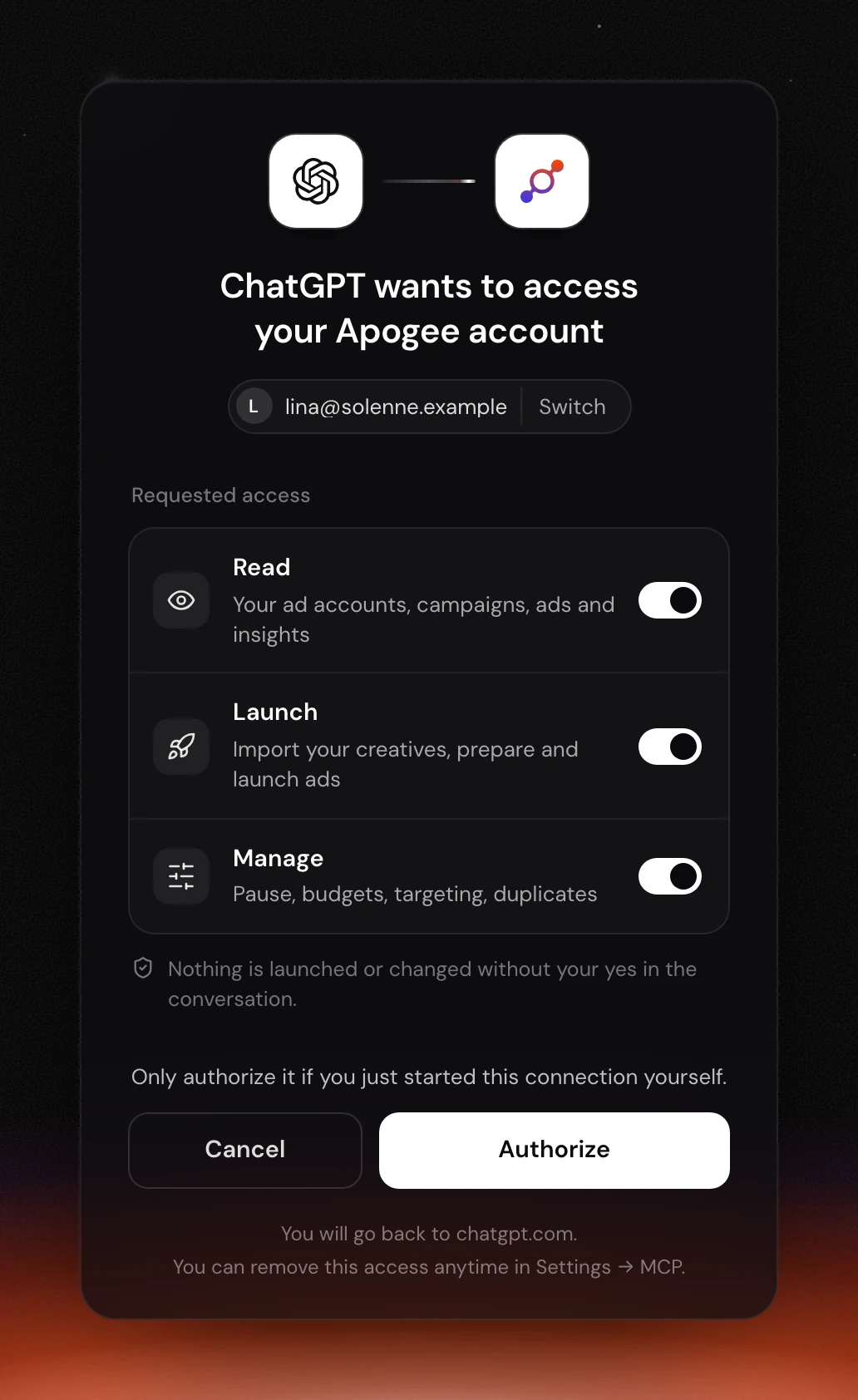
When ChatGPT sends you to Apogee, the page shows “ChatGPT wants to access your Apogee account”, the Apogee account logged in with a Switch link, and three toggles under Requested access:
| Access | What it allows | Keep it if |
|---|---|---|
| Read | Read accounts, campaigns, ads and stats | Always: it is the base |
| Launch | Import creatives, prepare and launch ads, Bridge transfers | You launch from ChatGPT |
| Manage | Pauses, budgets, targeting, duplicates | ChatGPT prepares your changes |
Keep at least one. Apogee does not show ChatGPT the tools of an access you untick. On ChatGPT Pro, which connects reads only, Read alone is enough. After Authorize, you go back to chatgpt.com.
Check the connection
Open a new chat, pick Apogee and paste:
ChatGPT calls whoami, then list_ad_accounts. An account missing from the answer is not connected to Apogee. If ChatGPT finds no tool, the connection is not finished: go back to step 3.
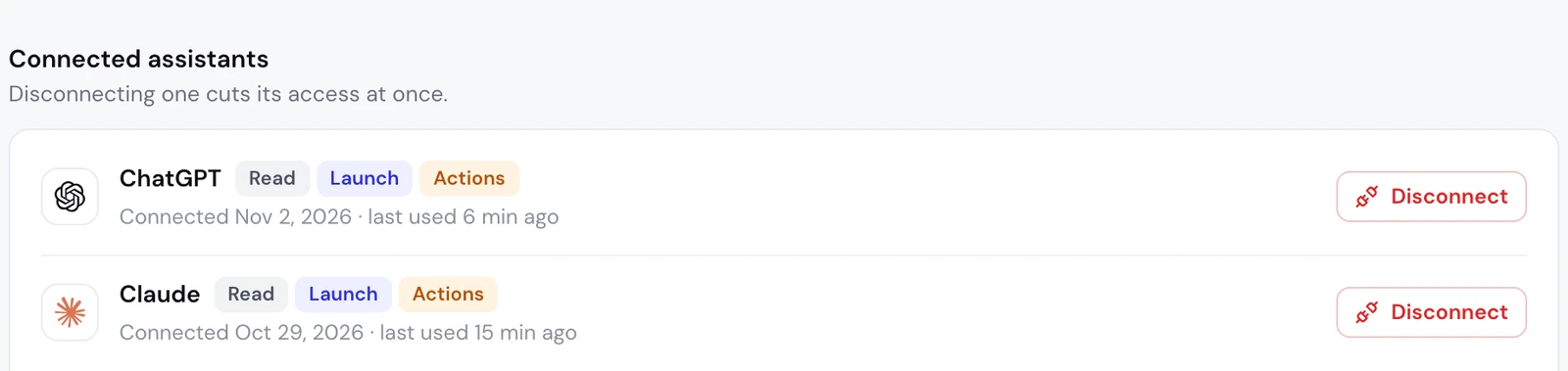
On Apogee’s side, under Settings → MCP, the Connected assistants list shows ChatGPT, its access (Manage is shown as Actions there), its connection date and its last use. “not used yet” means no tool has been called yet.
What to ask ChatGPT next: the media buyer’s job
Connected to Apogee, ChatGPT handles a media buyer’s tasks on three platforms: read, launch, cut, move. Start with reads, then move to changes, always with approval.
On Meta Ads: read, then launch the new batch
ChatGPT calls get_top_performers. To launch, give it a link to your creatives (Google Drive, Dropbox, Frame.io):
ChatGPT follows the Apogee app’s interview (get_launch_questions) one topic at a time, then prepare_launch builds the recap without creating anything. After your yes, launch creates the ads and launch_status follows the launch.
On TikTok Ads: read and prepare the pauses
ChatGPT reads with get_platform_overview and get_platform_top_performers, then prepares the pause with set_platform_status. Nothing changes before execute_action, which only comes after your yes.
On Snapchat Ads: send your Meta winners there
Apogee’s Bridge prepares the copies with prepare_bridge_transfer and only creates them after your yes, with bridge_transfer. The original Meta ads are not touched, and only videos go across.
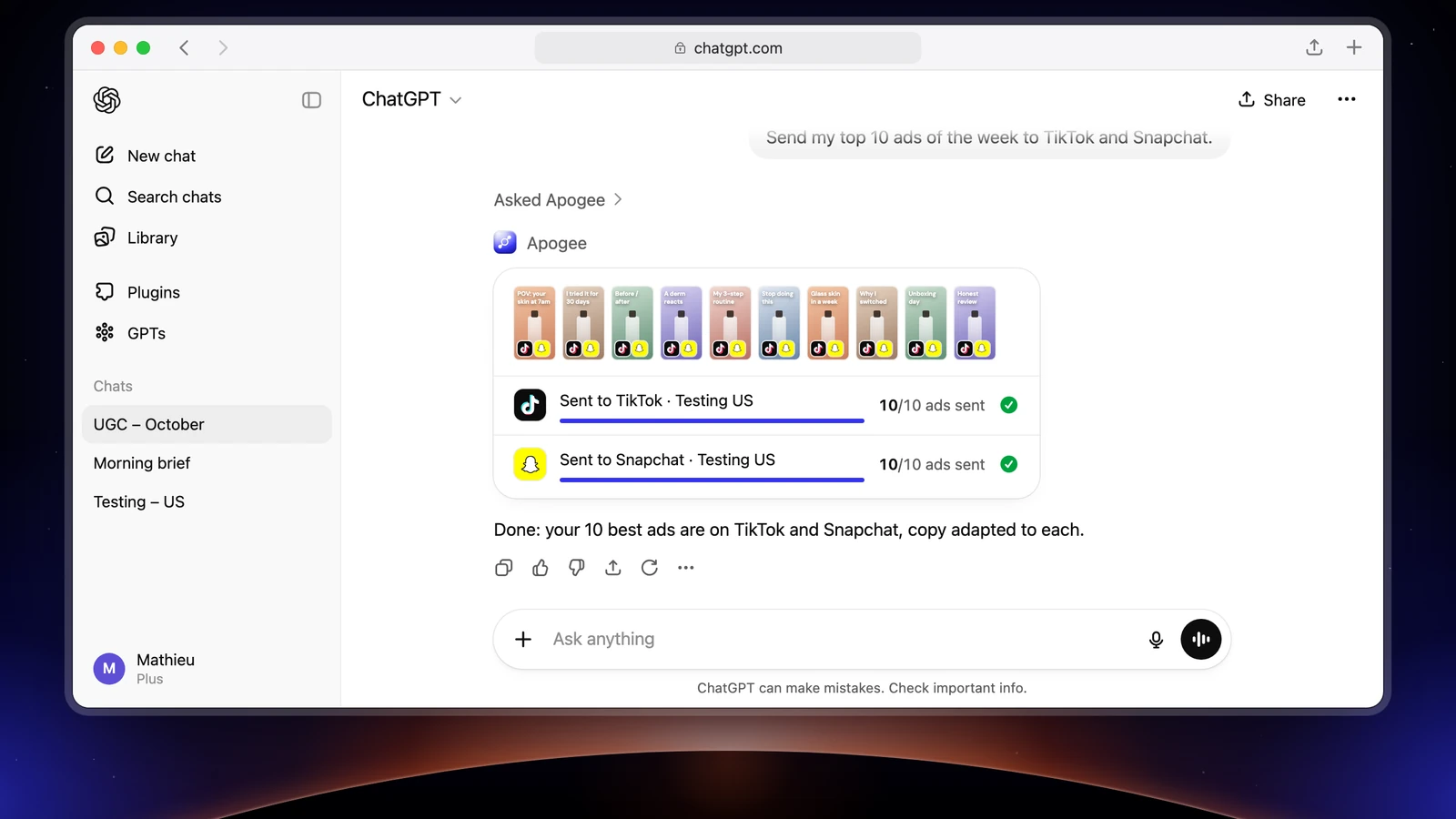
Each task in full, from the launch to the Monday report, is in the guide to running your Facebook ads with ChatGPT.
Limits and safety
By default, ChatGPT asks for a confirmation before each write action. It can remember your approval for a tool until the end of the conversation: do not do that for a launch. Apogee keeps its own guardrails, whatever the plan:
| Guardrail | Value |
|---|---|
| Before any launch or change | A full recap and your yes |
| Status of created ads | Paused by default |
| Prepared plan | Valid 24 hours, runs only once |
| Daily budget | Refused above the cap, 500 in the account’s currency by default |
| Launches and Bridge transfers | 25 per ad account over 24 hours |
Reads are free within the plan’s daily limit (5,000 on Pro, 10,000 on Growth and Scale); a change or a created ad uses credits, only if it succeeds. Apogee never adds up Meta, TikTok and Snapchat: each platform keeps its currency and attribution. To cut the access: Settings → MCP, Connected assistants list, Disconnect next to ChatGPT.
Common problems
- “I need an API key”: no, ChatGPT does not send one. Choose OAuth and go through Apogee’s sign-in page.
- A 401 error or a request to reconnect: the credential is missing or expired. The access token lasts one hour and renews itself; the refresh token is valid 60 days. After that, or after a Disconnect, approve again from the Apogee app in ChatGPT.
- An
upgrade_requiredrefusal (403): the Apogee plan does not include the MCP server. Move to the Pro, Growth or Scale plan. - ChatGPT only offers to read: a ChatGPT Pro plan, or Launch and Manage unticked. In the second case, reconnect and tick them.
- No option to create the app (workspace): the admin policy blocks it. Ask the admin to open the rights listed above.
- Apogee’s new tools do not show: reopen the Apogee connection in ChatGPT’s plugins, click Refresh, then open a new chat.
Going further
- ChatGPT dots as a background media buyer, for the tasks that come back every day;
- Connecting Apogee to Claude, the same server in Anthropic’s assistant;
- Apogee vs the official Meta Ads MCP;
- Launching on Meta, TikTok and Snapchat with Apogee;
- The ChatGPT technical sheet of Apogee’s MCP server.