More articles 12 min read
Claude Code MCP: add the Apogee server in one command
Claude Code MCP setup for Apogee: one command, OAuth or an API key, a first check, then prompts to run Meta, TikTok and Snapchat ads from your terminal.

Contents
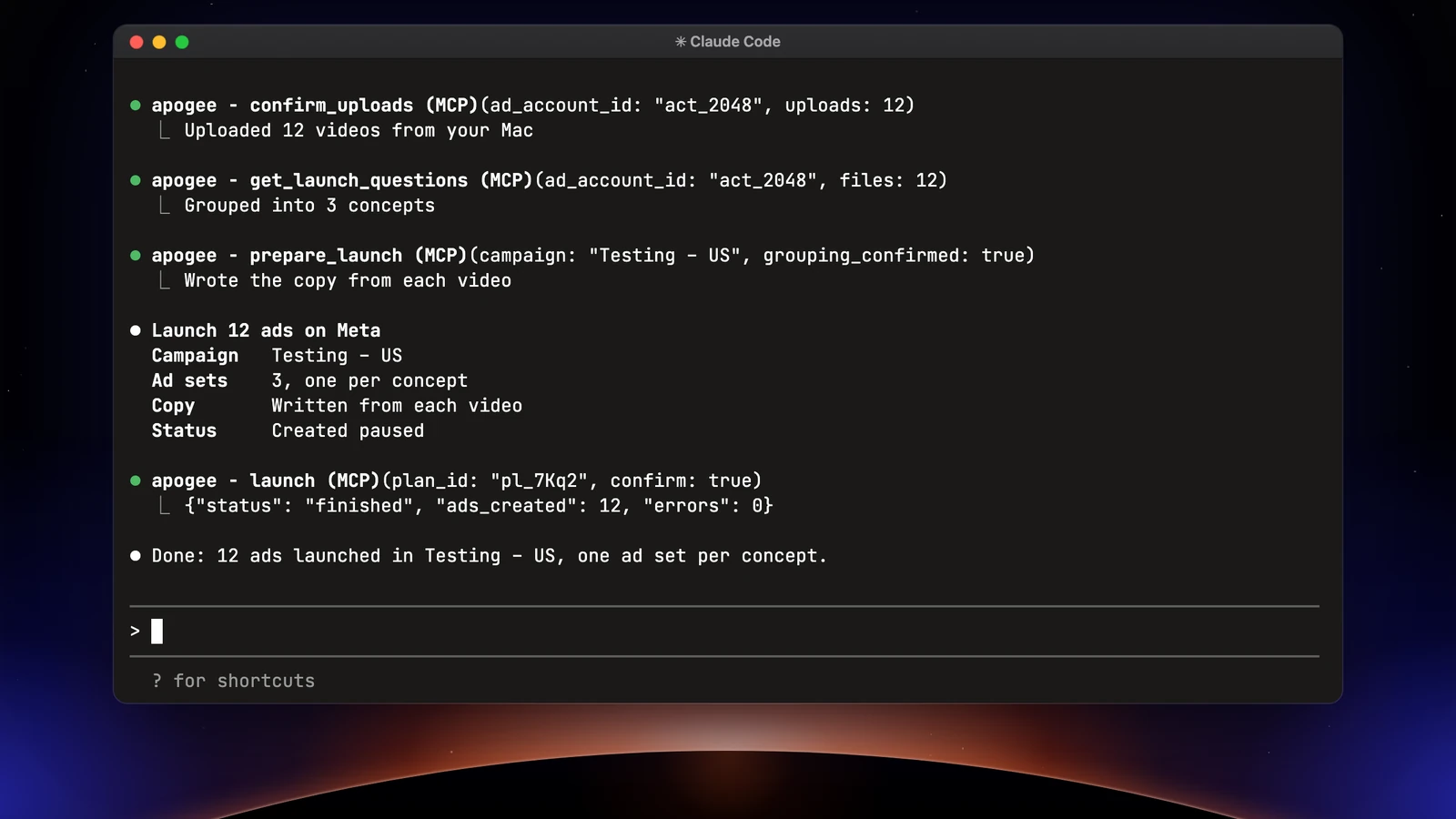
Setting up Claude Code MCP for Apogee takes one command: claude mcp add registers Apogee’s server, then /mcp or an API key signs you in. From there, Claude Code reads your numbers and prepares launches and pauses on Meta, TikTok and Snapchat from the terminal, and Apogee waits for your yes before each action. It is the option for media buyers and growth teams who already work in the terminal, among the MCP servers that run Meta Ads. Two prerequisites: a Claude account that includes Claude Code, and an Apogee plan that includes the MCP, from Pro.
Before you start
| Item | What you need |
|---|---|
| Claude Code | Installed and signed in with a Claude Pro, Max, Ultra, Team, Enterprise or Console account; the free claude.ai plan does not include it |
| Apogee plan | Pro, Growth or Scale, MCP server included; 7-day trial for €1; no MCP on Starter |
| Ad accounts | Your Meta, TikTok or Snapchat accounts already connected to Apogee: Claude Code only sees those |
| Server URL | https://app.apogee.ad/mcp |
Two ways to sign in:
| Browser sign-in (OAuth) | API key | |
|---|---|---|
| Where access is set | On Apogee’s consent page, when you connect | Under Settings → API, when you create the key |
| Lifetime | 1-hour access token, renewed with a token valid 60 days | 30 days, 90 days, 1 year, or a set date up to 1 year |
| Where to cut it | Settings → MCP, Connected assistants, Disconnect | Settings → API, API keys, Revoke |
| Best for | A workstation with a browser | A script, a machine with no browser, access fixed in advance |
On a Claude Team or Enterprise organization, an admin can restrict which MCP servers are allowed (managed settings allowedMcpServers and deniedMcpServers): ask them to allow https://app.apogee.ad/mcp. On Apogee’s side, a workspace owner can turn off a member’s API and MCP access.
Claude Code MCP server: the two commands to add Apogee
Both commands come from Apogee’s own guide, under Settings → MCP, Claude Code card.
Option 1: browser sign-in
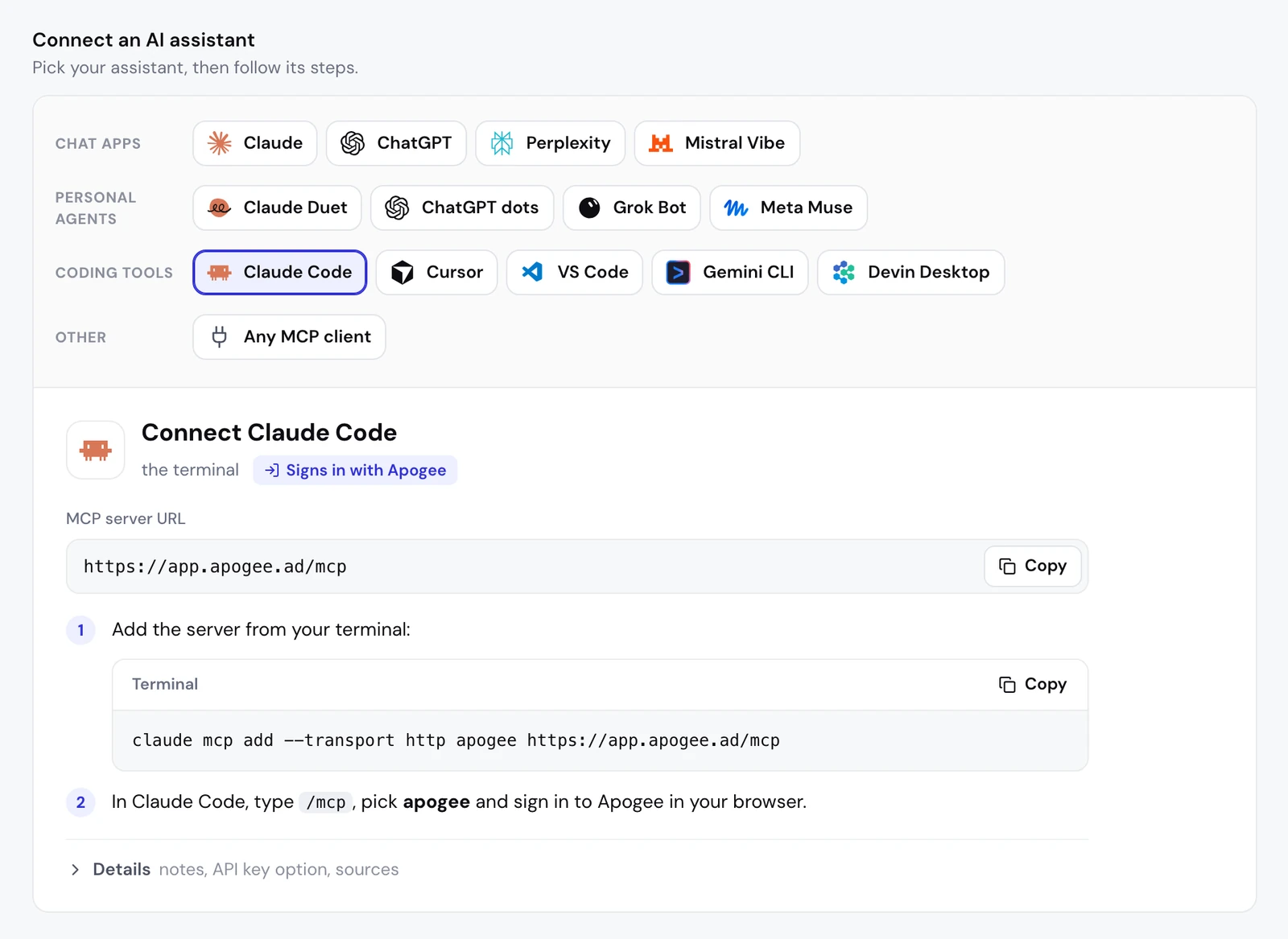
- In Apogee, open Settings → MCP, then Connect an AI assistant and pick Claude Code: the server URL and the command show up, each with a Copy button.
- In your terminal, from the folder you work in, add the server:
claude mcp add --transport http apogee https://app.apogee.ad/mcp- Start
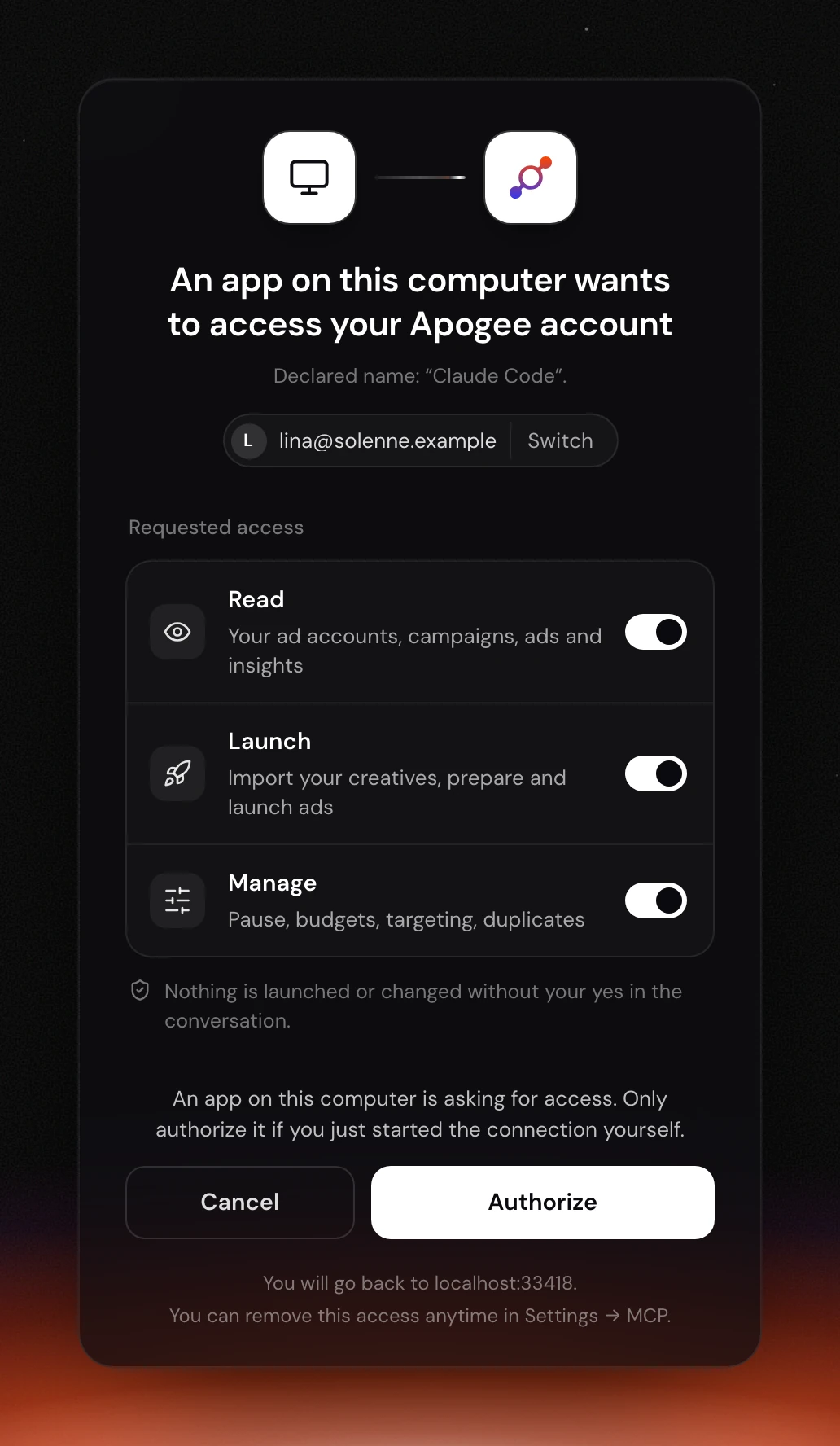
claude, type/mcpand pick apogee. - Your browser opens Apogee’s consent page. Check the account shown (Switch to change it), keep the access you need and click Authorize.
- Back in Claude Code,
/mcpshows apogee connected and its tools are available in the conversation.
Claude Code comes back to an address on your computer (localhost and a port). Apogee cannot certify who is listening there, so the page says what it knows: “An app on this computer wants to access your Apogee account”, with “Declared name: Claude Code” below. If you did not type /mcp right before, click Cancel.
Option 2: an API key
- In Apogee, open Settings → API, API keys section, and click Create key.
- Give it a Name (for example “Claude Code”), tick the Scopes you need among Read, Launch and Actions, and pick the end date under Expires: 30 days, 90 days (default), 1 year, or a set date up to 1 year.
- Click Create key and copy the
apk_…key: Apogee shows it only once. - Add the server with the key, replacing
apk_…with yours:
claude mcp add --transport http apogee https://app.apogee.ad/mcp \
  --header "Authorization: Bearer apk_…"
An Apogee account keeps 10 active keys at most. Give each tool its own key, with only the access it needs.
The access to keep
The consent page calls them Read, Launch and Manage; the key form and the connected assistants list say Read, Launch and Actions.
| Access | What it opens | MCP tools involved |
|---|---|---|
| Read | Read accounts, campaigns, ads and numbers on Meta, TikTok and Snapchat, follow imports and launches | list_, get_, get_, launch_ |
| Launch | Upload or import creatives, prepare and launch ads, Bridge transfers, a new campaign | get_, prepare_, launch, bridge_ |
| Actions | Pauses, activations, budgets, targeting, duplicates | pause_, scale_, set_, execute_ |
A tool outside the access you granted is not even offered to Claude Code. A Claude Code that only writes reports is fine with Read.
This project, you, or your team
| Scope | Option | Where Apogee is available | Saved in |
|---|---|---|---|
| Local (default) | none, or --scope local | The current project, for you only | ~/.claude.json |
| User | --scope user | All your projects | ~/.claude.json |
| Project | --scope project | The project, shared with your team | .mcp.json at the project root |
At project scope, never put a key in .mcp.json: it goes into the repository. Claude Code reads environment variables in that file, so each person keeps their key on their own machine:
{
  "mcpServers": {
    "apogee": {
      "type": "http",
      "url": "https://app.apogee.ad/mcp",
      "headers": { "Authorization": "Bearer ${APOGEE_API_KEY}" }
    }
  }
}
With browser sign-in, .mcp.json only holds the URL: each person types /mcp and signs in with their own Apogee account. Claude Code asks for approval before it uses a server declared in a project’s .mcp.json.
Check the connection
First request, read-only:
Claude Code calls whoami, which returns the Apogee account, the kind of connection (an assistant or an API key) and its access, then list_ad_accounts for each platform. If it finds no Apogee tool, the connection is not finished: run /mcp again. In the terminal, claude mcp list lists your configured servers and claude mcp get apogee shows Apogee’s details.
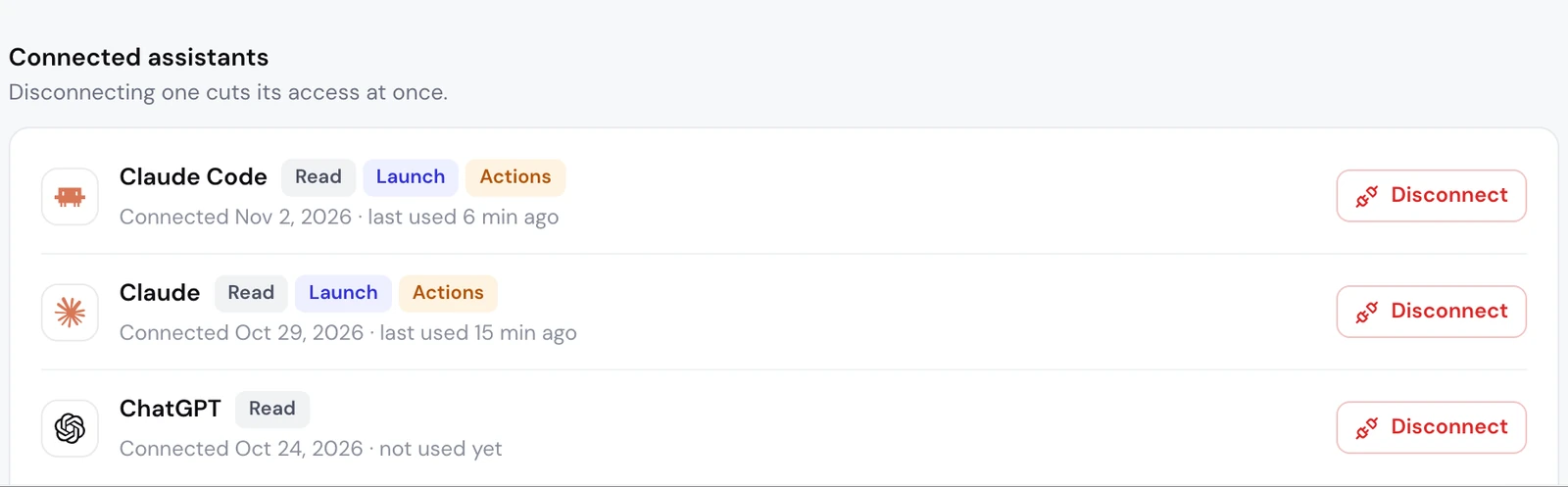
On Apogee’s side, Settings → MCP, Connected assistants section, lists Claude Code under its own name, with its access, connection date and last use. A connection made with an API key does not show there: you follow it under Settings → API.
We ran this setup for real on November 3, 2026, with an API key on a test ad account: whoami, the launch interview, a plan checked by Meta before it was saved, then a real launch of one ad set, paused, at €1 a day. The /mcp sign-in was done too, with the consent page shown above.
What to ask Claude Code next
Connected to Apogee, Claude Code takes a media buyer seat in your terminal. It prepares, you approve:
| Its task | Platform | What you approve |
|---|---|---|
| Read the numbers and spot the winners | Meta, TikTok, Snapchat | Nothing, it only reads |
| Launch a folder of creatives from your disk | Meta, TikTok, Snapchat | The launch recap |
| Cut an ad or adjust a budget | Meta, TikTok, Snapchat | Each change |
| Send a Meta winner to TikTok or Snapchat | Bridge | The transfer recap |
Each task is covered prompt by prompt in Claude Code for marketing: launch and track your Meta ads.
Read before you act
Claude Code relies on get_top_performers for Meta and on get_platform_overview and get_platform_top_performers for TikTok and Snapchat. Each platform stays in its own currency: Apogee never adds them up.
On Meta Ads: launch a folder from your disk
Claude Code works on your computer: it uploads the files of a local folder to Apogee itself, where a chat app needs a Drive, Dropbox or Frame.io link.
It goes through get_upload_urls and confirm_uploads for the files, get_launch_questions for the interview, prepare_launch for the recap, then launch after your yes. One creative in 9:16, 4:5 and 1:1 becomes a single ad.
On TikTok Ads and Snapchat Ads
The same flow works with a TikTok or Snapchat account named in the prompt: TikTok creates an ad group (an image runs as a carousel there), Snapchat an ad squad. For a Meta winner already running, Apogee’s Bridge creates a paused copy without touching the original ad:
Only videos go to TikTok and Snapchat through the Bridge. What each platform accepts is on the Meta, TikTok and Snapchat page.
Cut an ad that burns budget
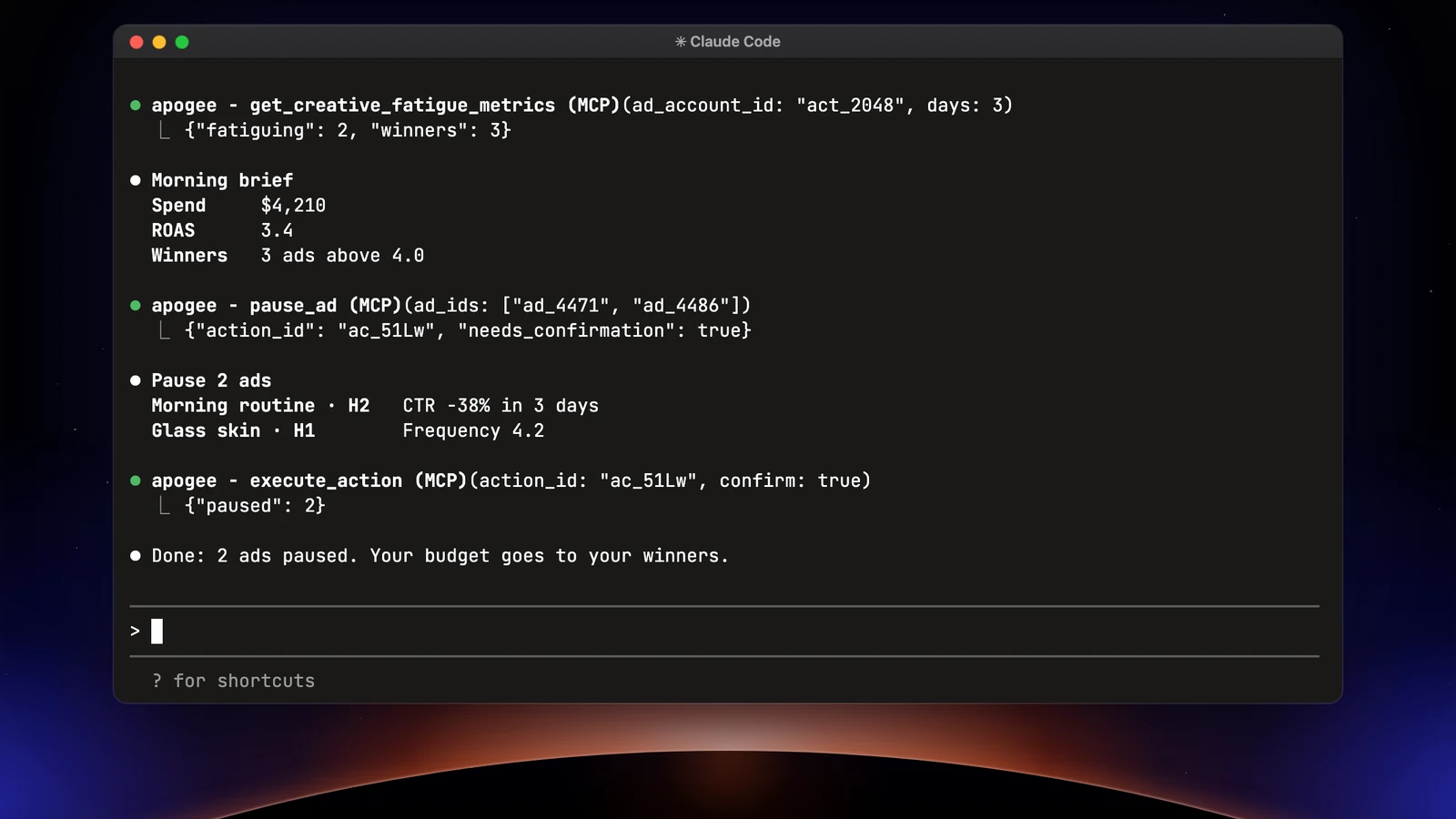
pause_ad (Meta) and set_platform_status (TikTok, Snapchat) prepare the pause without changing anything; execute_action runs it once you said yes.
Limits and safety
Apogee keeps its guardrails whatever Claude Code’s permission settings are:
| Guardrail | Value |
|---|---|
| Before any launch or change | A full recap and your yes |
| Status of created ads | Paused by default |
| Prepared plan | Valid 24 hours, runs only once |
| Daily budget | Refused above the cap, 500 in the account’s currency by default |
| Launches and Bridge transfers | 25 per ad account over 24 hours |
What Apogee’s MCP server does not do: create catalogs or audiences, add platforms together, send an image to TikTok or Snapchat through the Bridge, or touch an ad account that is not connected to Apogee. Reads are free within your plan’s daily limit (5,000 a day on Pro); an ad created costs 15 credits and a change that runs 2 credits, only when they succeed. Uploaded files go 50 per call, 500 MB each at most, within 2,000 files and 100 GB a day on Pro.
To cut access: Settings → MCP, Connected assistants, Disconnect next to Claude Code; for a key, Settings → API, API keys list, Revoke. On the Claude Code side, /mcp offers Clear authentication, and claude mcp remove apogee removes the server.
One Claude MCP server for Claude Code, Claude and Claude Duet
The same Apogee MCP server serves all three Anthropic products, for different jobs. Claude on the web and desktop adds it as a custom connector and reads Drive or Frame.io links; Claude Duet works in the background with recurring tasks; Claude Code reads your local folders and can write its reports to files. Each connection shows separately under Connected assistants.
Common problems
- 401, “Invalid or missing Apogee credentials”. No valid credential: a sign-in never finished, an expired connection, a key copied wrong, expired or revoked (Apogee answers the same in every case). With OAuth, type
/mcpand pick Re-authenticate on apogee. With a key, create a new one or use Regenerate under Settings → API, then runclaude mcp remove apogeeand add the server again with the new key. - 403, the plan does not include the MCP. The Apogee account is on a plan without the MCP: the consent page shows “Your plan does not include the Apogee MCP” and a See plans button. Move to Pro or above.
- 403, access turned off by an admin. Your Apogee workspace owner turned off your API and MCP access: ask them to restore it. On the Claude side, an organization can also block the server in its managed settings: ask for
https://app.apogee.ad/mcpto be allowed. - Claude Code says it cannot launch or pause. The Launch or Actions access was not granted, so those tools are not listed. Disconnect Claude Code in Apogee, run
/mcpagain and keep the access you need. - Apogee is missing from another project. The server is at local scope: run the command again with
--scope user. - 429, too many requests. Each connection gets 600 MCP calls per 15 minutes on Pro, 1,200 on Growth and Scale. A launch only needs a handful.
- “10 AI assistants connected”. Apogee accepts 10 connected assistants at once: disconnect one under Settings → MCP, then try again.
Going further
- Launching Meta ads with Claude, the same job in the chat app;
- Apogee vs the official Meta Ads MCP, and the same comparison for TikTok Ads and Snapchat Ads;
- Apogee’s technical guide for Claude Code, with every tool named here;
- Anthropic’s documentation on MCP servers in Claude Code and on installing Claude Code.