Creative and AI 10 min read
Facebook Ad Copy: Character Limits, Truncation and Structure
Facebook ad copy that fits: Meta's character limits for primary text, headline and description by placement, what gets truncated, and what gets ads rejected.

Contents
- What is the Facebook ad character limit for each field?
- How do character limits change by placement?
- What if Meta’s own pages disagree?
- How many text options can one ad have?
- What does Advantage+ do to your ad copy?
- How do you structure Facebook ad copy that survives truncation?
- Which ad copy rules get a Facebook ad rejected?
- What about the same copy on TikTok and Snapchat?
- Where does Apogee help?
- What does copy length not fix?
Most Facebook ad copy is never read in full. It shows truncated, under a visual, in a space that changes from one placement to the next, and Meta can move or rewrite parts of it. The useful question is what is left once the copy gets cut.
This page covers Facebook ad copy limits by field and by placement, what Meta does with the text you give it, and a way to structure copy that survives truncation. The values come from Meta’s Help Center, Meta’s Ads Guide, Meta’s developer documentation and Meta’s Advertising Standards, checked on 28 October 2026. The TikTok and Snapchat limits come from their own help centers, checked on 5 November 2026.
What is the Facebook ad character limit for each field?
Meta’s Help Center recommends, for most placements:
| Field | Where it shows | Recommended length |
|---|---|---|
| Primary text | above the creative | 125 characters |
| Headline | in bold, below the creative | 40 characters |
| Description | below the headline | 25 characters |
These are recommended lengths, not hard caps. Meta writes that past them, text may be truncated, and that it may be truncated further across placements and devices. Its most concrete advice fits in one line: primary text should span 1 to 3 lines at most.
None of the pages checked publishes a maximum for Ads Manager. Meta’s developer documentation does set one for multiple-text ads created through the API: 1,024 characters for primary text, 255 for headlines and descriptions.
Leaving a field blank is not neutral either. According to the Help Center, text may then be pulled from your destination URL, and you may not be able to edit it.
How do character limits change by placement?
Meta’s Ads Guide lists lengths placement by placement, and they are often shorter than the general rule:
| Placement | Primary text | Headline | Description |
|---|---|---|---|
| Facebook Feed | 50 to 150 characters | 27 characters | not listed |
| Instagram Feed | 125 characters | 40 characters | not listed |
| Facebook Stories | 125 characters | 40 characters | not listed |
| Instagram Stories | 125 characters | not listed | not listed |
| Facebook Reels | 40 characters | 55 characters | not listed |
| Instagram Reels | 44 characters | not listed | not listed |
| Facebook right column | not listed | 40 characters | not listed |
| Facebook Marketplace | 125 characters | 40 characters | 30 characters |
| Carousel in Facebook Feed | 80 characters | 20 characters | 18 characters |
Reels are the biggest gap: 40 to 44 characters of primary text, about a third of what a Feed allows. Carousels have their own constraints, covered in the article on Meta carousel ads, and creative dimensions are in Meta Ads specs 2026.
What if Meta’s own pages disagree?
The Ads Guide and the Help Center do not always give the same number:
| Field | Ads Guide | Help Center | Safer value |
|---|---|---|---|
| Primary text, Facebook Feed | 50 to 150 characters | 125 characters | 125 |
| Headline, Facebook Feed | 27 characters | 40 characters | 27 |
| Headline, Facebook Reels | 55 characters | 40 characters | 40 |
| Description, Marketplace | 30 characters | 25 characters | 25 |
Use the safer value in the last column, and check the preview in Ads Manager. Meta also lets you customize copy per placement: its Help Center gives the example of shorter copy for Stories. It is the same mechanism as for visuals, covered in the article on 4:5 and 9:16 multi-format ads.
Copy written for 125 characters gets cut in Reels, where Meta’s Ads Guide recommends 40 to 44 characters. If Reels matter to your account, write a short version of the primary text for those placements.
How many text options can one ad have?
Up to 5 primary texts, 5 headlines and 5 descriptions, according to Meta’s developer documentation. The Help Center says multiple text options are entered on single image or video ads, and that the delivery system picks which variations to show based on individual preferences.
Two practical consequences follow. First, on its page about optimize text per person, Meta writes that text you provide may appear in any location of your ad, and with any other text you provided. Every option has to stand on its own and contradict none of the others: put a “Free shipping” headline next to primary text that mentions shipping fees, and the ad argues with itself.
Second, reporting does not follow each variation. On its text generation page, Meta says reporting is based on a single ad, so you will not see results for specific text variations.
What does Advantage+ do to your ad copy?
Meta can rewrite it, move it and generate new versions. Three features are involved:
- Text improvements. According to Meta’s Help Center, they are on by default and take keywords and phrases from your copy to display them directly, or adjusted, on or around the creative: text overlays, footers, prominent headlines.
- Text generation. It suggests up to five variations of primary text and headline based on yours. Meta says variations are currently available only when primary text is in English, Portuguese or Spanish.
- Optimize text per person, which mixes your options. To turn it off on an image ad, Meta says to turn off visual touch-ups, relevant comments, add overlays and text improvements; on a video ad, video touch-ups, relevant comments and text improvements.
The copy you approve is not necessarily the copy that runs. How to turn these enhancements off, ad by ad or in bulk, is in the article on disabling Advantage+.
How do you structure Facebook ad copy that survives truncation?
Put the offer or the hook in the first line, and treat the rest as a bonus. If someone reads only what shows before the cut, they should already know what you sell and why now.
The example below was written for this article, for a fictional insulated water bottle brand.
Version that buries the offer (152 characters):
“We think people drink more water when they actually love their bottle. So we spent two full years designing this one, and this week only, it is 20% off.”
The offer starts at character 145: on most placements, it lands in the part that gets cut.
Version that leads with it (71 characters for the first line):
“20% off this week: the 24 oz bottle keeps drinks cold 24 hours, hot 12.”
The rest can tell the two-year design story: whoever taps See more is already interested. The headline “24 oz bottle, 20% off” (21 characters) fits the 27 of Facebook Feed, and the description “Free 30-day returns” (19 characters) fits the Help Center’s 25. For Reels, a short primary text, “20% off the 24 oz bottle” (24 characters), stays under 40.
Three rules come out of it:
- One idea per field. Primary text carries the offer, the headline restates it in a few words, the description adds a guarantee or a nonessential detail.
- Every option stands alone. With multiple text options, any headline can end up under any primary text.
- Say what you want people to do. Meta calls that the most important goal of text in ads: understanding the expected action at a glance.
Which ad copy rules get a Facebook ad rejected?
Meta’s Advertising Standards review text as well as visuals, and several rules target copywriting directly:
- Personal attributes. An ad must not assert or imply a personal attribute of the viewer, including their race or ethnicity, religion, age, sexual orientation, gender identity, disability, physical or mental health, vulnerable financial status, criminal record or name. As an illustration: “Tired of your back pain?” implies a health condition, while “A lumbar cushion for long days at a desk” describes the product.
- Health and weight loss. Under the Health and Wellness policy, ads for weight loss or weight gain products and for cosmetic products must not contain statements of inferiority about physical appearance, and health ads must not use sensational language or promise specific outcomes within a set timeframe without qualifiers.
- Profanity. The profanity policy bans it, even when it is disguised with symbols, emojis or deliberate misspellings.
Meta does not ban the word “you”. What gets copy rejected is a “you” that presumes a personal attribute: a question about the reader’s health, age or debt.
What about the same copy on TikTok and Snapchat?
A Facebook primary text does not fit either platform as is.
On TikTok, ad text shows up to 4 lines, then hides behind “See more”. To avoid the cut, TikTok suggests staying within about 100 characters in its spec for reservation in-feed ads, booked in advance through Reach & Frequency. That is a display guideline: its spec for auction in-feed ads, bought in the regular auction, gives no character limit. The same page says captions on non-Spark ads support no clickable links, @ mentions or hashtags. Spark Ads take their caption from the organic post. A Meta primary text has to come down to about 100 characters.
On Snapchat, the ad spec page lists only a brand name and a headline. The headline takes up to 34 characters. The brand name has to be the paying advertiser and cannot repeat the headline, and Snapchat’s own pages disagree on its length: 32 characters on that spec page, 25 on its ad formats page. Keep it under 25 to be safe. A Meta primary text does not carry over: Snapchat has room only for a 34-character headline.
Formats and the other limits are in the TikTok ad specs and the Snapchat ad specs.
Where does Apogee help?
Apogee is the tool we build. It helps in four places, once volume makes typing copy by hand unsustainable.
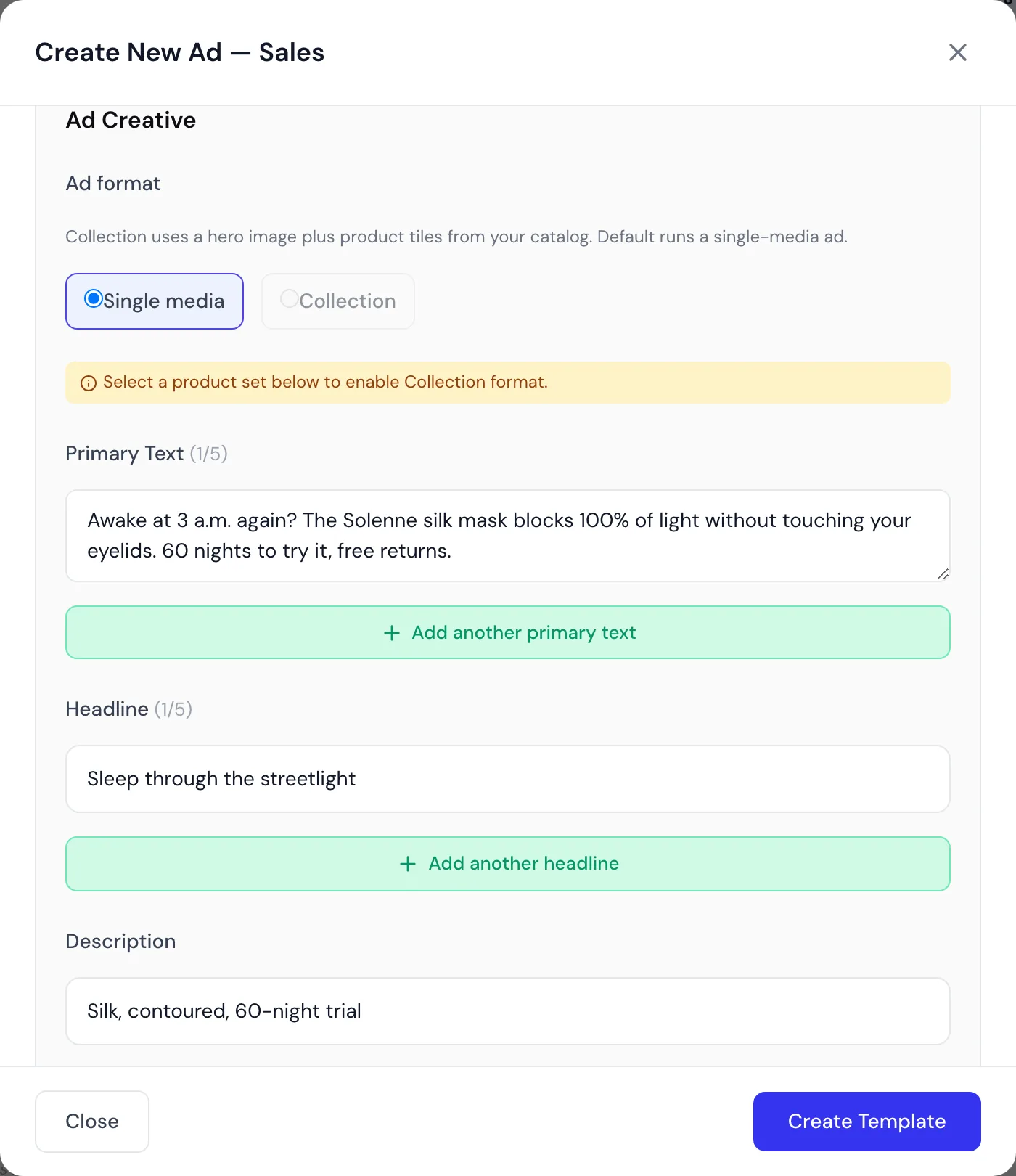
In Apogee’s bulk configuration, each ad takes 5 primary texts and 5 headlines with duplicate detection, plus one description, and the configuration propagates across the whole batch. One limit compared with Meta: a single description per ad, where the API allows five.
Apogee’s Advantage+ controls expose eleven enhancements one by one, text improvements included, all off by default, from the Pro plan.
The Copywriting Agent writes copy from the creative: it transcribes a video’s voiceover or analyzes a static’s visual, you set how many primary texts, headlines and descriptions per ad, and one button writes them into every ad. How it works is covered in the article on AI ad copy for Meta Ads. It is included from the Pro plan.
When a Meta ad moves to TikTok or Snapchat, the Bridge, from the Pro plan, makes the cuts. On TikTok, the primary text becomes the ad text, cut at 100 characters: the cut is hard and can fall mid-word, so review long text before launch. On Snapchat, the Meta headline becomes a 34-character headline, cut at a word boundary.
What does copy length not fix?
Short but vague copy is still vague. Staying under 125 characters guarantees the first line gets read, not that it says anything: “Discover our new collection” fits every placement and gives nobody a reason to tap.
None of the Meta pages checked puts a number on how much copy weighs against the creative, so this article does not claim it. What Meta does say is that testing is the best way to find what works for your audience.
Apogee does not make that call for you either. The Copywriting Agent writes from what the creative contains: a video with no voiceover and no on-screen text gives it little to work with. And neither the agent nor bulk configuration replaces the Ads Manager preview, which remains the only place to see what each placement actually cuts.